EasyManua.ls Logo

Sony DCX-930 - Page 41

Sony DCX-930
158 pages
Print Icon
To Next Page IconTo Next Page
To Previous Page IconTo Previous Page
Loading...
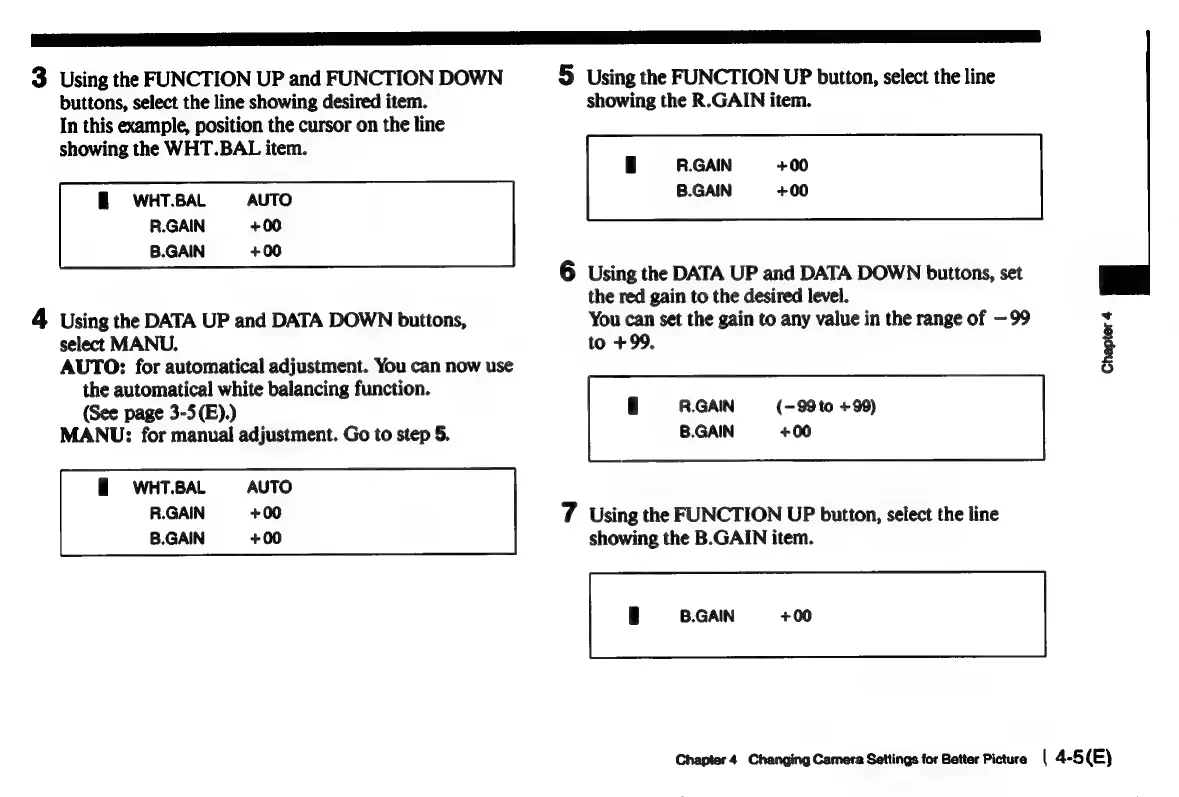
3
Using
the
FUNCTION
UP
and
FUNCTION
DOWN
buttons,
select
the
line
showing
desired
item.
In
this
example,
position
the
cursor
on
the
line
showing
the
WHT.BAL
item.
3
WHT.BAL
AUTO
R.GAIN
+00
B.GAIN
+00
4
Using
the
DATA
UP
and
DATA
DOWN
buttons,
select
MANU,
AUTO:
for
automatical
adjustment.
You
can
now
use
the
automatical
white
balancing
function.
(See
page
3-5(E).)
MANU:
for
manual
adjustment.
Go
to
step
5.
=WHT.BAL
=
AUTO
R.GAIN
+00
B.GAIN
+00
5
Using
the
FUNCTION
UP
button,
select
the
line
showing
the
R.GAIN
item.
R.GAIN
+00
B.GAIN
+00
6
Using
the
DATA
UP
and
DATA
DOWN
buttons,
set
the
red
gain
to
the
desired
level.
You
can
set
the
gain
to
any
value
in
the
range
of
—99
to
+99,
R.GAIN
(-99
to
+99)
B.GAIN
+00
7
Using
the
FUNCTION
UP
button,
select
the
line
showing
the
B.GAIN
item.
|
B.GAIN
+00
Chapter
4
Chapter
4
Changing
Camera
Settings
for
Better
Picture
|
4-5(E)

Related product manuals