7
Getting Started
To tune in the desired
preset the station
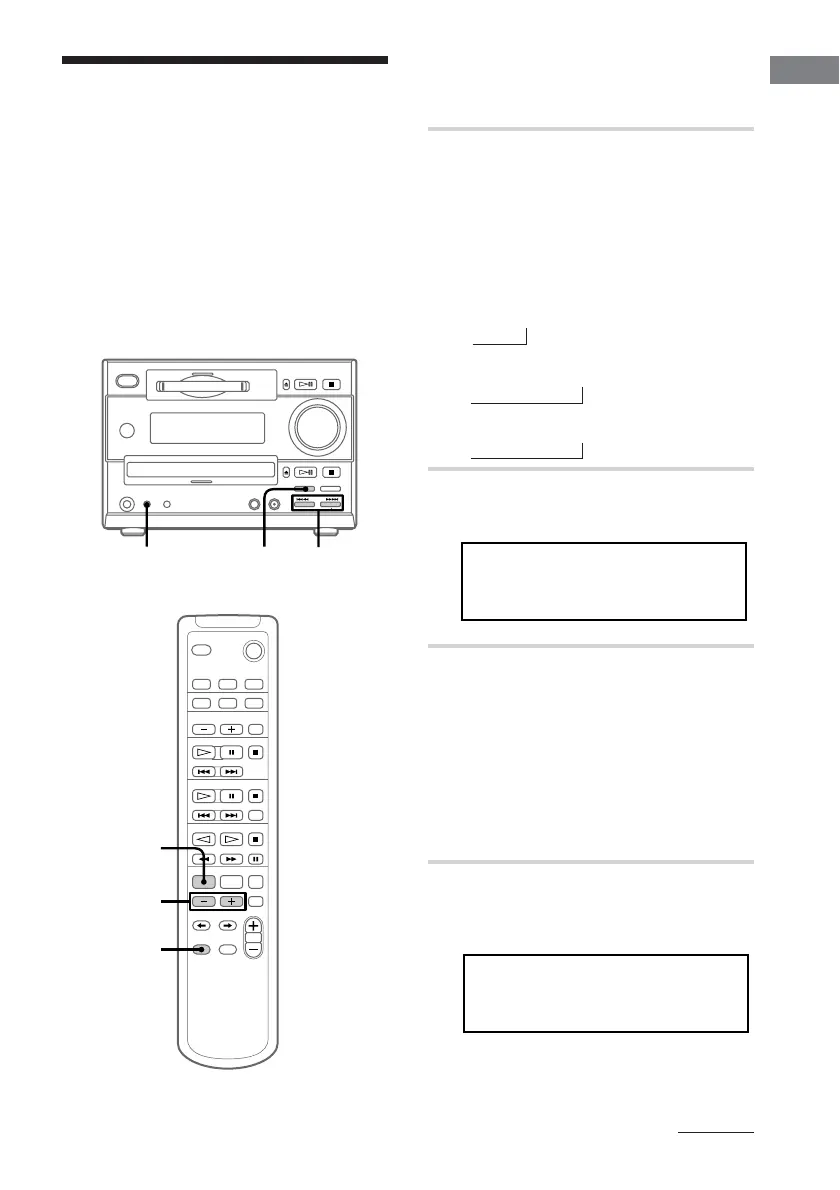
1 Press TUNER/BAND repeatedly
until the band you want appears in
the display.
Pressing TUNER/BAND turns the
power on.
Each time you press the button, the band
changes as follows:
North American model:
FM n AM
European model:
FM n MW n LW
Other models:
FM n MW n SW
2 Press TUNING MODE repeatedly
until “AUTO” appears.
3 Press TUNING +/–.
The frequency indication changes and
scanning stops when the system tunes in
a station. “TUNED” and “STEREO” (for
a stereo programme) appear. When you
want to stop scanning, press
TUNER/BAND.
Step 3: Presetting
radio stations
continued
You can preset the following number of
stations:
– North American model : 20 for FM and 10
for AM
– European model: 20 for FM, 10 for MW, and
10 for LW
– Other models: 20 for FM, 10 for MW, and 10
for SW
LEVEL SYNC
-
DBFB
AUTO
.75HM8FM z
To preset the station
4 Press EDIT then +/– on the remote
repeatedly until “Frq-Memory?”
appears.
LEVEL SYNC
-
DBFB
TUNED AUTO
M-eomqFrry?
213
4
4,6
5,7
n
n
n




 To Next Page