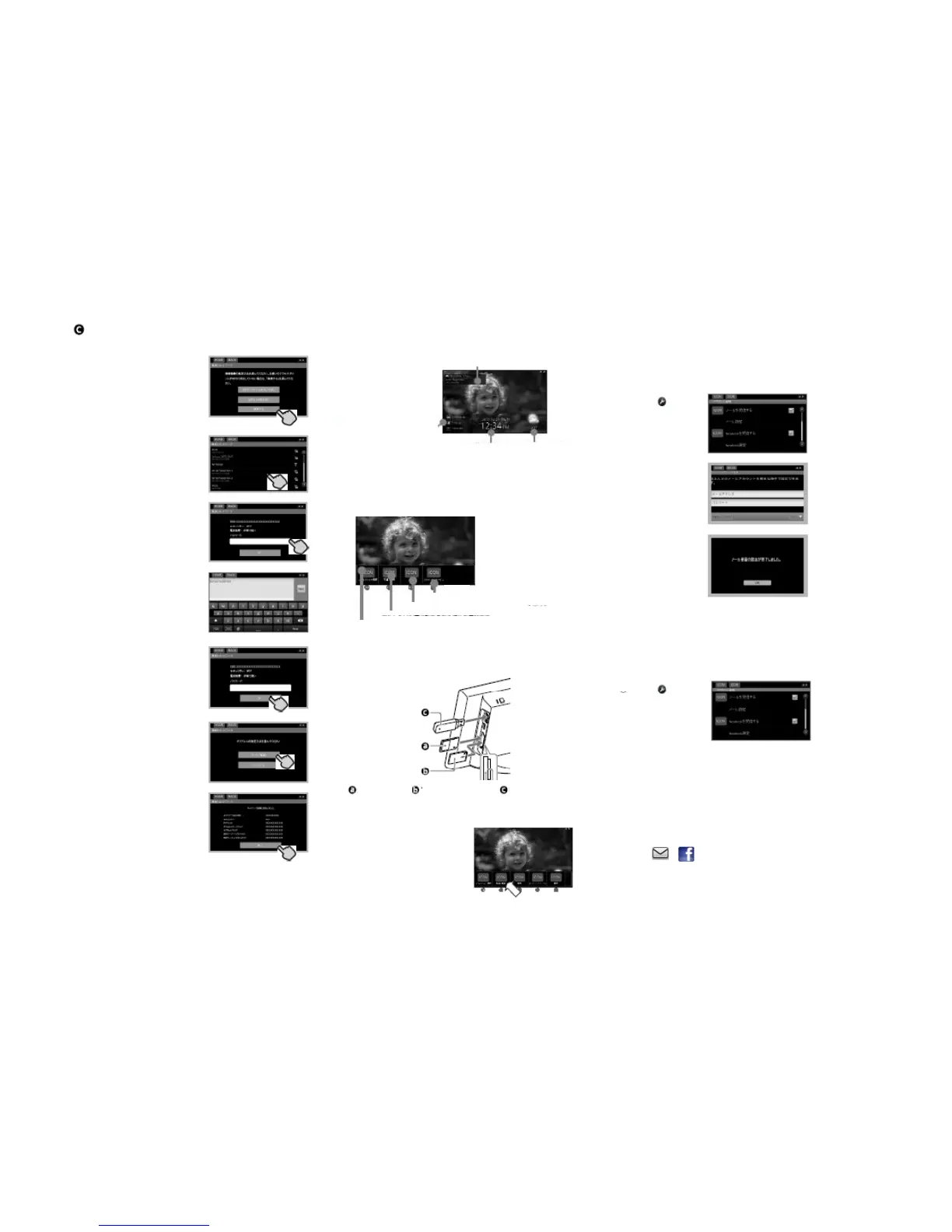
①Touch[Search]
SearchAccessPoints
StartsearchingAccessPoints,
Let’senjoyusingyourphotoframe
Seetheinformationofdisplayedpicture
Displaynewarrival
Slideshowwithalotofinformation
Let’senjoyNetworkServices
②TouchAccounticonintheMenubar
①PushtheMenubuttonisplacedbackofDPF
E‐mailphoto(Gmail)
Thendisplaythelistof
connectableAccessPoints
②TouchtheAccessPoint
whichyouwanttoconnectin
DisplayClock
DisplayWeather
e‐mail,facebook,
PersonalSpace.
Iftouchhere,
Switchtheslideshow
ofreceivedpicture
①Touchicon
therightsideof
ReceiveE‐mail
photos
③Input thePasswordofthe
AccessPoint
AboutMenu
PushtheMenubuttonisplacedbackofDPF,
Popupfunctionsettingicons.
②TouchE‐mail
addressbox,
InputE‐mailaddress
bySoftwarekeyboad
Password,thenKeyboard
appear
④Input thePassword,then
touch[Next]
BacktoSettingarea
Account
NetworkService
Wi‐Fi,General,Time,Weather
③TouchPassword
addressbox,
InputPasswordby
Softwarekeyboad
④TouchOK,returntoAccountmenu
⑤Touch[Next]
Slideshowmenu
Photomedia
Let’senjoySlideshow
①InsertthememorycardorUSBmediaincludepictures
⑤TouchBackicon,returntoSlideshow
#Updatephotossentbye‐mailperiodically
facebookphoto
Touchicon
⑥TouchtheIPaddress
settingmethodwhether
[Automatic]or[Manual].
Select
therightsideof
ReceiveE‐mail
photos
②Inputfacebookaddressandpassword‐>Touch[Login]
normally
⑦Ifsucceed,Touch[Finish].
SDcard MSDuo USBmemory
③TouchPhotoicon
intheMenubar‐>
②PushtheMenubuttonisplacedbackofDPF
③Continuetoinputasinstructedbyfacebook,Touch[OK]atlast
④TouchBackicon,returntoSlideshow
#Updatefacebookphotosperiodically
Thelatestphoto
Selectmedia‐>
Touch[Slideshow]
Supportedfileformat
JPEG:Baseline
TouchiconintheleftsideofSlideshow,
Displaythelatestphotos


 To Next Page