EasyManua.ls Logo

Sony DSX-M50BT - Main Unit Controls; Button Functions (1-5)

Sony DSX-M50BT
42 pages
Print Icon
To Next Page IconTo Next Page
To Previous Page IconTo Previous Page
Loading...
Guide
to
Parts
and
Controls
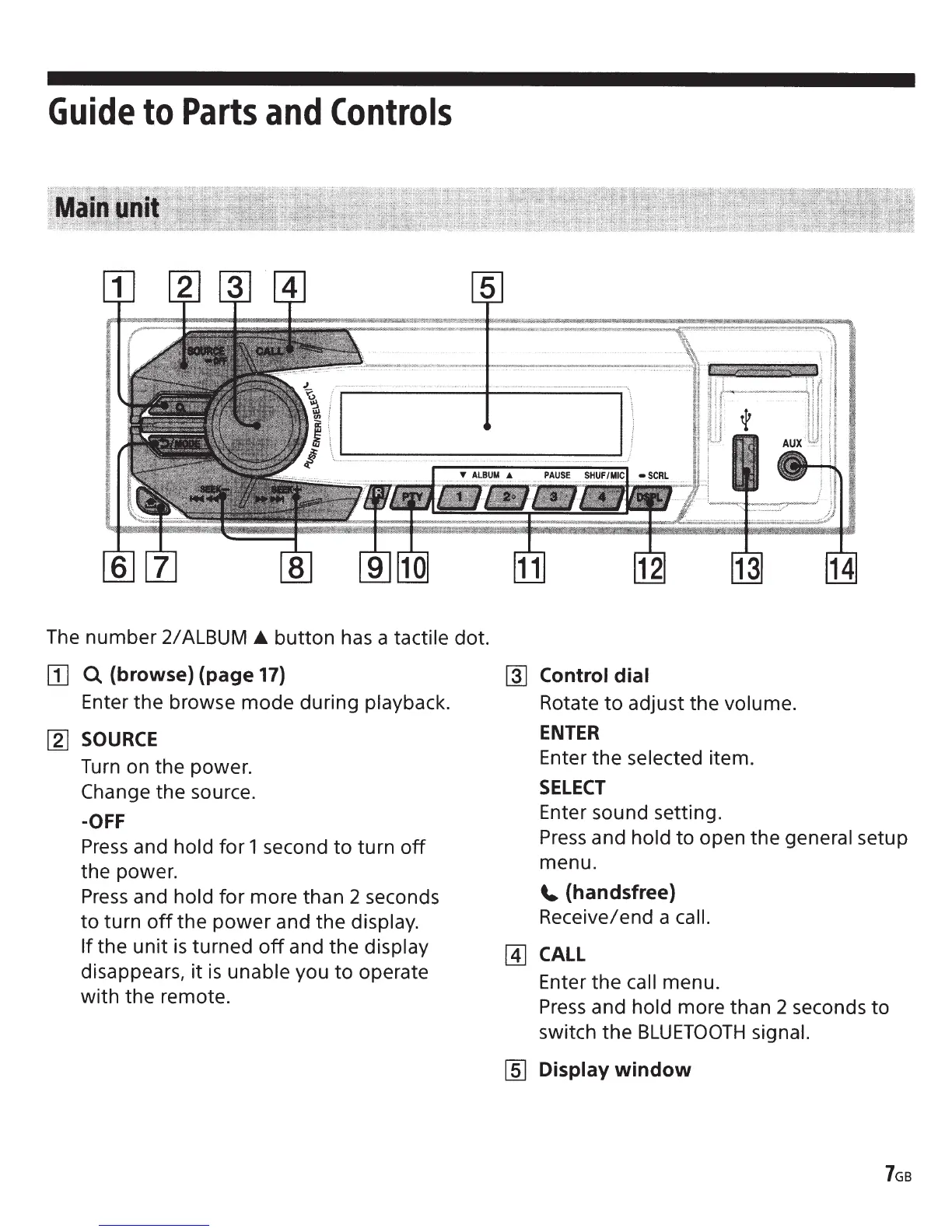
The number
2/
ALBUM
button has a
tactile
dot.
[I]
Q
{browse) (page
17}
Enter the browse mode during
playback.
[2]
SOURCE
Turn
on the power.
Change
the source.
-OFF
Press
and
hold
for 1 second
to
turn
off
the power.
Press
and
hold
for more than 2 seconds
to
turn
off
the
power
and the
display.
If
the
unit
is
turned
off
and the
display
disappears, it
is
unable
you
to
operate
with the remote.
~
Control dial
Rotate
to
adjust the
volume.
ENTER
Enter the
selected
item.
SELECT
Enter sound setting.
Press
and
hold
to
open the general
setup
menu.
~
(handsfree)
Receive/end a
call.
[4]
CALL
Enter the
call
menu.
Press
and
hold
more than 2 seconds
to
switch the
BLUETOOTH
signal.
[ID
Display
window