EasyManua.ls Logo

Sony DSX-M50BT - Remote Control Functions (RM-X231); Button Functions (6-18)

Sony DSX-M50BT
42 pages
Print Icon
To Next Page IconTo Next Page
To Previous Page IconTo Previous Page
Loading...
[§]
~{back)
Return
to
the previous display.
MODE {page 13,
15,
20)
[1]
~
{front
panel
release)
rnJ
SEEK+/-
Tune
in
radio stations
automatically.
Press
and
hold
to tune manually.
~I~
{prev/next),
.,....,~
{reverse/fast-forward)
[ID
Receptor
for
the
remote
commander
[Q]
PTY
{program
type)
Select
PTY
in
RDS.
[1]
Number
buttons
Receive stored radio stations.
Press
and
hold
to store stations.
Call
a stored phone number.
Press
and
hold
to store a phone number.
ALBUM
'Y/~
Skip
an
album
for audio device.
Press
and
hold
to skip
albums
continuously.
PAUSE
SHUF
{shuffle)
MIC
{page
20)
~
DSPL
{display)
Change display
items.
-SCRL
{scroll)
Press
and
hold
to scroll
a
display
item.
~
USB
port
!H)
AUX
input
jack
16~---+--
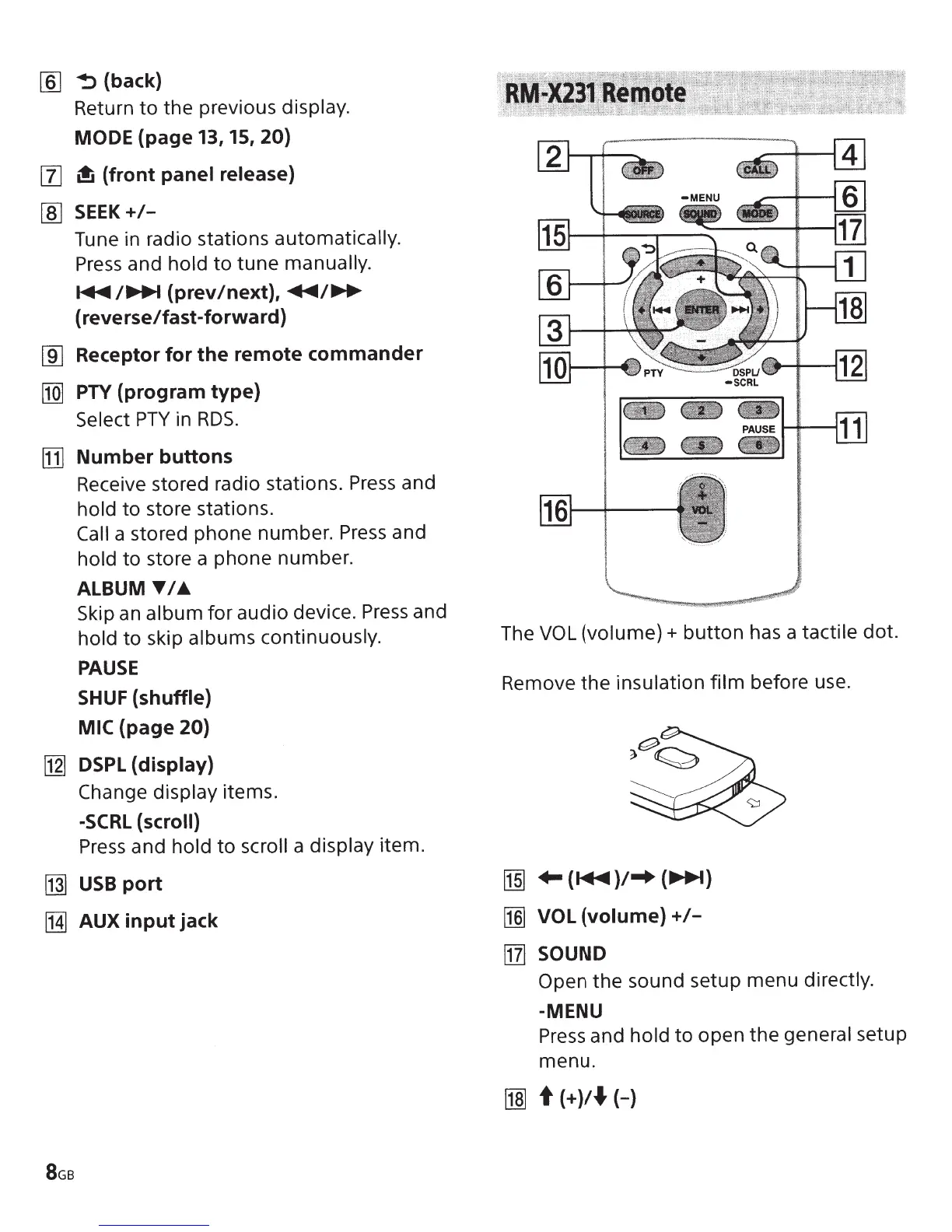
The
VOL
(volume)+
button
has
a tactile
dot.
Remove the insulation
film
before
use.
[1§]
...
{~)/-+
{~)
~
VOL
{volume)+/-
[11]
SOUND
Open
the sound setup menu directly.
-MENU
Press
and
hold
to open the
general setup
menu.
~
t
{+)/.f.{-)