10
Connecting to Other
Equipment
By connecting the player to your TV or
other equipment, you can increase your
viewing options.
b
• Refer to the instructions supplied with the
equipment to be connected.
• Before connecting, turn off the player and the
equipment to be connected, then unplug from
their wall sockets.
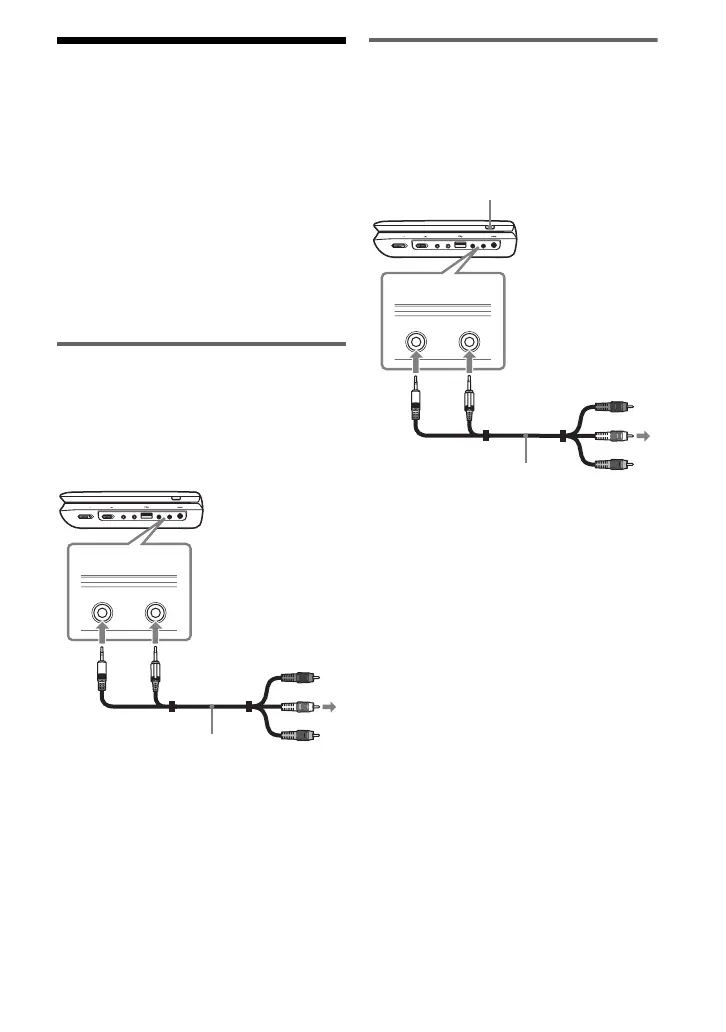
Enjoying images on a
connected TV
1 Connect the player to your TV or
monitor using the audio/video cable
(supplied).
z
The player can connect to an AV amplifier in the
same way as a TV.
Enjoying images on other
equipment
1 Connect the player to your video
player or camcorder using the
audio/video cable (supplied).
2 Turn on the player and press INPUT
SELECT repeatedly to select “Line
In.”
HOLD
A PHONES B
AUDIO
IN/OUT
VIDEO
IN/OUT
DC IN 9.5V
POWER OFF ON
INPUT SELECT
AUDIO
IN/OUT
VIDEO
IN/OUT
To AUDIO/
VIDEO input
jacks of a TV or
monitor
Audio/video cable
(supplied)
HOLD
A PHONES B
AUDIO
IN/OUT
VIDEO
IN/OUT
DC IN 9.5V
POWER OFF ON
INPUT SELECT
AUDIO
IN/OUT
VIDEO
IN/OUT
Audio/video cable
(supplied)
To AUDIO/
VIDEO output
jacks of a
video player or
camcorder
INPUT SELECT



 To Next Page