EasyManua.ls Logo

Sony FD-40E - Page 11

Sony FD-40E
24 pages
Print Icon
To Next Page IconTo Next Page
To Previous Page IconTo Previous Page
Loading...
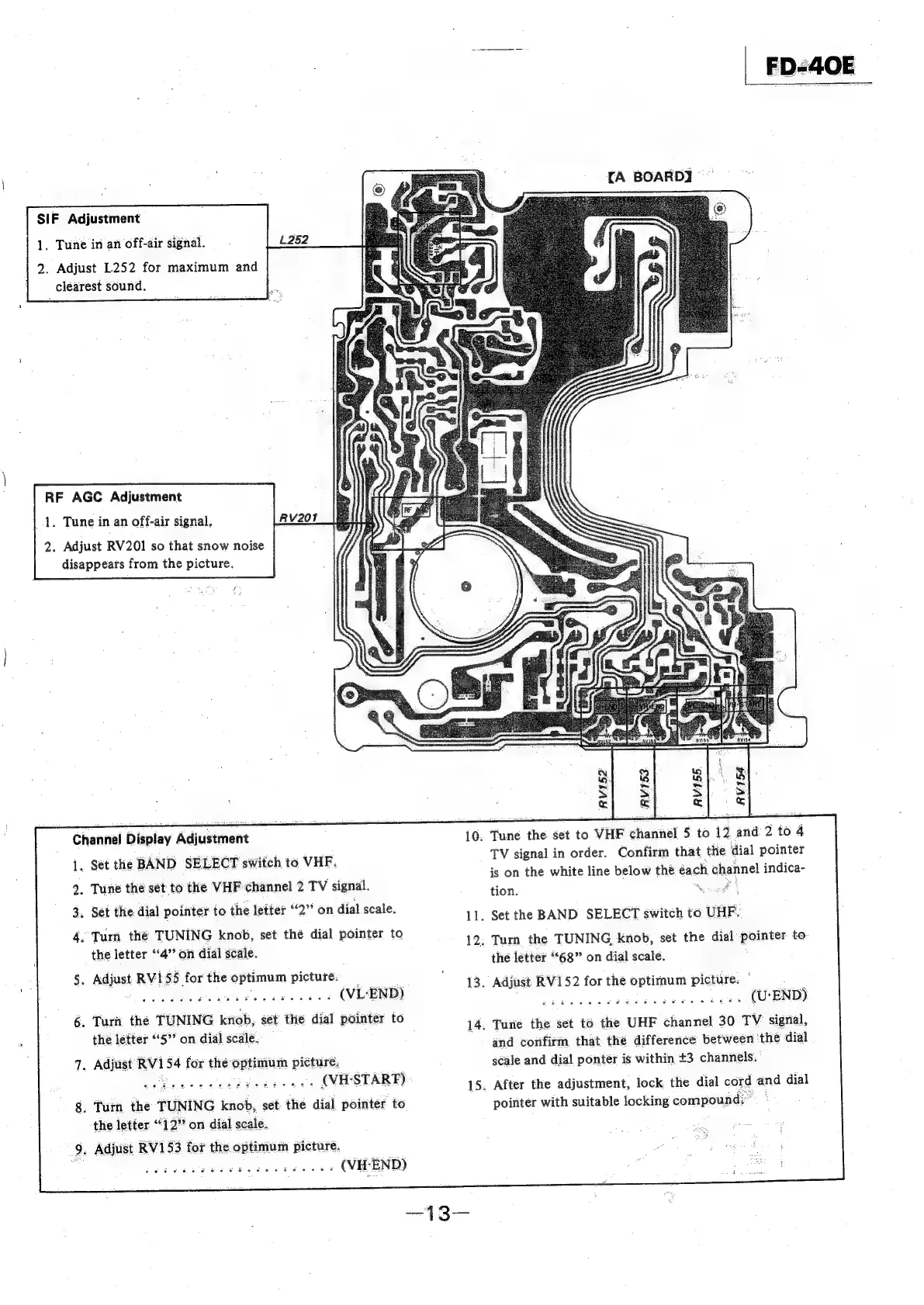
1,
Tune
in
an
off-air
signal.
2.
Adjust
L252
for
maximum
and
clearest
sound.
SIF
Adjustment
RF
AGC
Adjustment
1.
Tune
in
an
off-air
signal,
2.
Adjust
RV201
so
that
snow
noise
disappears
from
the
picture.
Channel
Display
Adjustment
1.
Set
the
BAND
SELECT
switch
to
VHF.
2.
Tune
the
sét
to
the
VHF
channel
2
TV
signal.
3.
4.
Turn
the
TUNING
knob,
set
thé
dial
pointer
to
Set
the
dial
pointer
to
the
letter
“2”
on
dial
scale.
the
letter
“4”
on
dial
scale.
&
Adjust
RVI
55
for
the
optimum
picture:
Bok
Oia
tlle
agtiel
Oot
tape
WN
ecg
.
(VL-END)
.
Turn
the
TUNING
knob,
sét
the
dial
pointer
to
the
letter
“5°
on
dial
scale.
.
Adjust
RV154
for
the
optimum
pictur.
ea
a
OE
RE
Ee
wee
a
(VH-STARF)
.
Tum
the
TUNING
knob,
set:
the
dial
pointer
to
the
letter
“12”
on
dial
scale.
.
Adjust
RV153
for
the
optimum
picture.
ett
ey
Fatncetnate
atid
ache
dan
Sree
(VH-END)
10.
11.
12.
13.
14.
15.
[A
BOARD]
~~
Tune
the
set
to
VHF
channel
5
to
12
and
2
to
4
TV
signal
in
order.
Confirm
that
the
dial
pointer
is
on
the
white
line
below
the
each
channel
indica-
tion.
Sey
any
Set
the
BAND
SELECT
switch
to
UHF.
Turn
the
TUNING,
knob,
set
the
dial
poanies
to
the
letter
“68”
on
dial
scale.
Adjust
RV152
for
the
optimum
picture.
flict
eden
dia
aieldo
ake
Stank
ee
(U:
END)
Tune
the
set
to
the
UHF
channel
30
TV
signal,
and
confirm,
that
the
difference
between
the
dial
scale
and
dial
ponter
is
within
+3
channels.
After
the
adjustment,
lock
the
dial
cord
and
dial
pointer
with
suitable
locking
compound;

Related product manuals