EasyManua.ls Logo

Sony FD-40E - Page 13

Sony FD-40E
24 pages
Print Icon
To Next Page IconTo Next Page
To Previous Page IconTo Previous Page
Loading...
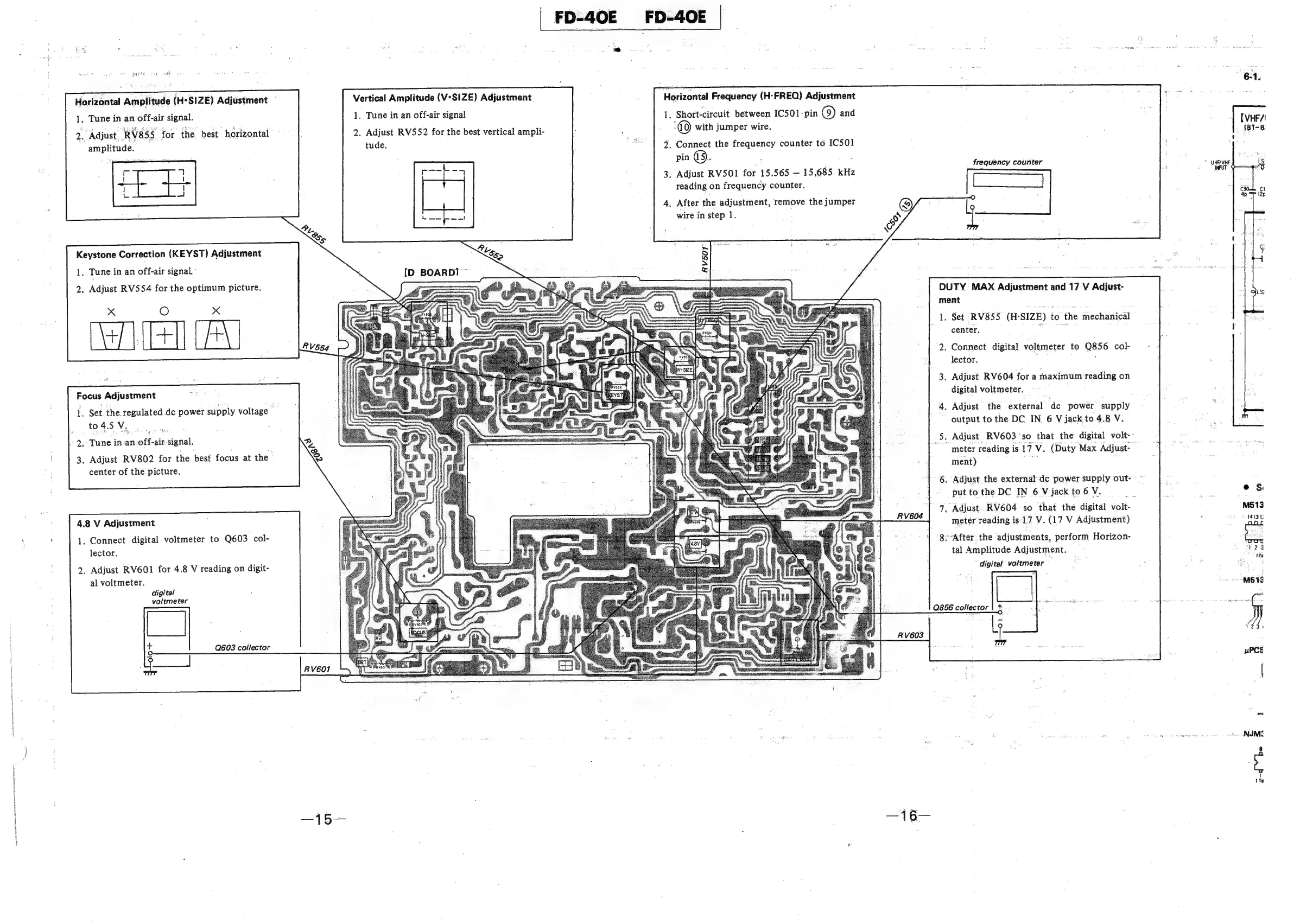
Horizontal
Frequency
(H:-FREQ)
Adjustment
1,
Short-circuit
between
IC501-pin
(9)
and
a©)
with
jumper
wire.
2.
Connect
the
frequency
counter
to
IC501
pin
@®.
3.
Adjust
RV50O1
for
15.565
15.685.
kHz
reading
on
frequency
counter.
Vertical
Amplitude
(V°SIZE)
Adjustment.
Horizontal
Amplitude
(H*SIZE)
Adjustment
1.
Tune
in
an
off-air
signal
2.
Adjust
RV552
for
the
best
vertical
ampli-
tude.
1.
Tune
in
an
off-air
signal.
2.
Adjust.
RV8SS.
for
the
best
horizontal
amplitude.
frequency
counter
4.
After
the
adjustment,
remove
the
jumper
©
/
wire
in
step
1.
Keystone
Correction
(KEYST)
Adjustment
1.
Tune
in
an
off-air
signal.
DUTY
MAX
Adjustment
and
17
V
Adjust-
ment
ae
Set
RV855,
(H-SIZE)
to
the
mechanical
center.
.
ae
2.
Adjust
RV554
for
the
optimum
picture.
Xx
O
x
Alla
Focus
Adjustment
2.
Connect
digital
voltmeter
to
Q856
col-
lector.
;
3.
Adjust
RV604
for
a
maximum
reading
on
digital
voltmeter.
4.
Adjust
the
external
‘de
power
supply
output
to
the
DC
IN
6
V
jack
to
4.8
V.
Ss
Adjust
RV603
"so
that
the
digital
volt-~
meter
reading
is
17
V.
(Duty
Max
Adjust-
_
ment)
:
1.
Set
the
regulated
de
power
supply
voltage
to4.5V.
2.
Tune
in:an
off-air
signal.
3.
Adjust
RV802
for
the
best
focus
at
the
center
of
the
picture.
e
ee
>
6.
Adjust
the
external
dc
power
supply
out=
~
put
to
the
DC
IN
6
V
jack
to
6
V.
is
®s
:
7.
Adjust.
RV604
so
that
the
digital
volt-
M513
4.8
V
Adjustment
meter
reading
is-17
V.
(17
V
Adjustment)
1413
a
:
Suncetsciaital
Volimetsn
rs
eee
8.-After
the
adjustments,
perform
Horizon-
eee
ector.
tal
Amplitude
Adjustment.
424
2.
Adjust
RV601
for
4.8
V
reading
on
digit-
digital:
voltmeter
.
tre
al
voltmeter.
a]
:
digital
M512
voltmeter
|
1
36
Q603
collector
S
uPCE
——
Rv60o1
ont
~
NIMZ
—15—
—16—

Related product manuals