Help Guide
Digital 4K Video Camera Recorder
FDR-AX43/AX43A/AX45/AX45A/AX60
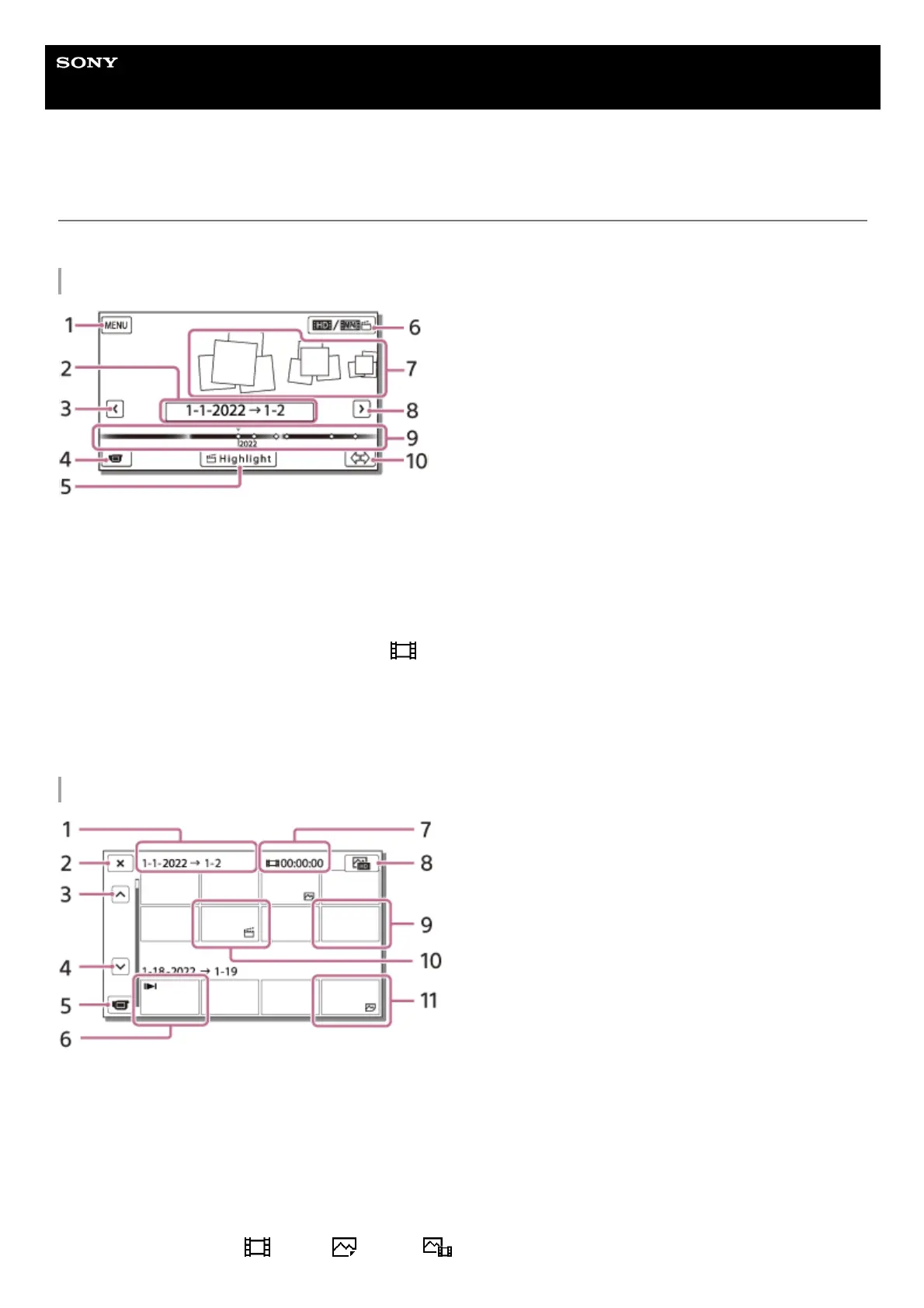
Screen display on the Event View screen
Explains items displayed on the Event View screen.
Event View screen
Index screen
To the MENU screen1.
Event name2.
To the previous event3.
To the movie/photo recording mode4.
Highlight Movie Maker5.
To switch movie format (XAVC S 4K/XAVC S HD/AVCHD/MP4)
The displayed icon differs depending on the [
File Format] setting.
6.
Events7.
To the next event8.
Time-line bar
9.
To change Event Scale (approx. 3 months/1.5 years)10.
Event name1.
To close the index screen2.
To the previous event3.
To the next event4.
To the movie/photo recording mode5.
Last played image6.
Recorded time/number of photos7.
To switch between the movie/photo playback screen (VISUAL INDEX)
Select the image type (
MOVIE, PHOTO, MOVIE/PHOTO) you want to play.
8.



 To Next Page