EasyManua.ls Logo

Sony FH-B50CD - System Connections; Speaker and Antenna Connections

Sony FH-B50CD
77 pages
Print Icon
To Next Page IconTo Next Page
To Previous Page IconTo Previous Page
Loading...
(@eyalarsvevi(e)
ats
Notes
on
connection
e
Connect
the
AC
power
cord
last.
¢
Cord
plugs
and
jacks
are
color
coded.
Red
plugs
and
jacks
are
for
the
right
channel
(R)
and
white
ones
for
the
left
channel
(L).
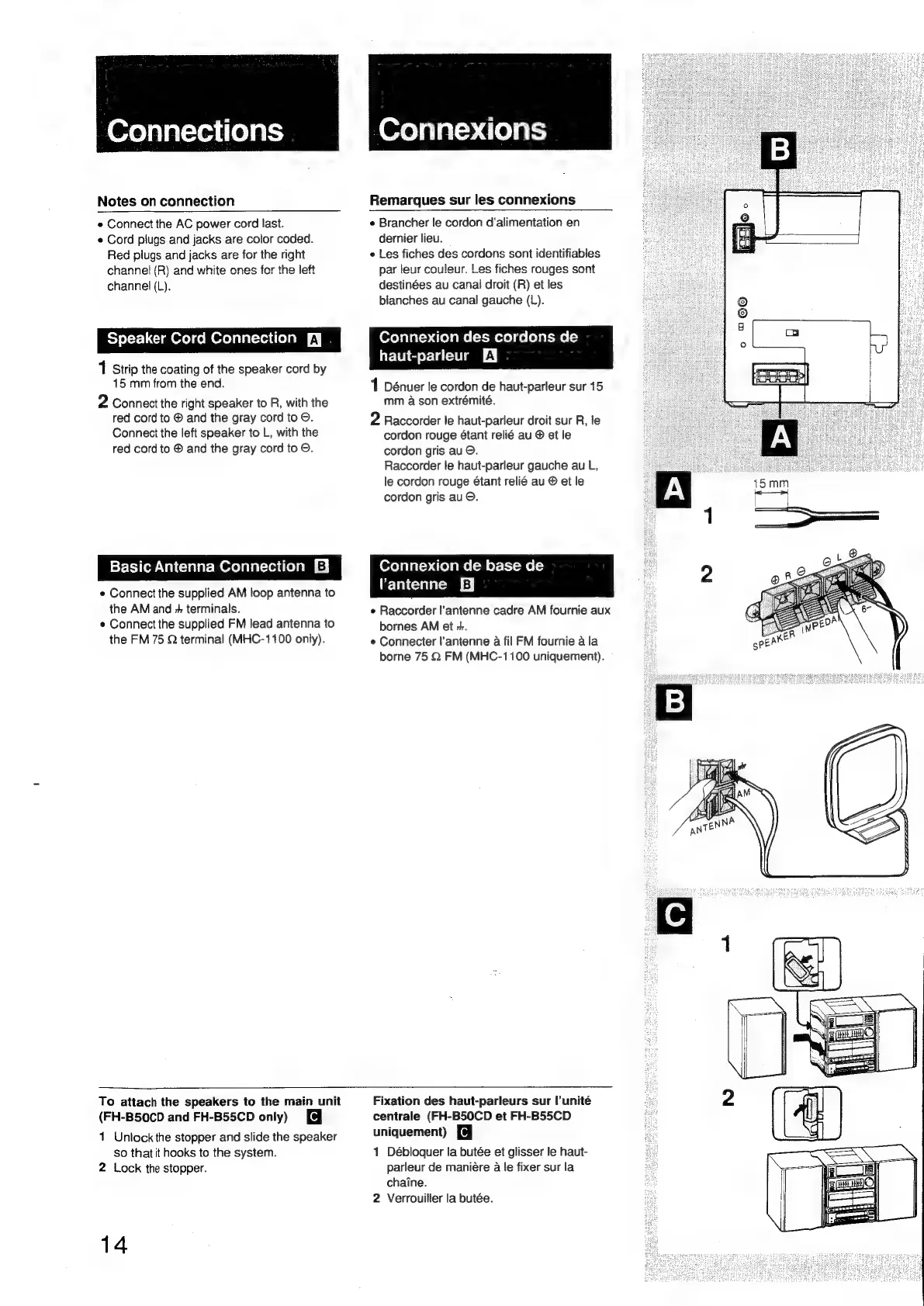
Speaker
Cord
Connection
fy
1
Strip
the
coating
of
the
speaker
cord
by
15
mm
from
the
end.
2
Connect
the
right
speaker
to
R,
with
the
red
cord
to
®
and
the
gray
cord
to
O.
Connect
the
left
speaker
to
L,
with
the
red
cord
to
®
and
the
gray
cord
to
©.
Basic
Antenna
Connection
e
Connect
the
supplied
AM
loop
antenna
to
the
AM
and
+
terminals.
e
Connect
the
supplied
FM
lead
antenna
to
the
FM
75
Q
terminal
(MHC-1100
only).
'@Xe)
py
al=).410)
abs)
Remarques
sur
les
connexions
e
Brancher
le
cordon
d'alimentation
en
dernier
lieu.
e
Les
fiches
des
cordons
sont
identifiables
par
leur
couleur.
Les
fiches
rouges
sont
destinées
au
canal
droit
(R)
et
les
blanches
au
canal
gauche
(L).
(Oxelalal=>.d{elame(=t-mexe)
ce
lelal-me
(=)
haut-parleur
LEY
1
Dénuer
le
cordon
de
haut-parleur
sur
15
mm
a
son
extrémité.
2
Raccorder
le
haut-parleur
droit
sur
R,
le
cordon
rouge
étant
relié
au
©
et
le
cordon
gris
au
©.
Raccorder
le
haut-parleur
gauche
au
L,
le
cordon
rouge
étant
relié
au
@
et
le
cordon
gris
au
©.
Connexion
de
base
de
Vantenne
EJ
e
Raccorder
l’'antenne
cadre
AM
fournie
aux
bornes
AM
et
+.
e
Connecter
l’antenne
a
fil
FM
fournie
a
la
borne
75
Q
FM
(MHC-1100
uniquement).
To
attach
the
speakers
to
the
main
unit
(FH-B50CD
and
FH-B55CD
only)
1
Unlock
the
stopper
and
slide
the
speaker
so
that
it
hooks
to
the
system.
2
Lock
the
stopper.
14
Fixation
des
haut-parleurs
sur
l’unité
centrale
(FH-B50CD
et
FH-B55CD
uniquement)
1
Débloquer
la
butée
et
glisser
le
haut-
parleur
de
maniére
a
le
fixer
sur
la
chaine.
2
Verrouilier
la
butée.

Related product manuals