EasyManua.ls Logo

Sony FH-B50CD - Radio Operations; Tuning into Stations

Sony FH-B50CD
77 pages
Print Icon
To Next Page IconTo Next Page
To Previous Page IconTo Previous Page
Loading...
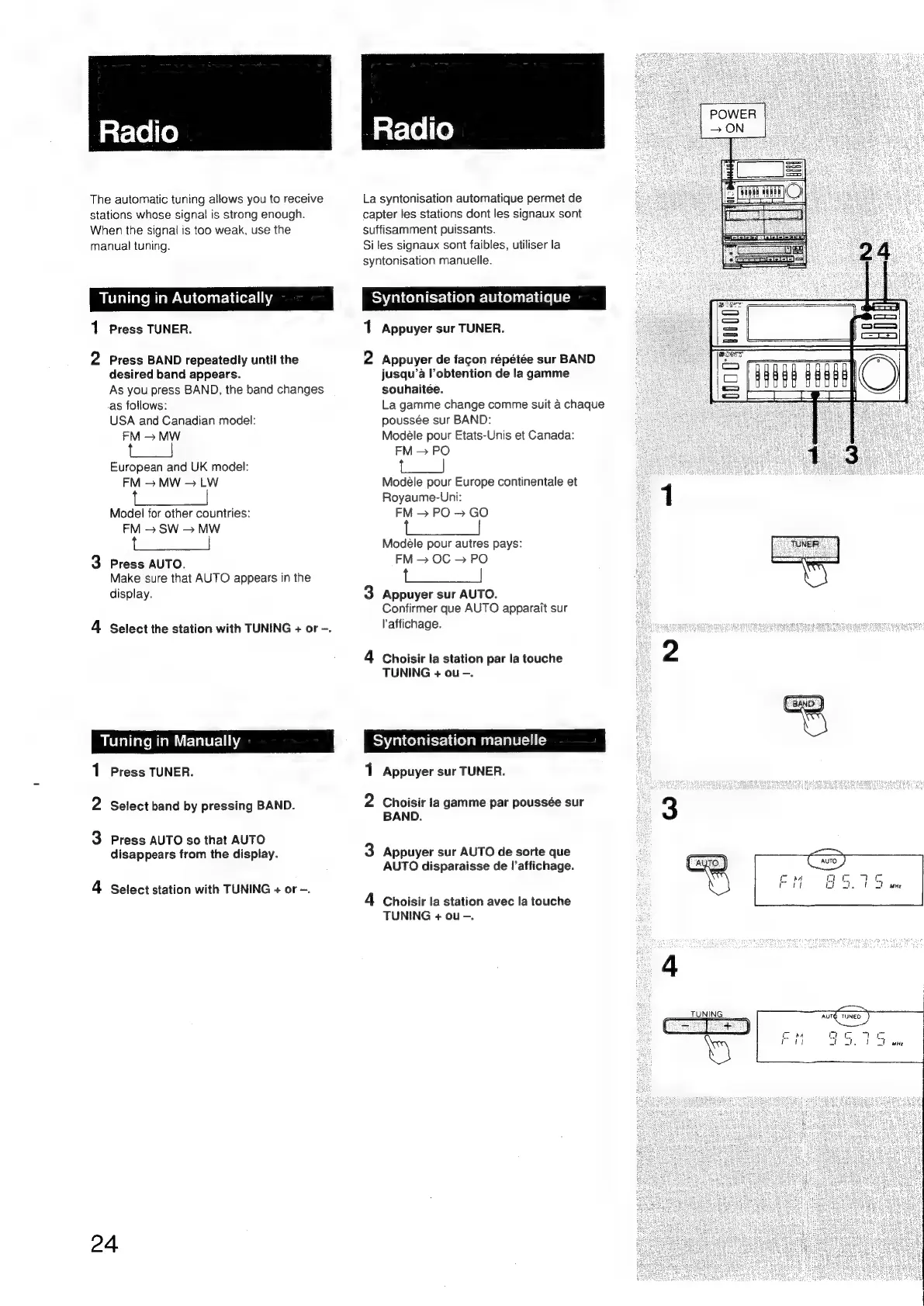
Radio
The
automatic
tuning
allows
you
to
receive
stations
whose
signal
is
strong
enough.
When
the
signal
is
too
weak,
use
the
manual
tuning.
Tuning
in
Automatically
Press
TUNER.
NO
=
Press
BAND
repeatedly
until
the
desired
band
appears.
As
you
press
BAND,
the
band
changes
as
follows:
USA
and
Canadian
model:
FM
>
MW
a,
European
and
UK
model:
FM
MW
>
LW
Model
for
other
countries:
FM
>
SW
>
MW
3
Press
AUTO.
Make
sure
that
AUTO
appears
in
the
display.
4
Select
the
station
with
TUNING
+
or
-.
Tuning
in
Manually
1
Press
TUNER.
2
Select
band
by
pressing
BAND.
3
Press
AUTO
so
that
AUTO
disappears
from
the
display.
4
Select
station
with
TUNING
+
or
-.
24
atslel(e)
La
syntonisation
automatique
permet
de
capter
les
stations
dont
les
signaux
sont
suffisamment
puissants.
Si
les
signaux
sont
faibles,
utiliser
la
syntonisation
manuelle.
Syntonisation
automatique
=,
Appuyer
sur
TUNER.
no
Appuyer
de
facon
répétée
sur
BAND
jusqu’a
l’obtention
de
la
gamme
souhaitée.
La
gamme
change
comme
suit
a
chaque
poussée
sur
BAND:
Modéle
pour
Etats-Unis
et
Canada:
FM
>
PO
|
Modéle
pour
Europe
continentale
et
Royaume-Uni:
FM
>
PO
>
GO
Modeéle
pour
autres
pays:
FM
OC
>
PO
arate
3
Appuyer
sur
AUTO.
Confirmer
que
AUTO
apparait
sur
l'affichage.
4
Choisir
la
station
par
la
touche
TUNING
+
ou
-.
Syntonisation
manuelle
1
Appuyer
sur
TUNER.
2
Choisir
ta
gamme
par
poussée
sur
BAND.
3
Appuyer
sur
AUTO
de
sorte
que
AUTO
disparaisse
de
l’affichage.
4
Choisir
la
station
avec
la
touche
TUNING
+
ou
-.
i
|
scorns
pe

Related product manuals