SONY FX9 Camera Setup
6
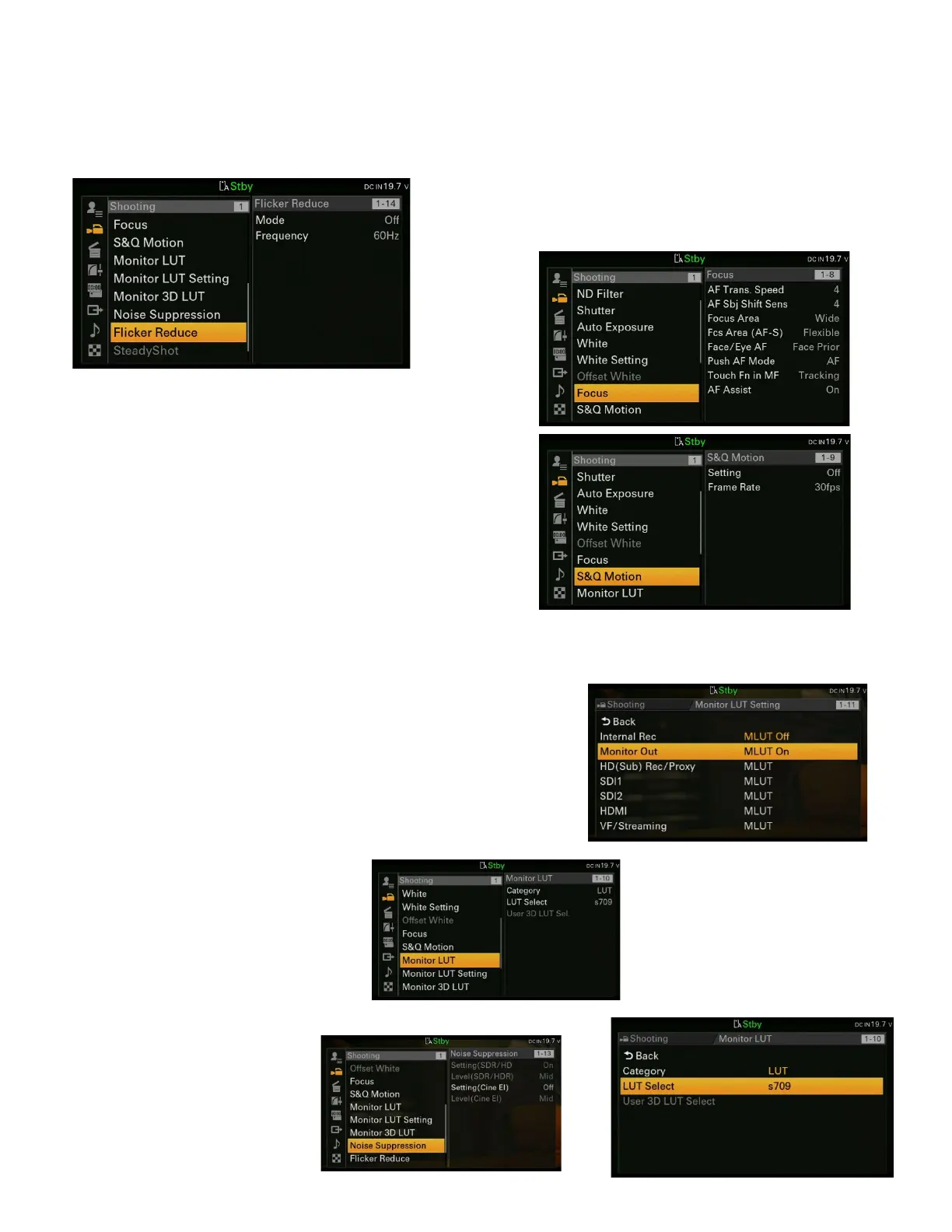
Offset White – inactive
Focus is only active when using E mount Lenses
with auto focus capabilities or EF mount lenses
with an appropriate adapter to permit the auto
focus
function to
perform.
Be sure to
test to
determine
the settings that work best for your project.
S&Q Motion – Slow and quick motion, to be used
when shooting a non-sync speed. Frame rates
are limited by the recording medium (card)
selected and image resolution. For the highest
frame rate, use CF Cards and/or a reduced
resolution (Imager Scan Mode – under the
Project/Rec Format menu) It may be necessary to
record in HD at 23.98 fps in order to achieve the
highest possible frame rate. This would then require one to up-rez the shot in post to fit
the 4K workflow. This must be tested with camera and post in pre-production.
Monitor LUT (Look Up Table)
Category LUT
LUT Select – either s709, 709 (800%) or S-Log3 –
depending on which you prefer to monitor
One can also upload a custom 3D LUT
Monitor LUT Setting
Internal Rec – MLUT Off
Monitor Out – MLUT On
Monitor 3D LUT
Load .cube file from SD Card
Noise Suppression
Setting (Cine EI) Off *(If you need noise suppression,
you can add it in color
grading)
Flicker Reduce
Mode Off



 To Next Page