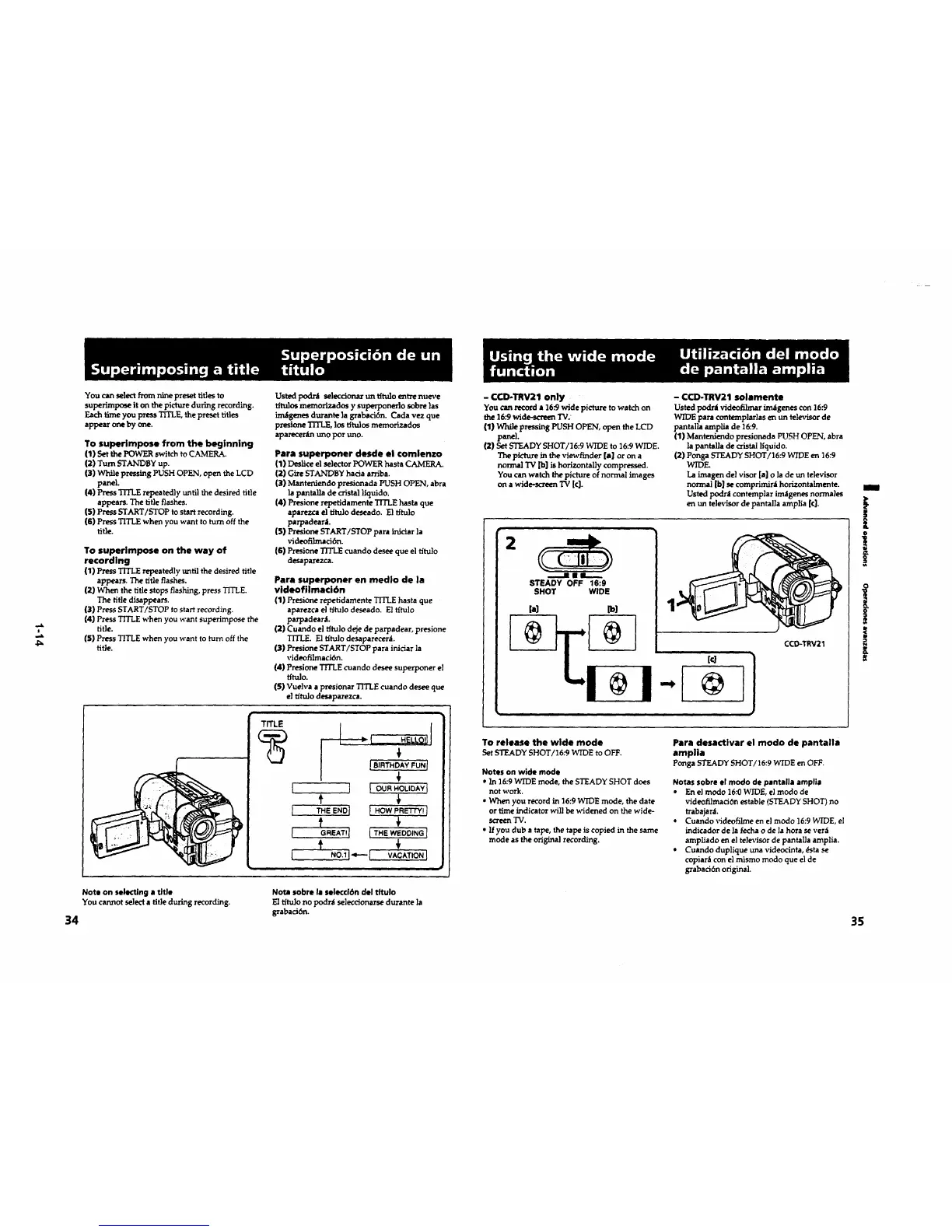
You can select from nine preset rifles to
superimpose it on the picture during recording.
Eachtime you press TITLE,the preset rifles
appearoneby one.
To superimpose from the beginning
(1) Set the POWER switch to CAMERA.
(2) Turn STANDBY up.
(3) While pressing PUSH OPEN, open the LCD
panel.
(4) Press TITLE repeatedly unri] the desired title
appears. The rifle flashes.
(S) Press START/STOP to start recording.
(6) Press TITLE when you want to turn off the
rifle.
To superimpose on the way of
recording
(1) Press TITLE repeatedly until the desired rifle
appears. The rifle flashes.
(2) When the rifle stops flashing, press TITLE.
The rifle disappears.
(3) PressSTART/STOP tostartrecording.
(4)PressTITLE when you want superimpose the
title.
(5) Press TITLE when you want to turn off the
rifle.
Usted podnl seleccionar m'Ltttu]o entre nueve
tftulos memorizados y superponer]o sobre ]as
irralgenesdurantelagrabad6n. Cada vez que
presioneTITLE, lostltulosmemorizados
aparecer[muno/>oruno.
Pare superponer desde el €omlenzo
(1) Deslice el selector POWER haste CAMERA.
(2) Gire STANDBY hacia arriba.
(3) Mante_xiendo presionada PUSH OPEN, abra
]a pantalla de cristal l|quido.
(4) Presione reperidamente TITLE hast• que
aparezca el tttu]o deseado. E1 fltulo
parpadearl.
(5) Presione START/STOP par• inJciarla
videofilmad6n.
(6) Presione TITLE cuando desee que el fltulo
desaparezca.
Pare superponer en medio de la
videofllmaci6n
(1) Presione repetidamente TITLE haste que
aparezcael fltulodeseado. Eltftulo
parpadearJ.
(2) Cuando el fltulo deje de parpadear, presione
TITLE. El t_tulo desapareceni.
(3) Presione START/STOP par• irficiar la
videofilrnaci6n.
(4) PresioneTITLE cuando deseesuperponer el
tftulo.
(S)Vueh,a a presionarTITLE cuando deseeque
el t_tu]o desaparezca.
TITLE
1
[
[
I
Note on selecting • title
You cannot select a title during recording.
34
Note sobre la selecci6n del tltulo
El t_tulo no po_r_t seleccionarse durante la
grabaci6n.
- CCD-TRV21 only
You can record • 16.'9 wide picture to watch on
the 16:9 wide-screen TV;
(1) While pressing PUSH OPEN, open the LCD
panel.
(2) Set STEADY SHOT/]6:9 WIDE to 16:9 WIDE.
The picture in the viewfinder [a] or on a
normal "IV [b] is horizontally compressed.
You can watch the picture of normal images
on a wide-screen "IV [C].
- CCD-TRV21 solamente
Usted podr_i videnfllmar im,_lgenes con 16:9
WIDE para contemplarlas en un televisor de
pantalla amplia de 16.-9.
(1) Mantmxiendo presionadaPUSH OPEN, abra
lapantallade cristalIfquido.
(2)Ponga STEADY SHOT/16:9 WIDE en 16:9
WIDE.
La imagen delvisor[a]o lade un televisor
normal [b]secomprimirlhorizontalmente.
Ustedpodr_icontempiarim;Igenesnormales
en un televisorde pantallaamplia [¢].
2
STEADY OFF 16:9
SHOT WIDE
CCD-TRV21
To release the wide mode
SetSTEADYSHOT/16:9 WIDEto OFF.
Notes on wide mode
• In 16:9 WIDE mode, the STEADY SHOT does
not work.
• When you record in 16:9 WIDE mode, the date
or t_me indicator will be widened on the wide-
sc_en TV.
• If you dub a tape, the tape is copied in the same
mode as the original recording.
Para desactivar el modo de pantalla
amplia
Ponga STEADYSHOT/16:9 WIDE en OFF.
Notas sobre el modo de pantalla amplie
• En el modo 16:0 WIDE, el modo de
videofilmaci6n estabie (STEADY SHOT) no
trabajar_L
• Cuando videofilme en el modo 16:9 WIDE, el
indicador de la fecha o de Iahora se verdi
ampllado en el televisor de pant•lie amplia.
• Cuando duplique una videocinta, _ta se
copiarli con el mismo modo qua el de
grabaci6n original.
m
I
!
o
!
!
35





 To Next Page