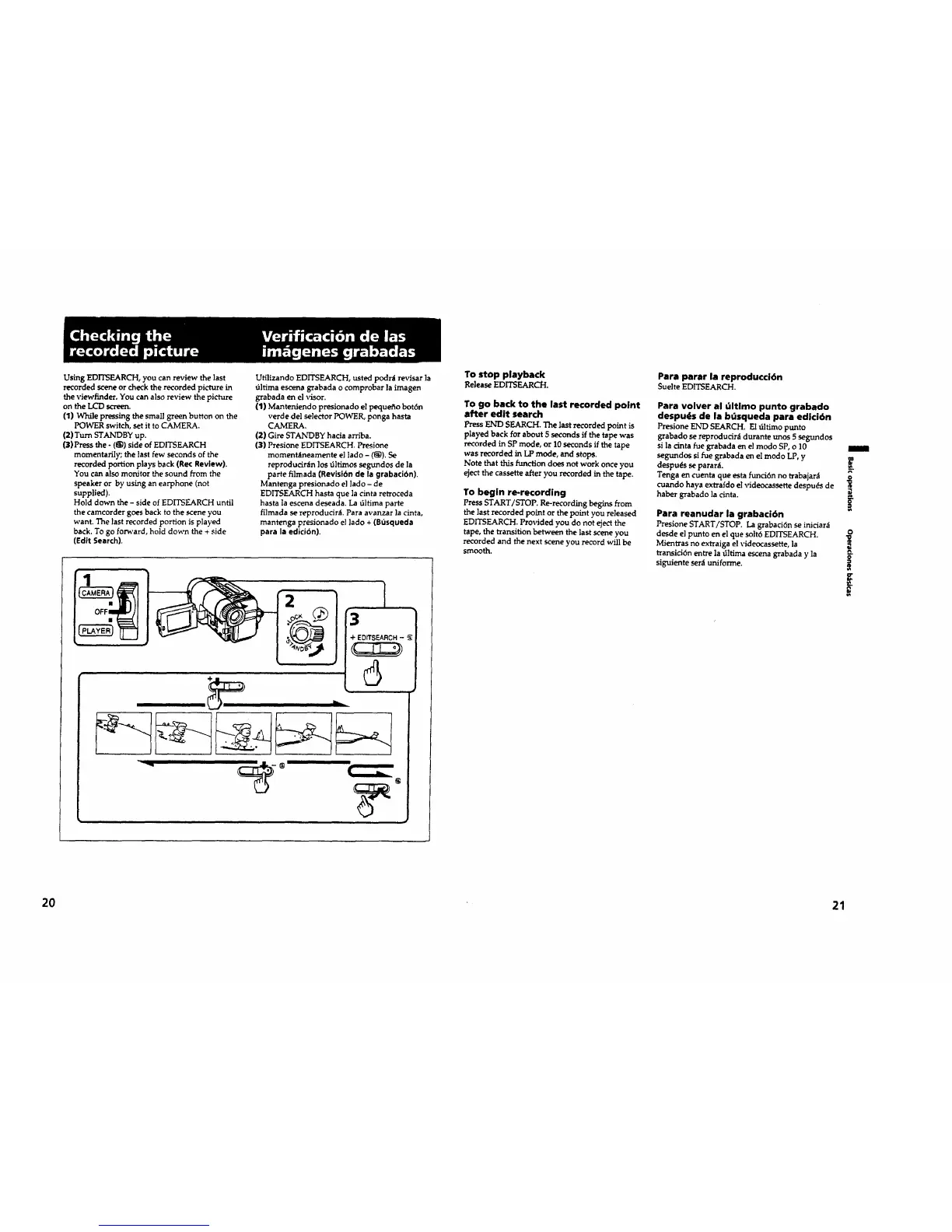
Using EDITSEARCH, you can review the last
recorded r_"eneor check the recorded picture in
the viewfinder, You can also review the picture
on theLCD screen.
(I)While pressingthesmallgreen buttonon the
POWER switch,setittoCAMERA.
(2)TurnSTANDBY up.
(3)Pressthe-(_1)sideofEDITSEARCH
momentarily; the last few seconds of the
recorded portion plays back (Rec Review).
You can alsomonitorthesound from the
speakeror by usingan earphone (not
supplied).
Hold clownthe- sideof ]_DITSEARCH until
thecamcorder goesback tothe sceneyou
want.The lastrecordedportionisplayed
back.To go forward,hold down the+ side
(Edit Search).
Ufilizando EDITSEARCH, usted podr_t revisar la
_ltima escena grabada o comprobar la imagen
grabada en el visor.
(1) Manteniendo presionado el pequefio bot6n
verde del selector POWER, ponga hasta
CAMERA.
(2) Gire STAIXrDBY hacia arribe.
(3) Presione EDITSEARCH. Presione
momentaneamente el lado - (_). Se
reproducir_Inlostiltimossegl.mdosde la
parte filmada (Revisibn de la grabacibn).
Mantenga presionado el lado - de
EDITSEARCH basra que la cinta retroceda
hasta la escena deseada. La 61tima parte
filmada se reproducir_. Paraavanzar la cinta,
mantenga presionado el ]ado + (Bt_squeda
para la edicibn).
I
3
To stop playback
ReleaseEDITSEARCH.
To go back to the last recorded point
after edit search
PressEND SEARCH. The lastrecordedpointis
played back for about 5 seconds if the tape was
recorded in SP mode, or 10 seconds if the tape
was recorded in LP mode, and stops.
Note that this function does not work once you
eject the cassette after you recorded in the tape.
To begin re-recording
PressSTART/STOP. Re-recordingbeginsfrom
thelastrecordedpointorthepointyou released
EDITSEARCH. Provided you do not ejectthe
tape, the transition between the last scene you
recorded and the next scene you record will be
smooth.
Para parar la reproduccidn
SuelteEDITSEARCH.
Para volver al Gltimo punto grabado
despu_s de la bGsqueda para edici6n
Presione ErsrDSEARCH. E1 tiltimo punto
grabado se reproducir_i durante unos 5 segundos
si la cinta fue grabada en el modo SP, o 10
segundos si rue grabada en el modo LP, y
despu_s separar_L _.
Tenga encuentaque estafunci6nno trabajar_i
cuando haya extraldoelvideocassettedespuds de
w
haber grabado lacinta. --.
Para reanudar la grabaci6n
PresioneSTART/STOP. La grabaci6nseinidar_
desde elpuntoen elque solt6ED/TSEARCH.
Mientrasno extraigaelvideocassette,la
rransici6nentrela_ltimaescenagrabada y la
siguiente ser_t uniforme.
O
?,
21
20





 To Next Page