Need help?
Do you have a question about the Sony HDR-MV1 and is the answer not in the manual?
Step-by-step guide on how to properly insert and secure the battery pack into the camcorder.
Guide to powering on the camcorder for the first time and configuring date, time, and language.
Instructions for correctly inserting a memory card into the camcorder for recording.
Provides general steps to resolve issues and common error codes.
Troubleshoots problems related to the camcorder's power and battery performance.
Solutions for issues with memory card operations, deletion, and recognition.
Diagnoses problems encountered during the recording process, like files not saving.
Addresses issues related to playing back files, such as files not playing or missing sound.
Interprets error codes and warning indicators displayed on the camcorder screen.
Information on charging, using, and maintaining the battery pack for longevity.
 General
| Sensor type | CMOS |
|---|---|
| Total megapixels | 16.8 MP |
| Optical sensor size | 1/2.3 \ |
| Effective megapixels (movie) | 8.4 MP |
| Optical zoom | - x |
| Image stabilizer | No |
| Wide angle lens system | Yes |
| Camcorder media type | Memory card |
| Compatible memory cards | MicroSD (TransFlash), MicroSDHC, MicroSDXC, MS Micro (M2) |
| Internal storage capacity | - GB |
| Focus adjustment | Auto |
| Scene modes | Beach, Fireworks, Landscape (scenery), Night landscape, Snow, Spotlight, Sunrise, Sunset |
| Built-in light | - |
| Camera shutter speed | 1/30 - 1/10000 s |
| Display diagonal | 2.7 \ |
| Display resolution (numeric) | 230000 pixels |
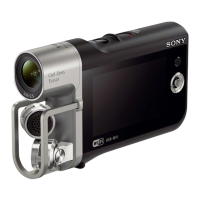
| Camcorder type | Handheld camcorder |
| Minimum illumination | 9 lx |
| Product color | Black |
| Video resolutions | 1280 x 720, 1920 x 1080 pixels |
| Maximum frame rate | 30 fps |
| Video formats supported | MPEG4 |
| Maximum video resolution | 1920 x 1080 pixels |
| Maximum image resolution | - pixels |
| PCM digital audio | 16-bit/48 kHz |
| Audio formats supported | LPCM |
| Headphone outputs | 1 |
| USB 2.0 ports quantity | USB 2.0 ports have a data transmission speed of 480 Mbps, and are backwards compatible with USB 1.1 ports. You can connect all kinds of peripheral devices to them. |
| Micro-USB 2.0 ports quantity | 2 |
| Component video (YPbPr/YCbCr) out | 0 |
| Battery type | NP-BX1 |
| Battery capacity | - mAh |
| Battery life (max) | - h |
| Display diagonal (metric) | 6.7 cm |
| Video compression formats | AVCHD, H.264 |
| Cables included | USB |
| Bundled software | PlayMemories Home |
 Weight and Dimensions
| Depth | 27 mm |
|---|---|
| Width | 116.5 mm |
| Height | 70.5 mm |
| Weight | 165 g |








 To Next Page