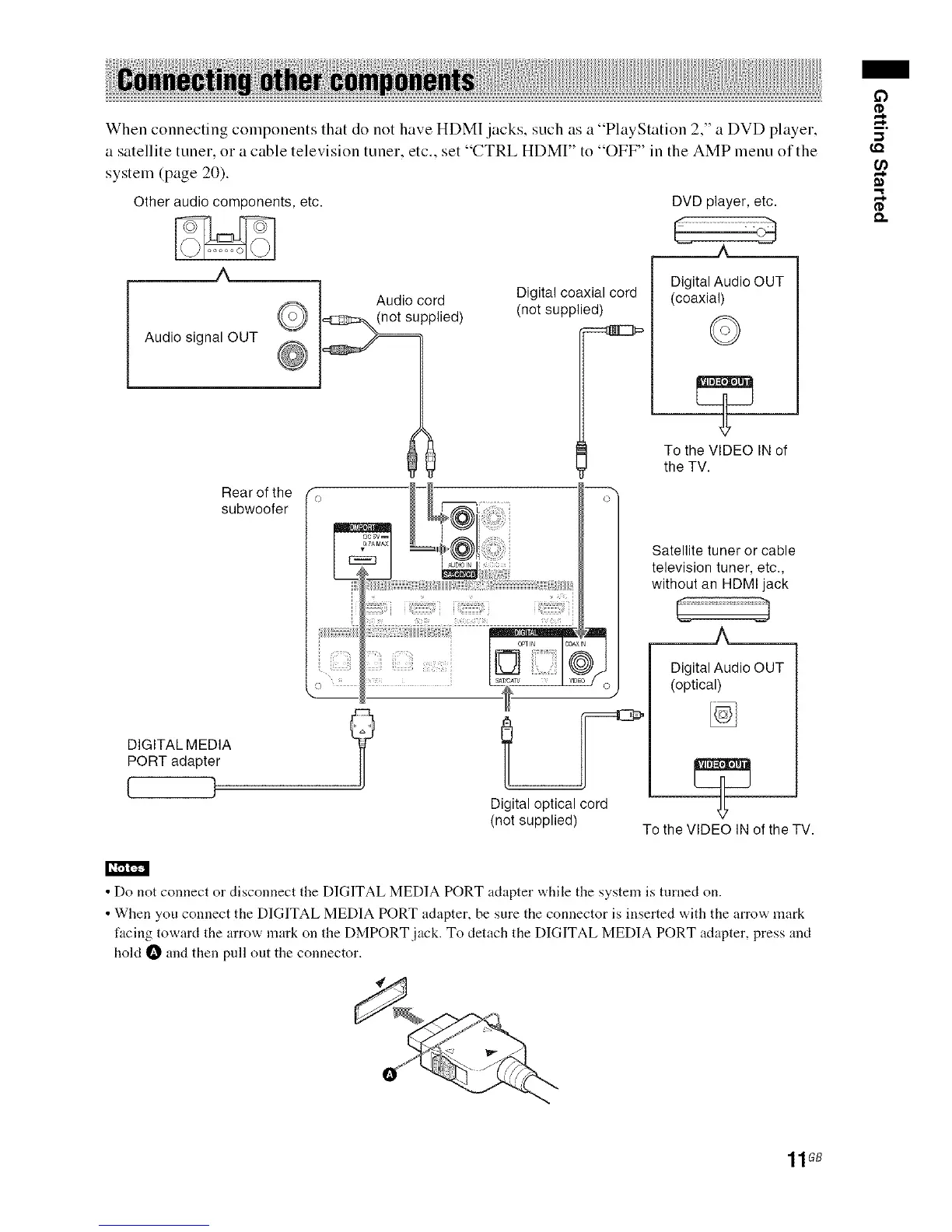
WhenconnectingcomponentsthatdonothaveHDM[jacks,suchasa"PlayStation2."aDVDplayer.
asatellitetuner,oracabletelevisiontuner,etc..set"CTRLHDMI"to"OFF"intheAMPmenuofthe
system(page20).
Other audio components, etc.
Audio cord
Audio signal OUT _ __"__ wwlied)
Rear of the fo
subwoofer
DIGITAL MEDIA
PORT adapter
[ 1
DVD player, etc.
Digital coaxial cord
(not supplied)
_=====._..,J___
Digital Audio OUT
(coaxial)
©
To the VIDEO IN of
the TV.
ii_iii!_!:il;!?ii
'_'((0)))_°_'× Satellite tuner or cable
television tuner, etc.,
without an HDMIjackDigitalAudioAOUT
., (optical)
Digital optical cord
(not supplied) To the VIDEO IN of the TV.
£3
-,1
I,Q
('D
I _,[,.l,ll,.,.j_
• Do not connect or disconnect the DIGITAL MEDIA PORT adapter while the system is turned on.
• When you connect the DIGITAL MEDIA PORT adapter, be sure the connector is inserted with the arrow mark
facing toward the arrow mark on the DMPORT jack. To detach the DIGITAL MEDIA PORT adapter, press and
hold _ and then pull out the connector.
11GB



 To Next Page