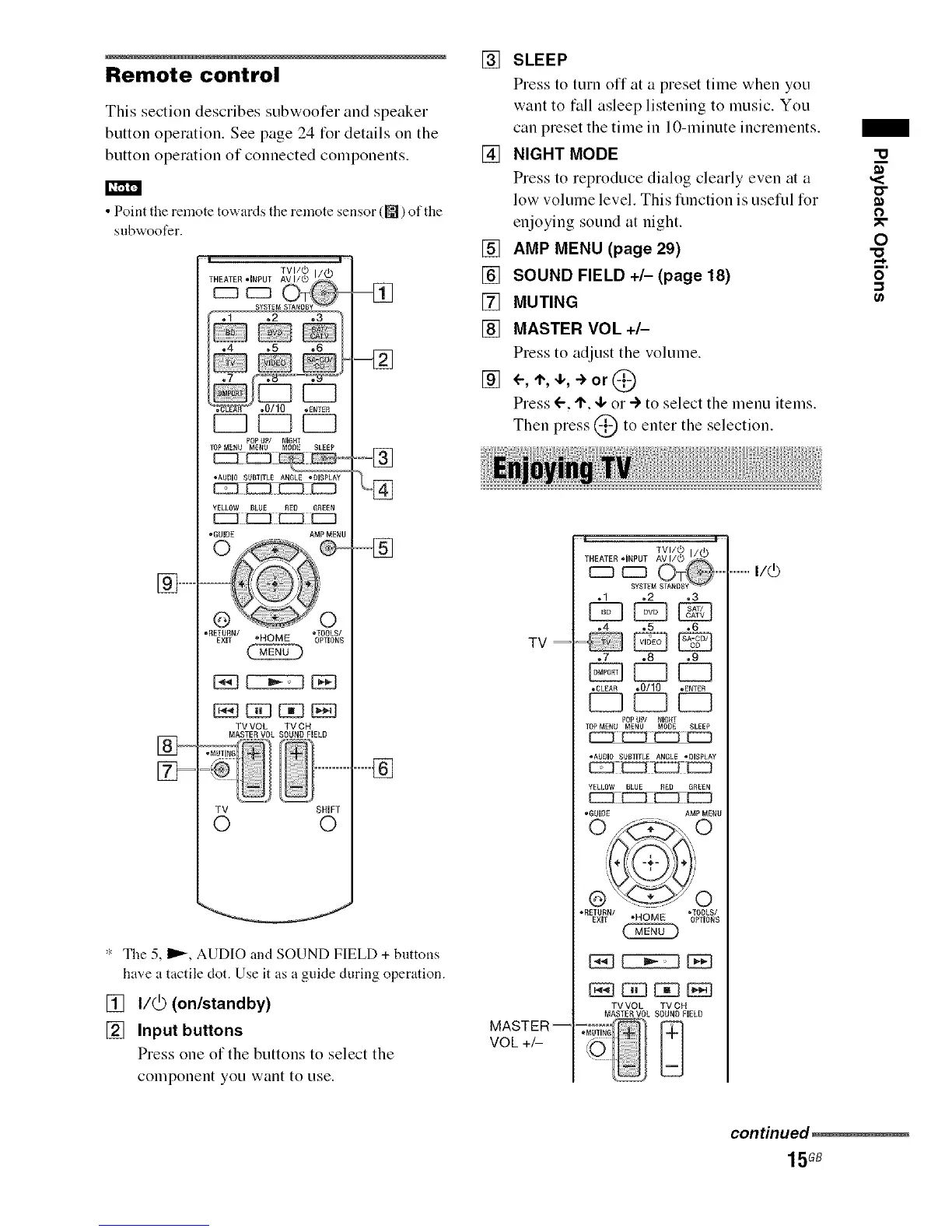
Remote control
This section describes subwoofer and speaker
button operation. See page 24 for details on the
button operation of connected components.
• Point the remote towards the remote sensor (_) of the
subwoofer.
] ..................
F
.4 .5 ,6
[Z3 E3
POPUP/ NIGH_
_OPMENU MENU MODE SLEEP
_ZZ]E
• AUDIO SUBTITLE ANGLE ,DISPLAY
_ [55D
YELLOW BLUff RED GREEN
_iiZZZ]ZZZZ3£Zi]
•GUIDE AMP MENU
o
-RETURN/ -TOOLS/
EXIT _HOME OPTIONS
TV VOL TV CH
MASTE,N VOL SOUND FIELD
,MUTING
TV SHWT
O O
.... ]
..................]
": The 5, I_, AUDIO and SOUND FIELD + buttons
have a tactile clot. Use it as a guide during operation.
[] I/@ (on/standby)
[] Input buttons
Press one of the buttons to select the
component you want to use.
[] SLEEP
Press to turn off at a preset time when you
want to tall asleep listening to music. You
can preset the time in 10-minute increments.
[] NIGHT MODE
Press to reproduce dialog clearly even at a
low volume level. This flmction is usefld for
enjoying sound at night.
[] AMP MENU (page 29)
[] SOUND FIELD +/- (page 18)
[] MUTING
[] MASTER VOL +/-
Press to adjust the volume.
[] <-, '1",,I,, -> or @
Press ('-, I", 4, or ") to select the menu items.
Then press @ to enter the selection.
TV=
MASTER--
VOL+_
.1 .2 ,3
[SZ] [SB
•4 o5 .6
•7 *8 ,9
•CLEAR *0/10 .EmEB
PoP uP/ NIaHT
TOPMENU MENU MODE SLEEP
• AUDIO SUBTITLE ANGLE JOISPLAY
•OUIOE AMP MENU
-RETURN/ _TOOLS/
EXIT *HOME OPTIONS
TV VOL TV CH
MASTES, VOL SOUND FIELD
_!_MUTING [_
.................I/(_
"u
,,<
0
0
N
o
"-1
continued_
15GB



 To Next Page