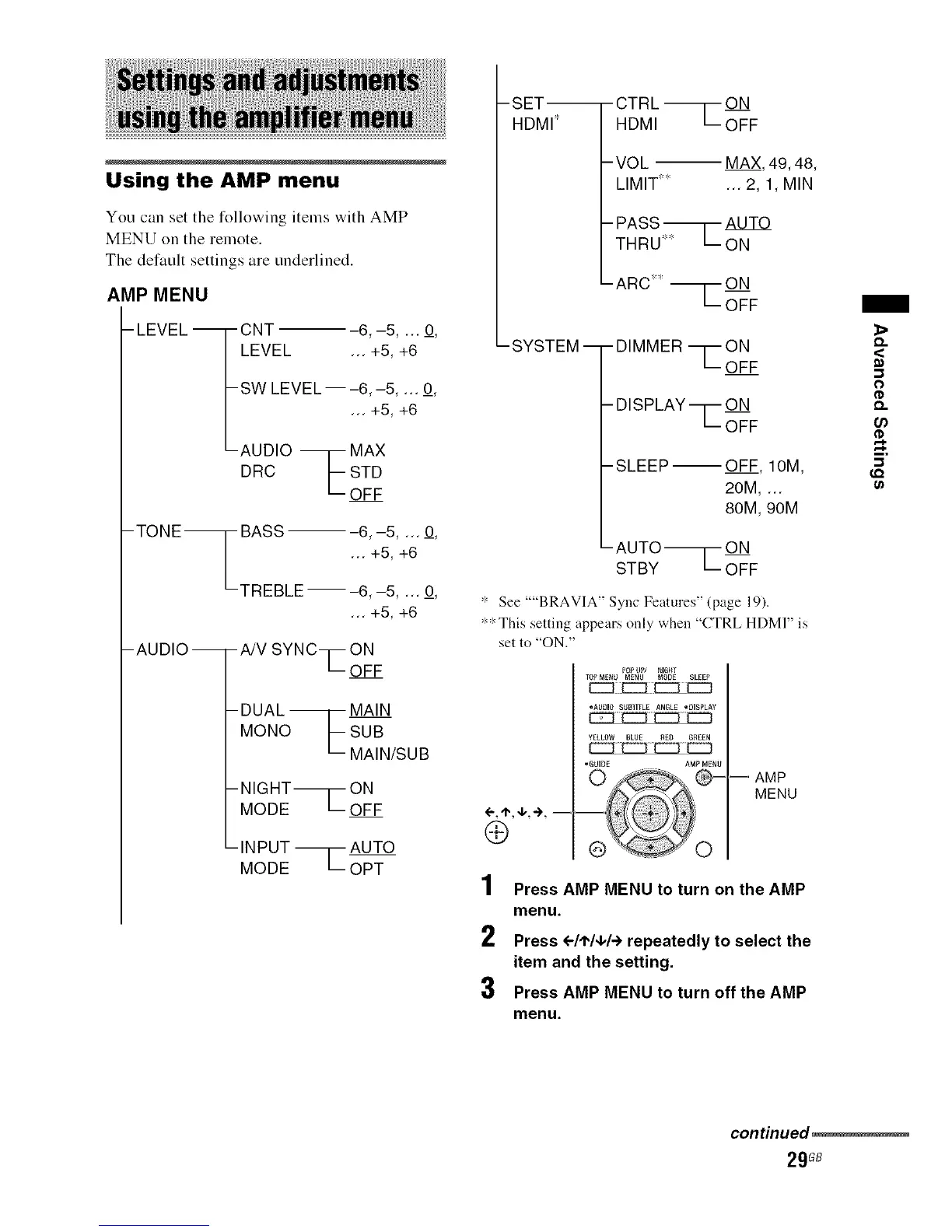
Using the AMP menu
You can set the following items with AMP
MENU on the remote.
The default settings are underlined.
AMP MENU
-LEVEL--
CNT ---6,-5 .... O,
LEVEL ... +5, +6
SW LEVEL--6,-5 .... O,
AUDIO "M';: ' +6
DRC F STD
L-OFF
- TO NE _ BASS -- -6, -5 .... O,
L ... +5, +6
TREBLE ---6, -5, ... O,
... +5, +6
-AUDIO --
-A/V SYNCq-- ON
LOFF
-DUAL _ MAIN
MONO LSUB
MAIN/SUB
-NIGHT__ON
MODELOFF
-INPUT --1-- AUTO
MODE L OPT
-SET-- -CTRL _ON
HDMI _ HDMI L OFF
-VOL -- MAX, 49, 48,
LIMIT .... ... 2, 1, MIN
- PASS _ AUTO
THRU' LON
ARC _'_'-- ON
-SYSTEM-- DIMMER ---[--ON
'--OFF
DISPLAY ---[-- ON
'--OFF
SLEEP--OFF, IOM,
20M, ...
80M, 90M
AUTO _ ON
STBY OFF
_'_See ""BRAVIA" Syuc Features" (page 19).
_'_:_This setting appears only when "CTRL HDM]" is
set to "ON."
4-, "t., 4,, -)., =
Q
1
2
3
POPUP/ _IGHT
TOPM_NU MENU MODE SLEEP
[::::::3:E:::::]Z_E:::D
°AUBIOSUBTITLEAN6LE °DISPLAY
-- AMP
MENU
Press AMP MENU to turn on the AMP
menu.
Press <-/'P/q,/÷ repeatedly to select the
item and the setting.
Press AMP MENU to turn off the AMP
menu.
_>
Q.
<
O
Q.
u)
I.Q
continued
29GB



 To Next Page