I/C)
.1
~
.4
SYSTEM
STANDB
.2 .3
B
l~i~1
.5
.6
I
VIDEO
I I
sAeED'
I
.7
.8
.9
I
OM
PORT
I I
TUNER
I 0
.CLEAR
.0110
.ENTER
CJDD
THEATER
·INPUT
c:J
0
TV
@]
SOUND FIELD
+/-
(page
37)
rID
MUTING
[[]
MASTER VOL
+/-
Press to adjust the volume.
[l] +-,1',
...
,
-+
or
[)
Press
+-,
1',""
or
~
to select the menu items.
Then press
8)
to enter the selection.
2
I
SYSTEM
STAND
.AUDIO
SUBTITLE
ANGLE
.DlSPLAY
I 0 I I I I
I!
I
pop
UP'
TDf'MENU
MENU
MEMORY
O.TUNING
I
I!
I I I I I
THEATER
.INPUT
DO
Remote
control
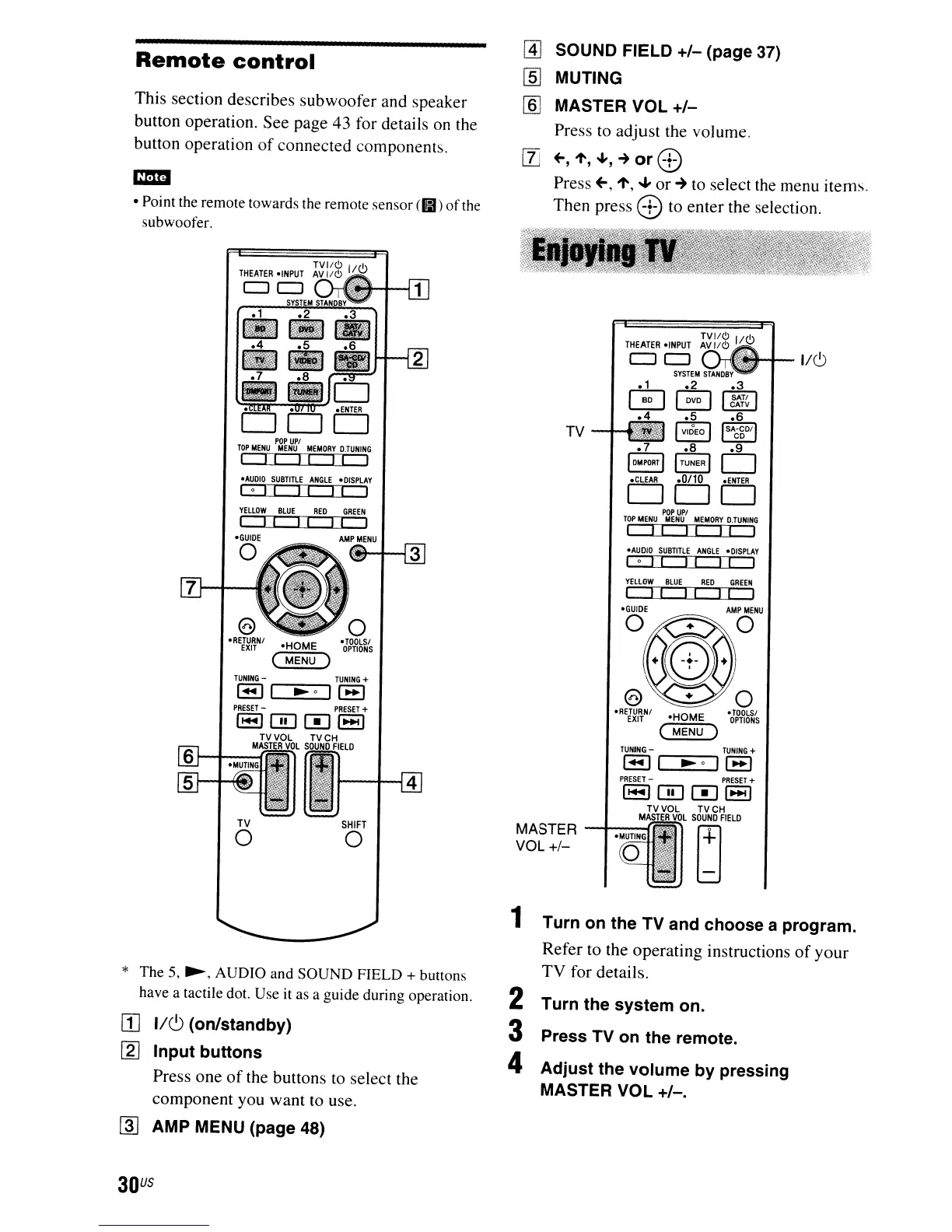
This section describes subwoofer and speaker
button operation. See page 43 for details
on
the
button operation
of
connected components.
em
• Point the remote towards the remote sensor
(81)
of
the
subwoofer.
o
•
TOOLS'
OPTIONS
·HOME
(
MENU)
YELLOW
BLUE
RED
GREEN
II
I I
I!
I
.AUDIO
SUBTITLE
ANGLE
.DlSPLAY
lol!
II
I!
I
POP
UPI
TOP
MENU
MENU
MEMORY
O.TUNING
I
II
II II
I
·RETURNI
EXIT
TUNING
-
TUNING
+
I_II
~o
11_1
PRESET
-
PRESET
+
l-10001-1
TVVOL
TVCH
MASTER
VOL
SOUND
FIELD
MASTER
---I1-.-
MUT
-ING-1C:;!rJ
r+l
VOL+/-
ld
SHIFT
o
o
.TOOLS'
OPTIONS
·HOME
(
MENU)
YELLOW
BLUE
RED
GREEN
I I
I!
I I I
AMP
MENU
TV
o
TUNING
-
~...,....._....,
* The 5,
~,
AUDIO and
SOUND
FIELD + buttons
have a tactile dot. Use it as a guide during operation.
[1] 1/(') (on/standby)
[2]
Input
buttons
Press one
of
the buttons to select the
component you want to use.
rnJ
AMP MENU (page 48)
1 Turn
on
the TV and choose a program.
Refer to the operating instructions
of
your
TV for details.
2 Turn the
system
on.
3 Press TV
on
the remote.
4
Adjust
the
volume
by
pressing
MASTER VOL
+/-.
30
US


 To Next Page