5 Press (B.
"COMPLETE"
appears in the front panel
display. and the station
is
stored.
You can preset 20 FM and
lOAM
stations.
Before tuning. make sure to turn down the
volume to minimum.
• 1
G
.4
G
•7
~~.=tF""--4-
TUNER
IOMPORTI
D
.CLEAR
.0/10
.ENTER
DOD
TUNED
~!
•..
6 Repeat 2
to
5
to
store
other stations.
To
change
the
preset
number
Restart from step 3.
Preset radio stations in the
system's
memory first
(see "Presetting radio stations" (page 34)).
POP
UPI
TOP
MENU
MENU
MEMORY
O.TUNING
I I I
I! I!
I
.1
G
.4
o
.7
ii"""'--'=9:.
~-t--
TU
NER
IDMPORTI
0
.CLEAR
.0/10
.ENTER
DOD
o
'TOOLSI
OPTIONS
'RElun
NI
'HOME
(
MENU)
+-,1',
-I-,~,
-+--1
~'A~UO:::IO~S:UB::T1T:LE:-:AN:!;GL;E
~';DlS;;'PL~Ay:4-
MEMO
RY
I 0 I I
I!
I I I
YELLOW
BLUE
REO
GREEN
I I
I!
I!
I
AMP
MENU
o
+-,1',~,~,-"'--
~~;::--;:-!~~---jr--
PRESET
+/-
MASTER
--il----fl~
VOL
+/-
'AUOIO
SUBTITLE
ANGLE
'DlSPLAY
lol!
II
I!
I
o
'RETURNI
.TOOLSI
EXIT
OPTIONS
MENU
-lr:'::~~~~J~
TUNING
+/-
YELLOW
BLUE
REO
GREEN
I!
I I I I I
AMP
MENU
o
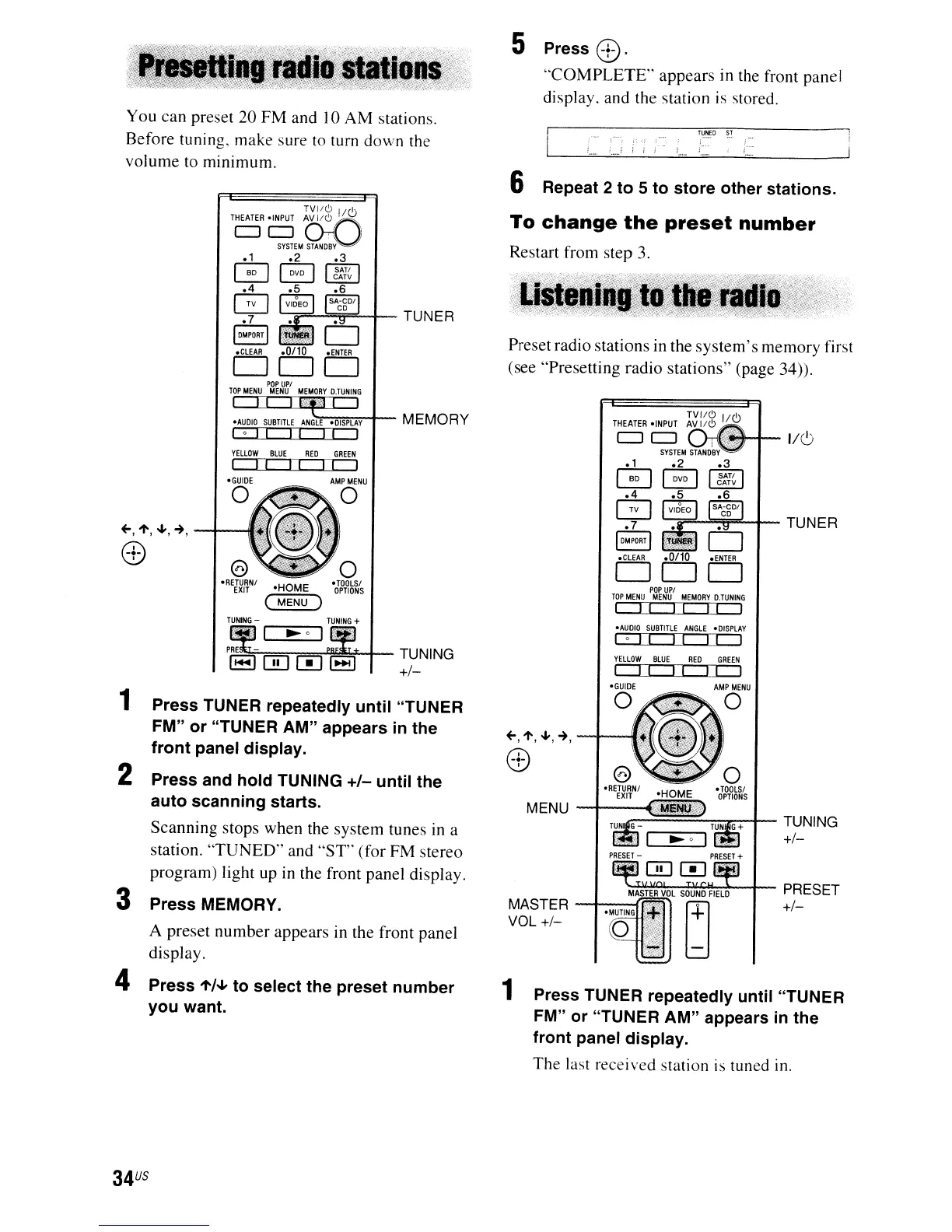
1 Press TUNER repeatedly
until
"TUNER
FM"
or
"TUNER
AM"
appears in the
front
panel
display.
The
last received station is tuned in.
~==-==~~+--
TUNING
+/-
TUNING
-
~....".....--,
1 Press TUNER repeatedly
until
"TUNER
FM"
or
"TUNER
AM"
appears in
the
front
panel display.
2 Press and
hold
TUNING
+/-
until
the
auto
scanning
starts.
Scanning stops when the system tunes
in
a
station.
'TUNED"
and "ST" (for FM stereo
program) light up
in
the front panel display.
3 Press MEMORY.
A preset number appears in the front panel
display.
4 Press
"'/~
to
select the
preset
number
you
want.
34
US


 To Next Page