o Even
if
the system is turned
off
(active
standby
mode). the
HDMl
signal will be
sent
from the
connected
component
to the
TV
via the
HDMl
connection.
You
can
enjoy
image and
sound
of
the
component
on the TV.
o
Depending
on the
TV.
the start
of
the content
may
not
be
output.
o
When
the
TV
is
turned on before this system
is
turned
on. the
TV
sound will not be
output
for a moment.
o
Depending
on the
TV.
when you adjust the
system's
\'olume using
TV's
remote. the volume Ie\
el
appear"
on the
TV
screen. in the
same
way
it
would appear
when you adjust the
TV's
volume.
In
this case. the
volume level that
appears
on the
TV
screen and the
system's
front panel display
may
differ.
-AUDIO
SUBTITLE
ANGlE
-DISPLAY
loll
II II
I
Using
the
Volume
Limit
function
o
This
function is
available
only
when the Control for
HDMl
function is set to on.
o
This
function is not available
when
the output
method
changes
from the
system
speakers
to the
TV
speaker.
MAX
..........
49
..........
48
...
2
..........
1
..........
MIN
5 Press AMP MENU.
The
AMP
menu turns off.
When the System Audio Control function is
active and the output method changes from the
TV speaker to the system speakers
automatically, loud sound may be output
depending on the volume level
of
the system.
You can prevent this by limiting the volume
level.
1 Press AMP MENU.
2 Press
1'/'"
repeatedly until "SET HOMI"
appears, then press
8)
or
~.
3 Press
1'/'"
repeatedly until "VOL LIMIT"
appears, then press
8)
or~
.
4 Press
1'/'"
to select the volume limit you
want.
The
volume limit changes as follows:
r~-I--
AMP
MENU
SYSTEM
STANDBY
•1
.2 .3
GEJlg:J"
.4
.5
.6
[:]
I
VIOEO
I I
SA
c5
0/i
•7
.8
.9
I
DMPO~T
I I
TUNER
I D
.CLEAR .0/10
.ENTER
DOD
PDP
UPJ
TOP
MENU MENU
MEMORY
D.TUNING
,
II
II
I I I
THEATER
'INPUT
c::J c::J
YELLOW
BLUE
REO
GREEN
I
II II II
AMP
MENU
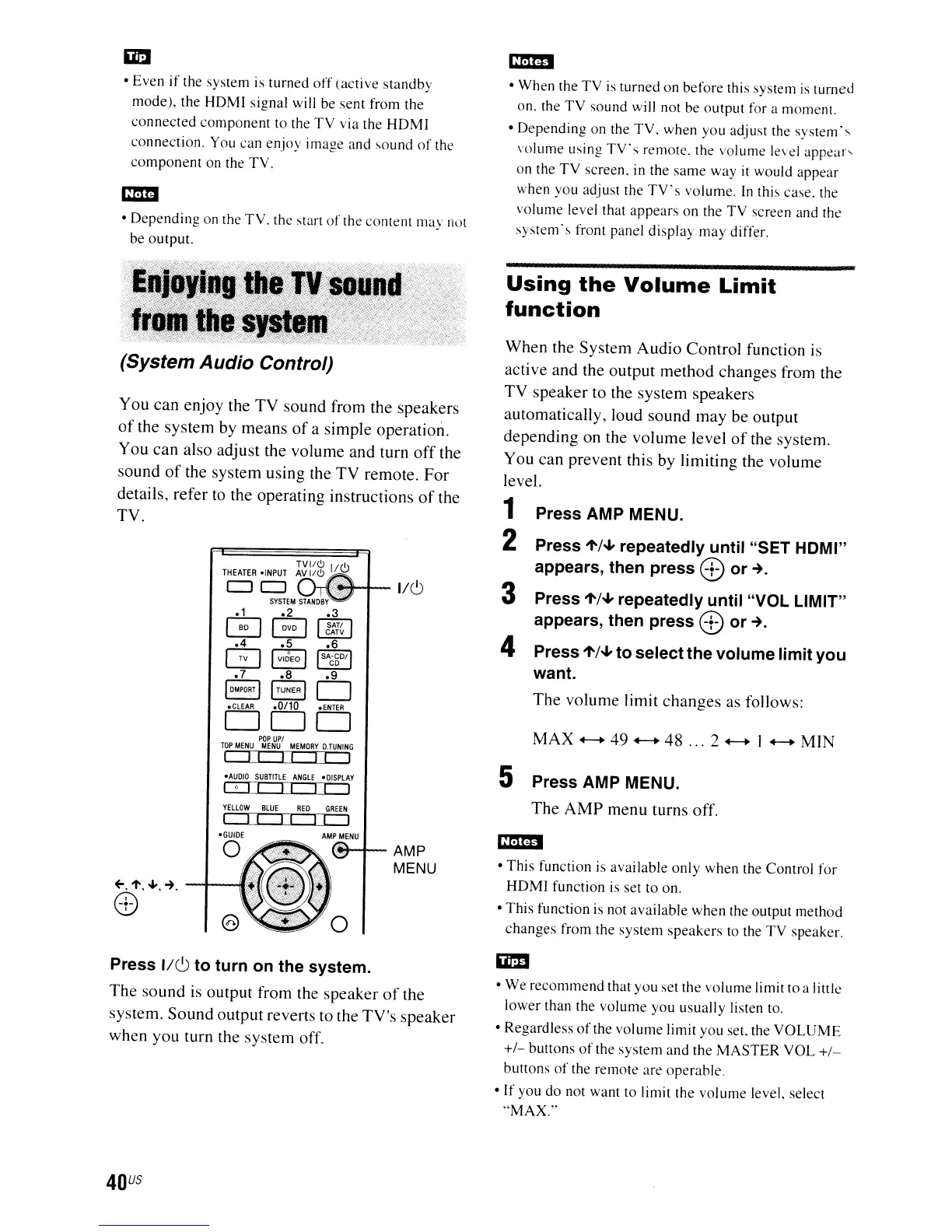
(System Audio Control)
You can enjoy the TV sound from the speakers
of
the system by means
of
a simple operation.
You can also adjust the volume and turn
off
the
sound
of
the system using the TV remote.
For
details, refer to the operating instructions
of
the
TV.
Press 1/6 to turn on the system.
The
sound is output from the speaker
of
the
system.
Sound
output reverts to the TV's speaker
when you turn the system off.
o
We
recommend
that
you
set the volume limit
to
a little
lower
than the
volume
you
usually
listen to.
o Regardless
of
the
volume
limit
you
set. the
VOLUME
+/-
buttons
of
the system
and
the
MASTER
VOL
+/-
buttons
of
the remote are operable.
o If you do not want to limit the
volume
level, select
"MAX."
40
US



 To Next Page