1 Press and
hold
the
input
button
whose
assignment
you
want
to
change, and
then
press
and
hold
AV
IIC)
atthe
same
time.
Example: While holding down DVD, press
and hold
AV
I/~.
2 While
continuing
to
hold
down
AV I/CJ,
release the
input
button
you selected
in
step
1.
Example:
While
continuing
to
hold down
AV
I/C),
release DVD.
3 While
continuing
to
hold
down
AV
I/C),
refer
to
the
following
table and press
the
corresponding
number
button
for
the
category
you
want.
Example:
While
continuing to hold down
AV
I/~,
press
1.
4 Release the
number
button
you
selected in
step
3, and then release AV
1/6.
Example: Release
1,
then release AV
I/~.
Now you can use the DVD button to control
the Blu-ray Disc player.
Input
buttons
Returns to the previous
screen
of
any displayed
menu.
Function
Selects a menu item and
enters the selection.
POP
UP!
TOP
MENU
MENU
MEMORY
D.TUNING
I
II
II
I I I
Number
buttons
INPUT
~~=~~~~~~
AV
lie!)
lie!)
Remote Button
[l]
0-'
RETURN
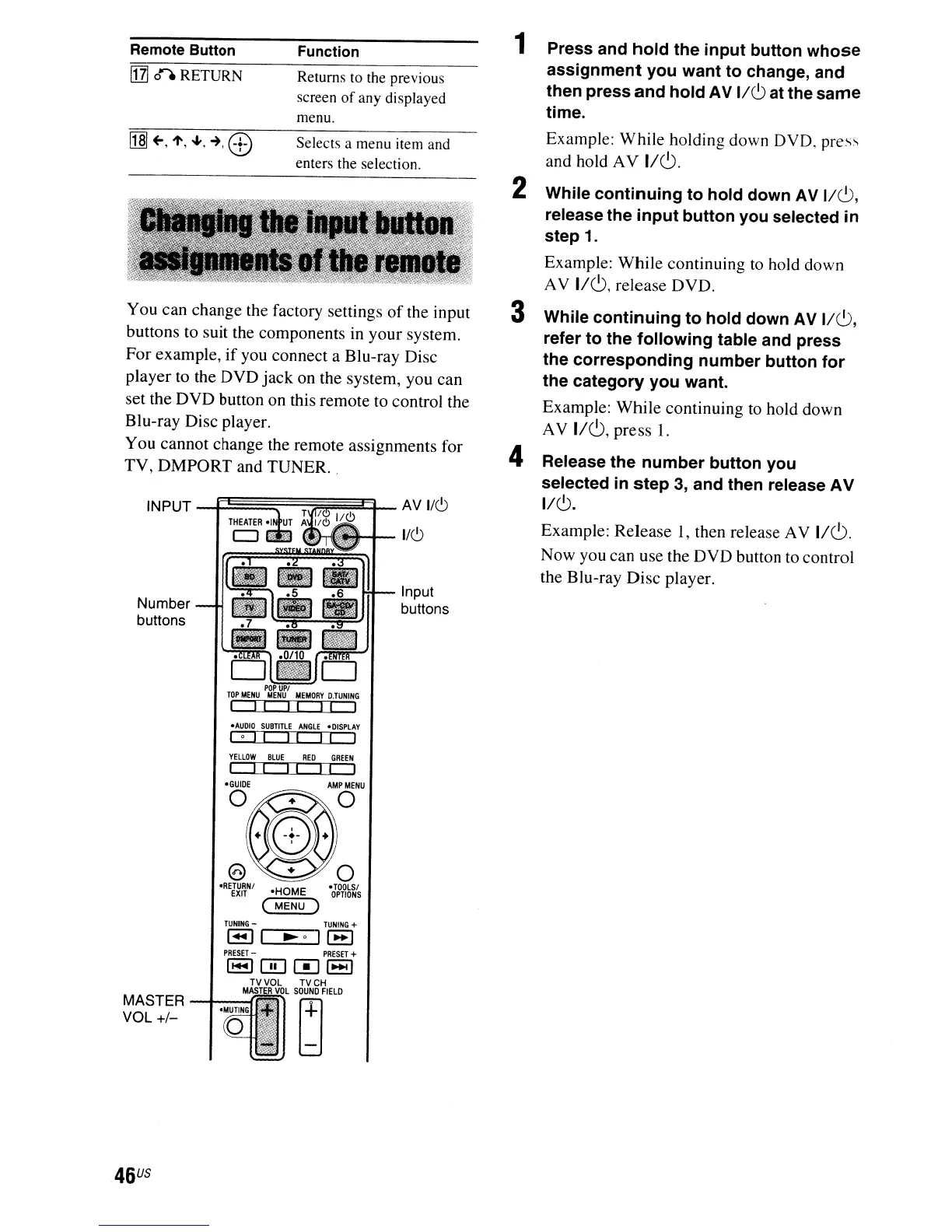
You can change the factory settings
of
the input
buttons to suit the components in your system.
For example,
if
you connect a Blu-ray Disc
player to the DVD
jack
on the system, you can
set the DVD button on this remote to control the
Blu-ray Disc player.
You cannot change the remote assignments for
TV,
DMPORT
and TUNER. .
-AUDIO
SUBTITLE
ANGLE
-DISPLAY
loll
II II
I
YELLOW
BLUE
RED
GREEN
I I I I
II
I
-GUIDE
MASTER
--I~--(~
VOL +1-
46
US



 To Next Page