8
GB
Indicators
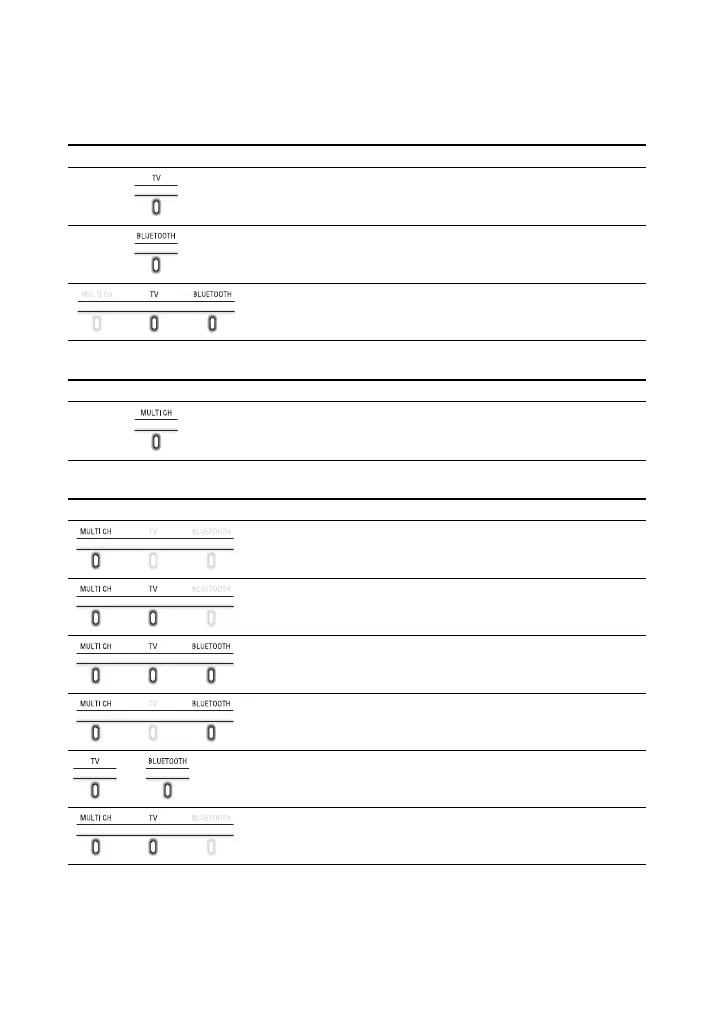
A lighting or flashing of the indicators on the Bar Speaker indicates the following
state.
Currently selected input
Sound format, surround effect
Volume
Indicators Status
Lights while TV input is selected.
Lights while BLUETOOTH input is selected.
Light while the Sound Bar is connected to the TV with the
BLUETOOTH function (TV input is selected).
Indicators Status
• Lights while 5.1ch Multi-channel sound is input.
• Flashes once while the sound mode is selected (page 20).
Indicators Status
Flashes once when the volume level is set to low (1 - 20).
Flash once when the volume level is set to medium (21 - 40).
Flash once when the volume level is set to high (41 - 49).
• Flash repeatedly while the sound is muted.
• Flash twice when the volume level is set to maximum/minimum.
or
The current input indicator flashes once when adjusting the
subwoofer volume by pressing SW
+/–.
Flash three times when the subwoofer volume level is set to
maximum/minimum.



 To Next Page