Getting Started
masterpage:Right
lename[E:\SEM_Janet\Data_HT-
L800_REV\J9040472_4254753121SL800GB\4254753121\GB03CON_HT-SL800-CEL.fm]
7
GB
model name1[HT-SL800]
[4-254-753-12(1)]
.
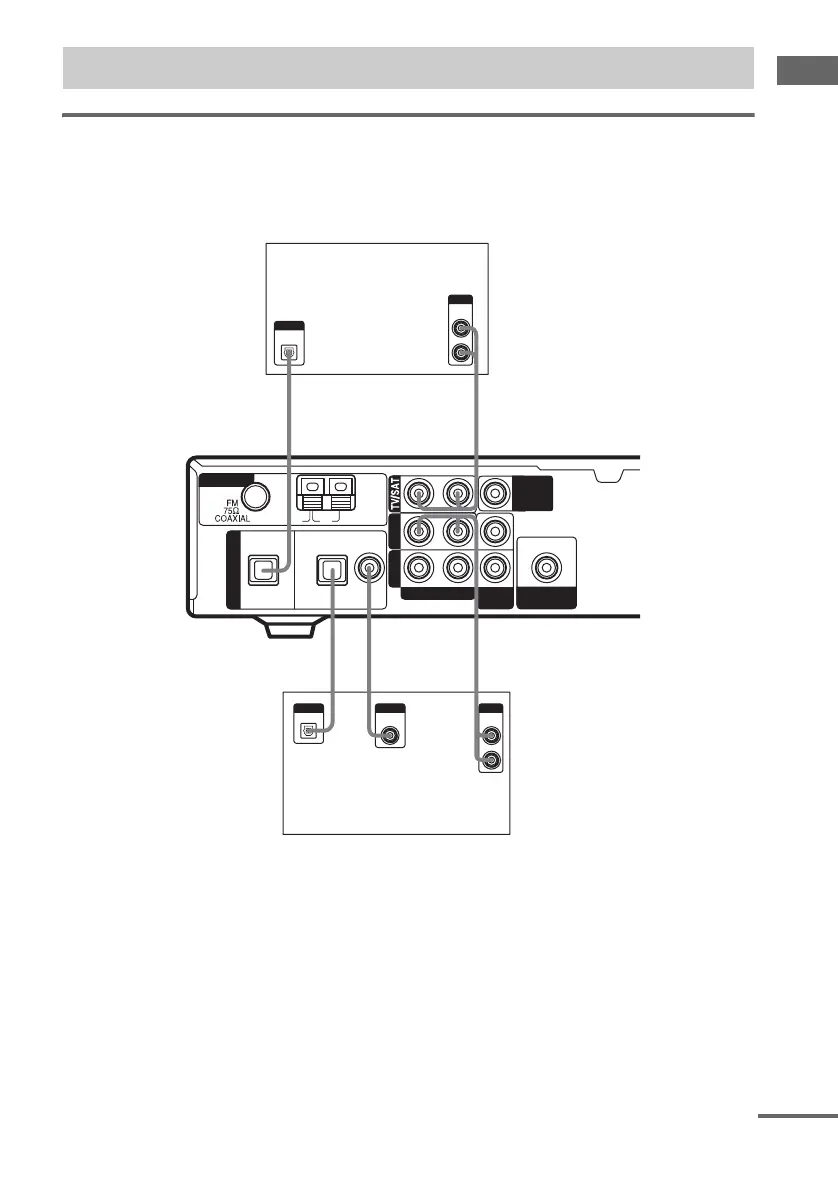
Hooking up a DVD player or satellite tuner
For details on the required cords (A–E), see page 6.
1 Connect the audio jacks.
* Connect to either the COAX IN or OPT IN jack. We recommend making connections to the COAX IN jack.
Tip
All the digital audio jacks are compatible with 32 kHz, 44.1 kHz, 48 kHz and 96 kHz sampling frequencies.
1a: Connecting components with digital audio output jacks
AM
U
OPT IN
TV/SAT
DVDVIDEO
AUDIO IN
DIGITAL
ANTENNA
DVD
RL
VIDEO
IN
SUB
WOOFER
OUT
MONITOR
OUT
DIGITAL
OPTICAL
OUTPUT
D
A
AE
*
D
*
R
AUDIO
OUT
OUTPUT
L
DIGITAL
COAXIAL
OUTPUT
OPTICAL
OUTPUT
AUDIO
OUT
OUTPUT
L
R
OPT IN COAX IN
Satellite tuner
DVD player
continued
GB01COV_HT-SL800-CEL.book Page 7 Friday, June 18, 2004 5:04 PM



 To Next Page