3
ICD-SX46/SX56/SX66
SECTION 1
GENERAL
This section is extracted
from instruction manual.
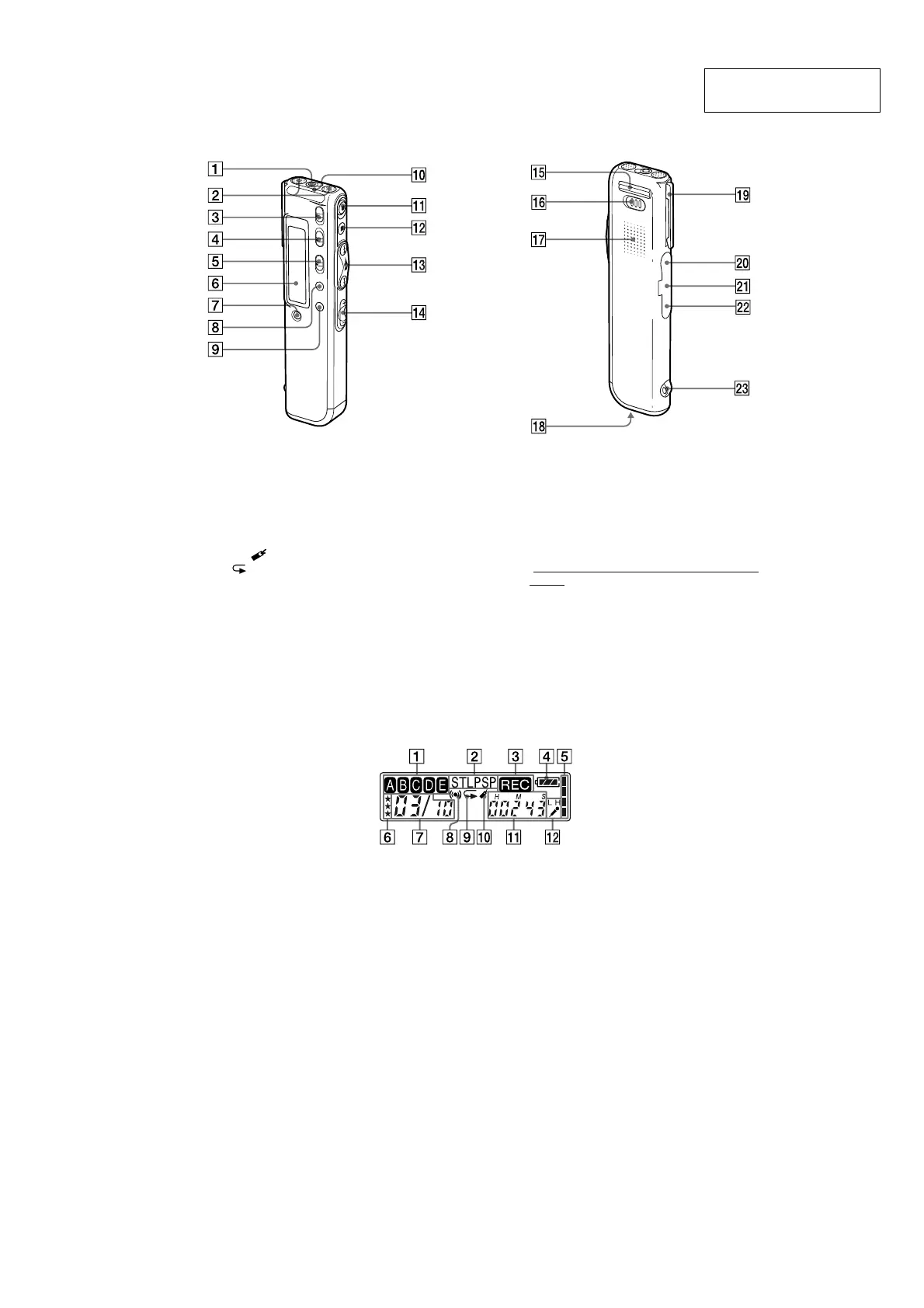
Identifying the front and rear panels of the unit
1 i (headphones) jack
2 Built-in microphone
3 DIRECTNL (directional) switch
4 VOICE UP (Digital Voice Up) switch
5 DPC ON/OFF switch
6 Display window
7 ERASE button
8 DIVIDE/
(bookmark) button
9 A-B
(repeat)/PRIORITY button
0 OPR (operation) indicator
qa zREC (record) /REC PAUSE button
qs xSTOP button
qd Jog lever
FOLDER/MENU/.(review/fast backward)/
> (cue/fast forward)/x• B (play/stop•enter)
qf VOL (volume) +/– buttons
qg Base
qh HOLD switch
qj Speaker
qk Battery compartment
ql Clip*
w; m (microphone) jack
wa USB connector
ws DC IN 3V jack
(For Korean and the People’s Republic of China
models, this jack does not exist.)
wd Slit for a handstrap
*Notes
• To prevent the clip from breaking, avoid hooking it on thick
fabric, such as a pocket of a heavy coat.
•When bending down or running with the unit clipped on
your pocket, be careful not to drop the unit.
Using the display window
1 Folder indication
Displays the current folder (A, B, C, D or E).
2 Recording mode indication
Displays the current recording mode:
•ST: Standard play stereo recording mode
•STLP: Long play stereo recording mode
•SP: Standard play monaural recording mode
• LP: Long play monaural recording mode
3 REC (Recording) indicator
4 Remaining battery indicator
When the AC power adaptor (not supplied) is
connected, the indicator does not appear (excluding
the Korean and the People’s Republic of China
models).
5 Remaining memory indicator
6 Priority marks
7 Selected message number /Total message
number in the folder
8 Alarm indicator
Appears when the alarm is set for a message.
9 Repeat play indicator
Appears while a message or a specific portion (A-B)
of the message is played back repeatedly.
0 Bookmark indicator
Appears when the bookmark is set for a message.
qa Counter /Remaining time indication /
Recording date and time indication /Current
time indication
The display selected with the DISP in the menu
appears.
qs SENS (microphone sensitivity) indication
Displays the current microphone sensitivity:
•H (high): To record at a meeting or in a quiet/
spacious place.
•L (low): To record for dictation or in a noisy place.




 To Next Page