EasyManua.ls Logo

Sony ICF-C703 - Clock and Alarm Functions; Setting the Clock; Preset Tuning; Setting the Alarm

Sony ICF-C703
20 pages
Print Icon
To Next Page IconTo Next Page
To Previous Page IconTo Previous Page
Loading...
S
+,
en).
¿Ha
A,
i.
ide
Pete
Features
+
Dual
alarm
PLL
(phase
locked
loop)
synthesized
clock
radio
+
Display
with
adjustable brightness
Even
if
the
power
supply
ls
interrupted.
the
time
setting
and
the
memory
will
be
backed
up
for
1
hour
without
battery.
Precautions
+
Operate
the
unit
on
the
power
sburces
specified
in
“Specifications”.
+
The
nameplate
indicating
operating
voltage,
etc.
is
located
at
the
bottom
of
the
unit
(North
and
South
American
model)
or
at
the
bottom
of
the
AC
power
adaptor
(other
models).
REDE
power
cord
(mains
see
puit
it
out
by
the
plug,
not
the
Bala
A
not
diete
bons
NS AC
pone?
source
(mains)
as
long
as
it
is
connected
to
the
wall
outlet,
even
if
the
unit
itself
has
been
turned
off.
+
Do
not
place
the
unit
on
surfaces
(rugs,
blankets,
etc.)
or
near
materials
(curtains,
draperies)
that
block
the
ventilation
holes.
+
Should
anything
fall
into
the
unit,
unplug
the
unit
and
have
it
checked
by
personne!
before
operating
it
further.
+
To
clean
the
casing,
use
a
soft
cloth
dampened
with
a
mild
detergent
solution.
Please
note
that
accordingly
only
Sound
and
TV-Radio
Receivers
meant
for
the
entire
Population
are
allowed
to
be
received
via
this
set.
it is
prohibited
to
receive
all
other
transmission
such
as
police
radio
or
mobile
radio.
If
you
have
any
questions
or
problems
concerning
your
unit,
please
consult
your
nearest
Sony
dealer.
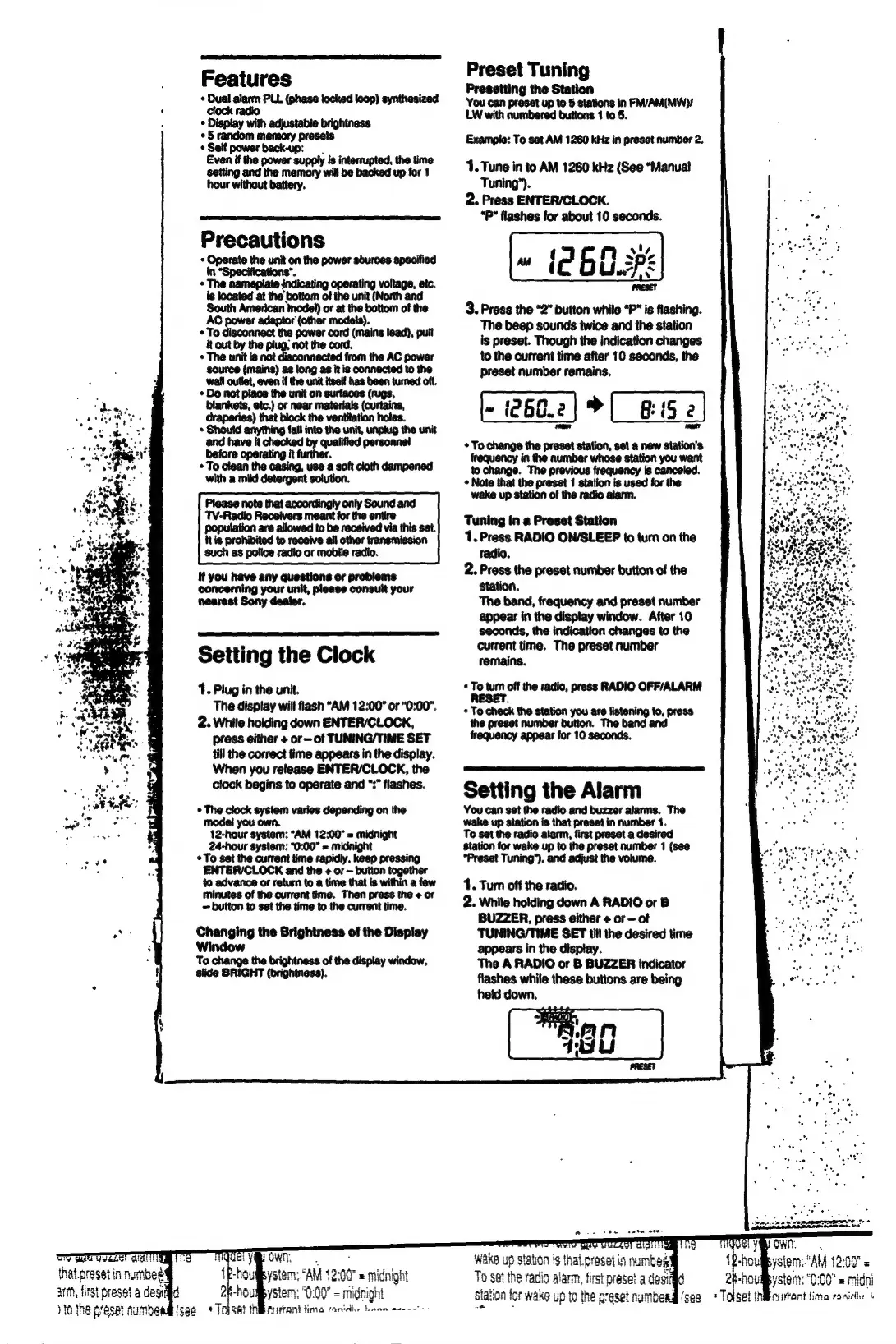
Setting
the
Clock
1.
Plug
in
the
unit.
The
display
will
flash
“AM
12:00"
or
"0:00".
2.
While
holding
down
ENTER/CLOCK,
press
either
+
or
of
TUNING/TIME
SET
till
the
correct
time
appears
in
the
display.
When
you
release
ENTER/CLOCK,
the
clock
begins
to
operate
and
“:”
flashes.
+
The
clock
system
varies
depending
on
the
model
you
own.
12-hour
system:
“AM
12:00”
=
midnight
24-hour
system:
“0:00”
=
midnight
+
To
set
the
current
time
rapidly,
keep
pressing
ENTER/CLOCK
and
the
+
or
button
together
to
advance
or
return
to
a
time that
is
within
a
tew
minutes
of
the
current
time.
Then
press
the
+
or
=
button
to
set
the
time
to
the
current
time.
Changing
the
Brightness
of
the
Display
Window
To
change
the
brightness
of
the
display
window,
slide
BRIGHT
(brightness).
Ta
ya
own.
tou
ystem.
AM
12:00
=
Midnight
2h-houmystem:
"0:00"
=
midnight
{see
+
Tojsat
NBR
turrant
tima
ranidi.
kann
as
Preset
Tuning
Presetting
the
Station
ce
apart
1o
5
eee
FM/AM(MWY
LW
with
numbered
buttons
1
Example:
To
set
AM
1260
kHz
in
preset
number
2.
1.
Tune
in
to
AM
1260
kHz
(See
"Manual
Tuning”).
2.
Press
ENTER/CLOCK.
“P*
flashes
for
about
10
seconds.
3.
Press
the
“2”
button
while
“P”
is
flashing.
The
beep
sounds
twice
and the
station
is
preset.
Though
the
indication
changes
to
the
current
time
after
10
seconds,
the
preset
number
remains.
260.)
CES
+
To
change
the
preset
station,
set
a
new
station's
frequency
in
the
number
whose
station
you
want
to
change.
The
previous
frequency
is
canceled.
+
Note that
the
preset
1
station
is
used
for
the
wake
up
station
of
the
radio
alarm.
Tuning
in
a
Preset
Station
1.
Press
RADIO
ON/SLEEP
to
turn
on
the
radio.
2.
Press
the
preset
number
button
of
the
station.
The
band,
frequency
and
preset
number
appear
in
the
display
window.
After
10
seconds,
the
indication
changes
to
the
current
time.
The
preset
number
remains.
«
To
turn
off the
radio,
press
RADIO
OFF/ALARM
+
To
check
the
station
you
are
listening
to,
press
the
preset
number
button.
The
band
and
frequency
appear
for
10
seconds.
Setting
the
Alarm
You
can
set
the
radio
and
buzzer
alarms.
The
wake
up
station
is
that
preset
in
number
1.
To
set
the
radio
alarm,
first
preset
a
desired
station
for
wake
up to
the
preset
number
1
(see
“Preset
Tuning”),
and
adjust
the
volume.
1.
Turn
off
the
radio.
2.
While
holding
down
A
RADIO
or
B
BUZZER,
press
either
+
or
of
TUNING/TIME
SET
till
the
desired
time
appears
in
the
display.
The
A
RADIO
or
B
BUZZER
indicator
flashes
while
these
buttons
are
being
Wake
ups
5
tation
oni
i$
that.
présel
in
amb
To
set
the
radio
alarm,
first
preset
a
desid
station
for
wake
up
to
the
preset
numbead
(sea
2
Soo
ape
carteira
AAA
+
ystem:
“AM
1200"
=
2R-houfystom:
0:00"
=
midni
=
Toiset
iibcurtant
ima
romidio
1

Related product manuals