EasyManua.ls Logo

Sony ILCE-6600 - User Manual

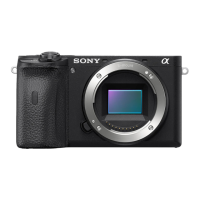
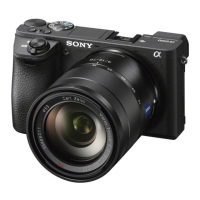
Sony ILCE-6600
629 pages
Print Icon
To Next Page IconTo Next Page
Loading...
Help Guide
Interchangeable Lens Digital Camera
ILCE-6600 α6600
Use this manual if you encounter any problems, or have any questions about your product.
Interval shooting
You can automatically shoot a series of still images with the shooting interval and number of shots
that you set in advance.
Looking for valuable information, such as essential points on shooting (Tutorials)
This website introduces convenient functions, ways of usage, and setting examples. Refer to the
website when you set up your camera. (Another window will open.)
ILCE-6600 lens compatibility information
This website provides the lens compatibility information. (Another window will open.)
Names of parts/Icons and indicators
Identifying parts
1

Table of Contents

Question and Answer IconNeed help?

Do you have a question about the Sony ILCE-6600 and is the answer not in the manual?

Summary

Basic Operations

Using MENU items

Details how to access and navigate the camera's menu system for settings.

Assigning Frequently Used Functions to Buttons (Custom Key)

Allows customization of camera buttons to frequently used functions for quicker access.

Using the control wheel

Explains how to use the control wheel for navigation and selecting settings.

Preparing the Camera

Checking the camera and the supplied items

Lists and describes all the items included in the camera package.

Charging the Battery Pack

Provides instructions on how to insert and remove the battery pack.

Inserting;Removing a Memory Card

Details the process of inserting and removing a memory card into the camera.

Attaching;Removing a Lens

Explains the procedure for attaching and removing lenses from the camera.

Shooting Still Images

Focus Mode

Details the different focus methods available to suit subject movement.

Exposure Compensation

Allows adjustment of image brightness by compensating exposure.

White Balance

Corrects color tones to achieve a neutral white subject under various lighting conditions.

Recording Movies

Movie Recording Formats

Details the available movie file formats like XAVC S and AVCHD.

S&Q Settings

Configures settings for slow-motion and quick-motion recording.

Audio Recording

Controls whether to record sound or silence during movie shooting.

Customizing the Camera

Registering Frequently Used Functions

Allows registering frequently used functions to custom keys for quick access.

Customizing the Functions of the Dial (My Dial Settings)

Enables assignment of desired functions to control dials and wheels.

Customizing MENU (My Menu)

Allows users to create a personalized menu of frequently used items.

Connectivity and Transfer

Connecting to a Smartphone

Guides on connecting the camera to a smartphone via Wi-Fi or NFC.

Transferring Images to a Computer

Explains how to import images from the camera to a computer.

Maintenance and Troubleshooting

Cleaning Mode

Provides instructions for cleaning the image sensor and camera body.

Troubleshooting

Offers solutions for common product issues and malfunctions.

Summary

Basic Operations

Using MENU items

Details how to access and navigate the camera's menu system for settings.

Assigning Frequently Used Functions to Buttons (Custom Key)

Allows customization of camera buttons to frequently used functions for quicker access.

Using the control wheel

Explains how to use the control wheel for navigation and selecting settings.

Preparing the Camera

Checking the camera and the supplied items

Lists and describes all the items included in the camera package.

Charging the Battery Pack

Provides instructions on how to insert and remove the battery pack.

Inserting;Removing a Memory Card

Details the process of inserting and removing a memory card into the camera.

Attaching;Removing a Lens

Explains the procedure for attaching and removing lenses from the camera.

Shooting Still Images

Focus Mode

Details the different focus methods available to suit subject movement.

Exposure Compensation

Allows adjustment of image brightness by compensating exposure.

White Balance

Corrects color tones to achieve a neutral white subject under various lighting conditions.

Recording Movies

Movie Recording Formats

Details the available movie file formats like XAVC S and AVCHD.

S&Q Settings

Configures settings for slow-motion and quick-motion recording.

Audio Recording

Controls whether to record sound or silence during movie shooting.

Customizing the Camera

Registering Frequently Used Functions

Allows registering frequently used functions to custom keys for quick access.

Customizing the Functions of the Dial (My Dial Settings)

Enables assignment of desired functions to control dials and wheels.

Customizing MENU (My Menu)

Allows users to create a personalized menu of frequently used items.

Connectivity and Transfer

Connecting to a Smartphone

Guides on connecting the camera to a smartphone via Wi-Fi or NFC.

Transferring Images to a Computer

Explains how to import images from the camera to a computer.

Maintenance and Troubleshooting

Cleaning Mode

Provides instructions for cleaning the image sensor and camera body.

Troubleshooting

Offers solutions for common product issues and malfunctions.

Sony ILCE-6600 Specifications

General IconGeneral
Sensor Resolution24.2 MP
Image ProcessorBIONZ X
ISO Range100-32000 (expandable to 50-102400)
Continuous Shooting Speed11 fps
Weight503 g (With battery and memory card)
Stabilization5-axis in-body image stabilization
BatteryNP-FZ100
Sensor TypeAPS-C
Autofocus Points425
Video Resolution4K (3840 x 2160)
LCD Screen3.0-inch touchscreen
ViewfinderElectronic viewfinder
Battery Life810 shots
Dimensions120.0 x 66.9 x 69.3 mm
Wireless ConnectivityWi-Fi, Bluetooth
PortsMicrophone jack, Headphone jack

Related product manuals