ILCE-7SM3
5-021-320-11(1)
GB
7
Startup guide
\\win-473\CAMERA\CX85000(OT)_IM\JPGB\01_Compose\5021320111_OT_GB_100p\5021320111ILCE7SM3UC2\01GB-ILCE7SM3UC2\020PRE.indd
DTP data saved: 2020/07/02 17:56
PDF file created: 2020/07/02 17:58
GB
7
Startup guide
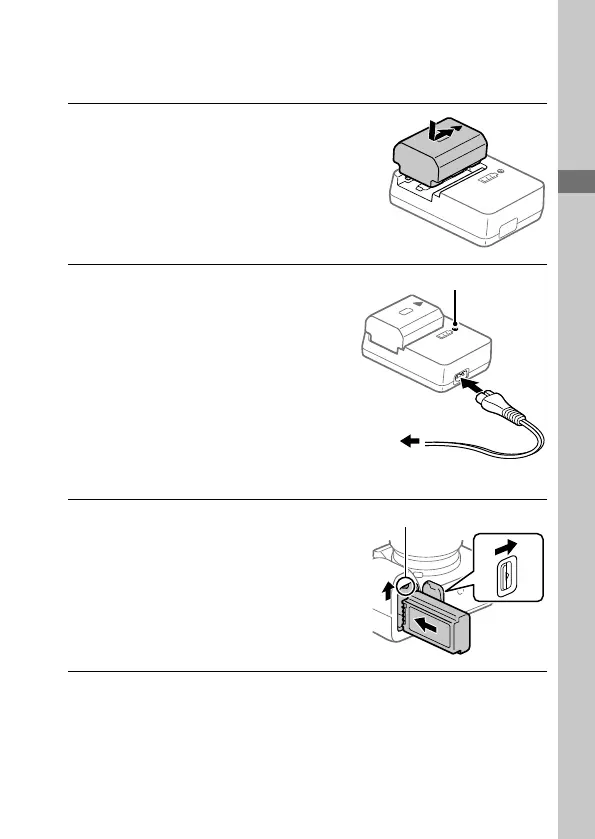
2: Preparing the battery pack
1
Insert the battery pack into
the battery charger.
• Place the battery pack on the
battery charger in the direction
of . Slide the battery pack in
the direction of the arrow as far
as it will go.
2
Connect the battery charger
to a wall outlet (wall socket)
using the power cord
(supplied).
• When charging starts, the
CHARGE lamp on the battery
charger will light up. When
charging is finished, the CHARGE
lamp and all indicators turn off.
CHARGE lamp
To a wall outlet
(wall socket)
3
Insert the battery pack into
the camera.
• Open the battery cover, and
then insert the battery pack
while pressing the lock lever.
• Push the battery pack until it
locks into place, and then close
the cover.
Lock lever



 To Next Page