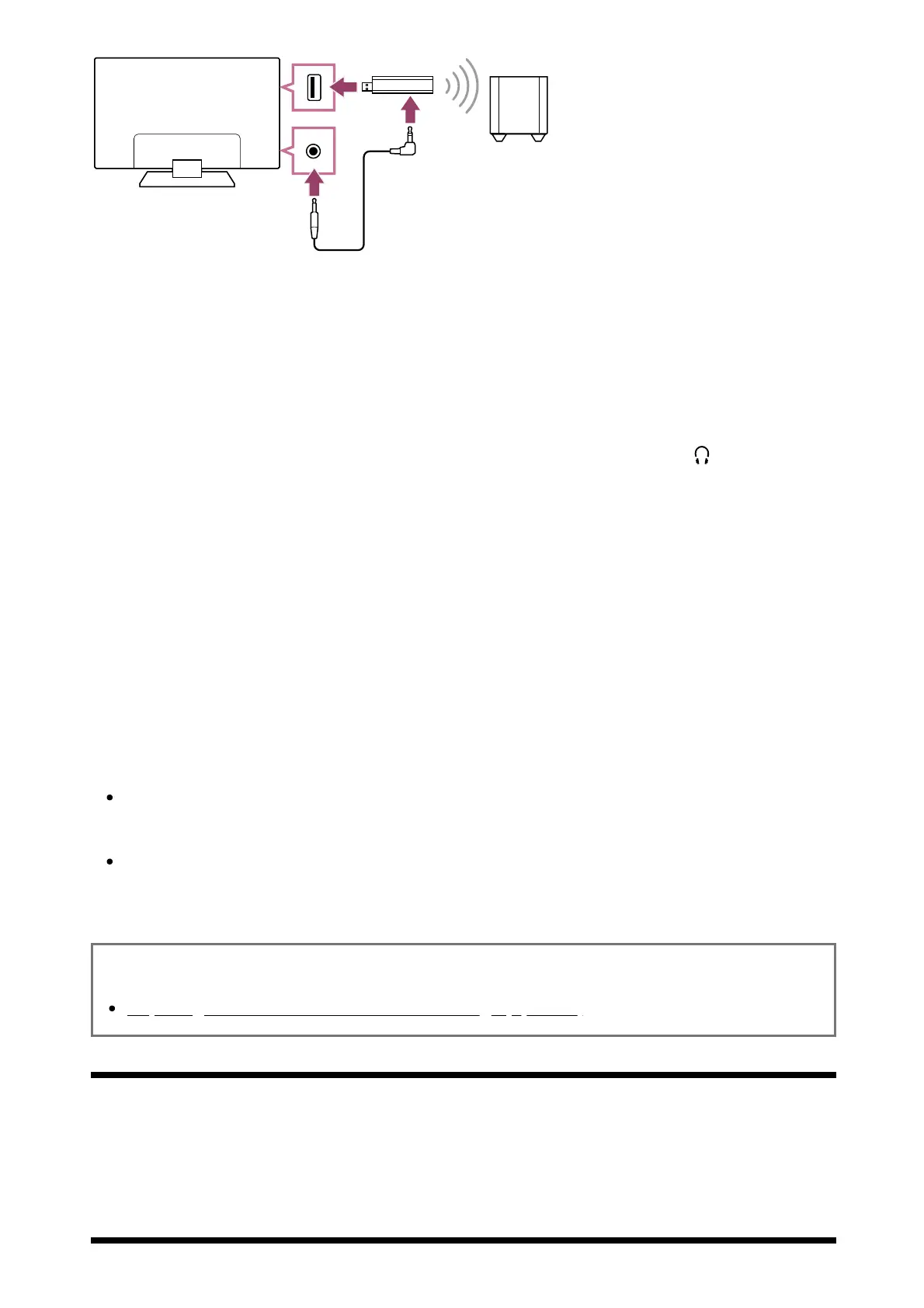
(A) Wireless Transceiver
(B) Wireless Subwoofer SWF-BR100
(C) Audio cable
Connect the audio cable (supplied) to the Wireless Transceiver.
Connect the other end of the audio cable to the AUDIO OUT / (Headphone)
jack (socket) of the TV.
Connect the Wireless Transceiver to the USB port of the TV.
[Headphone/Audio out] is automatically set to [Subwoofer].
Position the Wireless Subwoofer and connect it to the AC power.
We recommend that the Wireless Subwoofer be placed as close as possible
to the TV.
Hint
When the Wireless Transceiver is disconnected, [Headphone/Audio out] is
automatically restored to its original setting.
For details on how to set up the Wireless Subwoofer, refer to the instruction manual
supplied with the Wireless Subwoofer.
Related topics
Adjusting wireless subwoofer-related settings (optional)
[78] Using the TV with Other Devices | Sony wireless subwoofer (optional) (Sony wireless
subwoofer supported models only)
Adjusting wireless subwoofer-related settings
(optional)


 To Next Page
 Loading...