25
GB
Using MENU Functions
KLV-46/40/32V400A
3-300-887-11(2)
• The options you can adjust vary depending on the situation. Unavailable options are greyed out or not displayed.
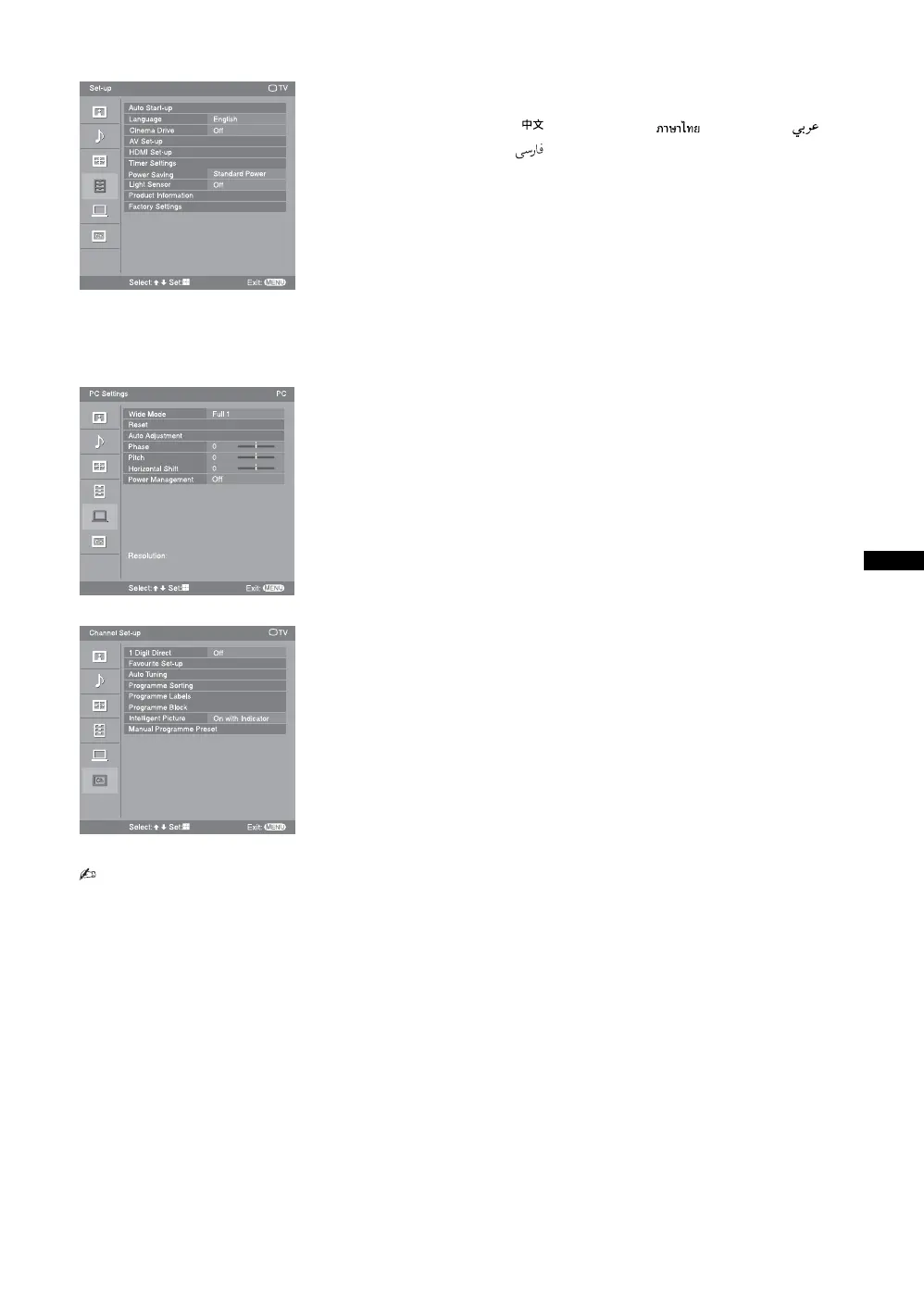
Set-up menu (page 29)
“Auto Start-up”
“Language”: “English” t “ ” (Chinese) t “” (Thai) t “”
(Arabic) t “ ” (Persian)
“Cinema Drive”: “Auto” t “Off”
“AV Set-up”: “Video Labels”, “Auto S Video”, “Speaker”, “Audio Out”,
“Colour System”
“HDMI Set-up”: “Control for HDMI”, “Auto Devices Off”, “Auto TV On”,
“Device List Update”, “HDMI Device List”
“Timer Settings”: “Sleep Timer”, “On Timer”, “Clock Set”
“Power Saving”: “Standard Power” t “Reduced Power” t “Picture Off”
“Light Sensor”: “On” t “Off”
“Product Information”
“Factory Settings”
PC Settings menu (page 32)
“Wide Mode”: “Full 1” t “Full 2”
“Reset”
“Auto Adjustment”
“Phase”
“Pitch”
“Horizontal Shift”
“Power Management”: “On” t “Off”
Channel Set-up menu (page 33)
“1 Digit Direct”: “On” t “Off”
“Favourite Set-up”
“Auto Tuning”
“Programme Sorting”
“Programme Labels”
“Programme Block”
“Intelligent Picture”: “On with Indicator”t “On”t “Off”
“Manual Programme Preset”: “Programme”, “TV System”, “VHF Low”/ “VHF
High”/ “UHF”, “Label”, “AFT”, “Audio Filter”,
“Skip”, “Colour System”, “Signal Booster”,
“Signal Level”
Select:
Set:
Exit:
MENU
TV
Set-up
Auto Start-up
Language
Cinema Drive
AV Set-up
HDMI Set-up
Timer Settings
Light Sensor
Product Information
Factory Settings
Power Saving
Off
Off
English
Standard Power
Resolution:
PC Settings
PC
Select:
Set:
Exit:
MENU
Reset
Auto Adjustment
Phase
Pitch
Horizontal Shift
Power Management
Wide Mode
Off
Full 1
0
0
0
Channel Set-up
Select:
Set:
Exit:
MENU
TV
Off
On with Indicator
1 Digit Direct
Auto Tuning
Programme Sorting
Programme Labels
Programme Block
Intelligent Picture
Favourite Set-up
Manual Programme Preset






 To Next Page