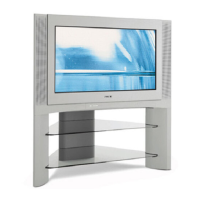
This document provides operating instructions for a Sony Trinitron Color TV, specifically models KV-HA21 and KV-HA14. It covers initial setup, safety warnings, securing the TV, panel descriptions, connecting optional components, troubleshooting, and customizing picture and sound settings.
Function Description
The Sony Trinitron Color TV is designed for home entertainment, providing visual and audio output for broadcast channels and external video sources. It features a Trinitron picture tube, known for its high-quality display. The TV can receive broadcast signals via an antenna and cable TV channels, offering a wide range of viewing options. Users can connect various optional components such as camcorders, video game equipment, VCRs, and audio systems to expand its functionality.
The core function of the TV involves displaying television programs and content from connected devices. It incorporates an automatic channel presetting feature, allowing for easy setup of available channels. Manual channel presetting is also supported for fine-tuning or adding new channels. The TV offers customization options for picture and sound, enabling users to adjust settings to their preferences. Timer functions, including "Wake Up" and "Sleep" timers, provide convenience for automatic power management.
Usage Features
Initial Setup:
The setup process is straightforward, starting with inserting batteries into the remote control. The antenna cable (not supplied) connects to the antenna input at the rear of the TV. After plugging in the power cord, the TV is turned on using the power button. The automatic channel presetting feature is then initiated by pressing "CABLE" to select "CABLE: ON" and then "AUTO PROGRAM" on the remote. This automatically scans and stores available channels. For language selection, "SELECT" is used until "LANGUAGE/語文顯示:ENGLISH" appears, allowing users to change the on-screen display language.
Remote Control Functions:
The remote control is central to operating the TV. It includes buttons for power, TV/video input selection, channel navigation (CH +/-), volume adjustment (VOL +/-), and menu navigation (SELECT). Specific buttons like "ENT" confirm input numbers, "ADD/ERASE" manages channel presetting, and "MUTING" mutes the sound. "DISPLAY" shows on-screen information, while "PIC MODE" and "SOUND MODE" allow for quick picture and sound adjustments. Timer functions are controlled by "WAKE UP" and "SLEEP" buttons.
Channel Management:
The TV supports both automatic and manual channel presetting. Automatic presetting scans for cable TV, VHF, or UHF broadcast channels. Manual presetting allows users to add new channels or fine-tune channels with weak signals. Channels can also be skipped if they are unused or unwanted, improving the browsing experience. The TV can receive up to 125 cable TV channels or 68 VHF/UHF broadcast channels, depending on the "CABLE" setting.
Picture and Sound Customization:
Users can customize their viewing experience through various picture and sound modes. "PIC MODE" offers options like "DYNAMIC" (high contrast), "STANDARD" (normal contrast), and "SOFT" (mild pictures). For sound, "SOUND MODE" provides "♪ DYNAMIC" (dynamic and clear sound), "♪ DRAMA" (emphasizes vocals and background music), and "♪ SOFT" (soft sound). Fine adjustments can be made to "PICTURE," "COLOR," "BRIGHT," "HUE," "L-BALANCE," "TREBLE," "BASS," and "SHARP" settings. "SPACE SOUND" mode enhances monaural sound with a stereo-like effect.
Timer Functions:
The "Wake Up" timer allows users to set a specific time for the TV to turn on automatically, along with a desired program number or video input. The "Sleep" timer automatically turns off the TV after a set period (e.g., 30, 60, or 90 minutes). These timers can be canceled by turning off the TV's main power. If no buttons are pressed for two hours after the TV is turned on by the "Wake Up" timer, it automatically enters standby mode.
Connecting External Devices:
The TV provides multiple input terminals for connecting optional components. The front panel includes video and audio input jacks, suitable for temporary connections like camcorders. The rear panel offers additional video and audio inputs, as well as an antenna input. A "MONITOR OUT" terminal allows connection to an audio system or VCR for recording or enhanced audio. It's important not to connect video equipment to both front and rear video inputs simultaneously to avoid display issues.
Troubleshooting:
The manual includes a comprehensive troubleshooting guide for common issues such as snowy pictures, no picture/sound, dotted lines, double images, no color, and abnormal color patches. Solutions range from checking cable connections and antenna setup to adjusting color systems and demagnetizing the TV. For persistent problems, users are advised to contact a Sony dealer.
Maintenance Features
Safety Warnings:
The manual emphasizes critical safety precautions. Users are warned about high voltages inside the TV and advised not to open the cabinet. It highlights the importance of proper power cord connection and avoiding damage to the cord. Children's safety is addressed by advising against leaving them unsupervised with the TV or allowing them to climb on it. The TV should not be exposed to rain or moisture, and any liquid or solid object falling into it requires professional inspection.
Battery Care:
To prevent battery leakage and damage to the remote, batteries should be removed if the remote will not be used for several days. Any liquid from leaking batteries should be immediately washed away from skin.
Ventilation and Placement:
Proper ventilation is crucial; the TV's ventilation openings should not be blocked, and it should not be installed in confined spaces like bookcases. The TV should be placed on a stable stand and floor capable of supporting its weight, ensuring the stand surface is flat and larger than the TV's bottom area. Objects should not be placed on top of the TV.
Cleaning:
The TV should be cleaned with a dry and soft cloth. Harsh chemicals like benzine or thinner should not be used, and the picture tube should not be scratched.
Power Management:
Users are advised not to plug too many appliances into the same power socket. The power cord should always be pulled out by the plug, not the cord itself. Unplugging the TV before moving it or during extended periods of non-use is recommended, as the TV remains connected to the AC power source even when turned off.
Securing the TV (KV-HA21 only):
For the KV-HA21 model, the manual provides instructions for securing the TV to prevent it from falling. This involves using supplied screws, clamps, and a band to attach the TV to its stand or a wall/pillar. This feature enhances safety, especially in environments where the TV might be accidentally knocked over.
Environmental Considerations:
The TV is recommended for home use only and should not be used in vehicles or environments subject to excessive dust, heat, moisture, or vibrations, as these conditions can affect its performance and longevity. Changes in room temperature may cause the TV cabinet to expand or contract, producing noise, which is noted as a normal occurrence and not a malfunction. The TV's demagnetizing function, which produces a "boom" sound when turned on, is also a normal operational aspect.



 To Next Page
 General