EasyManua.ls Logo

Sony LBT-G2000 - Page 5

Sony LBT-G2000
23 pages
Print Icon
To Next Page IconTo Next Page
To Previous Page IconTo Previous Page
Loading...
'®elalal-va
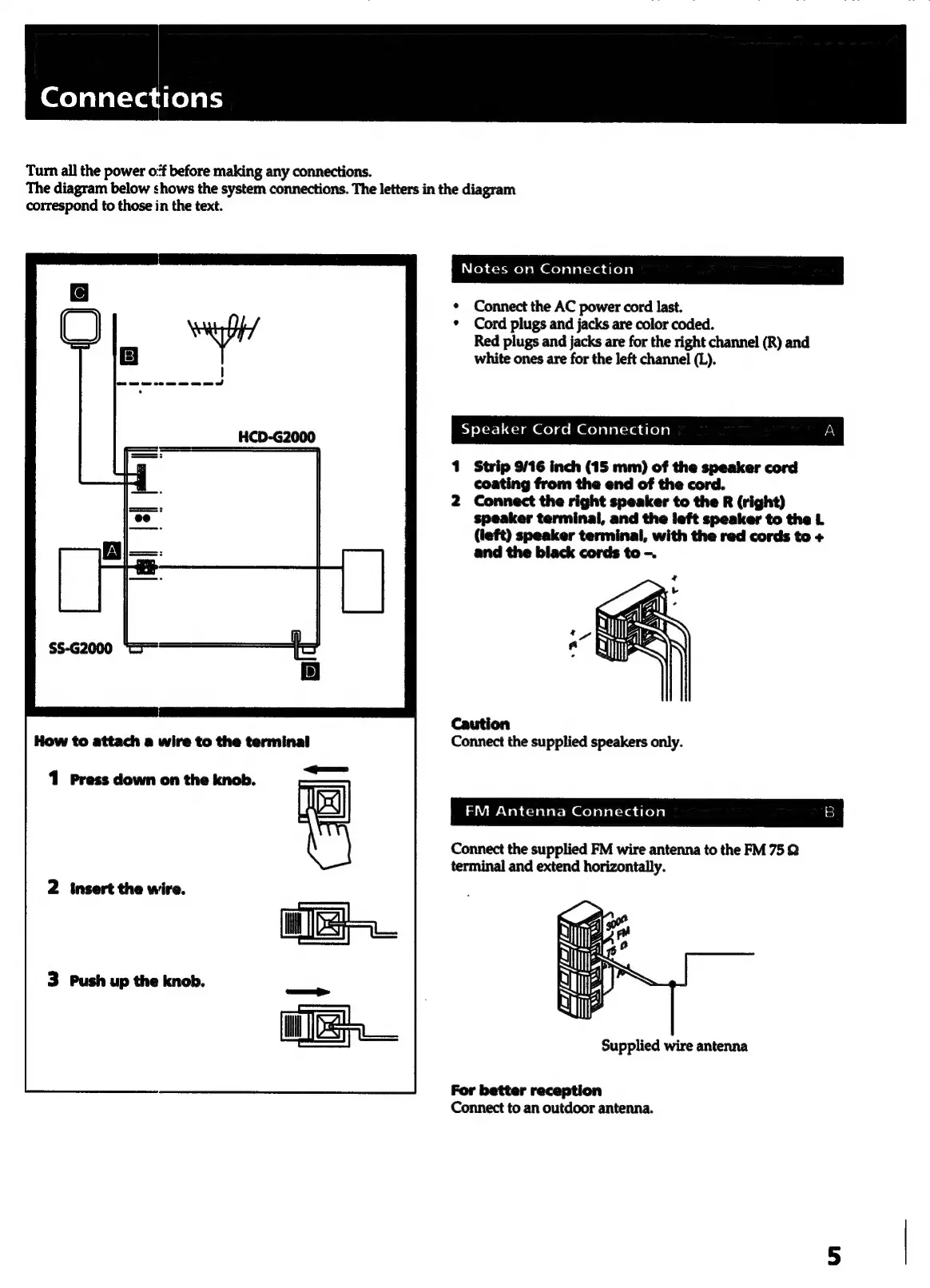
Turn
all
the
power
o:f
before
making
any
connections.
The
diagram
below
shows
the
system
connections.
The
letters
in
the
diagram
correspond
to
those
in
the
text.
Toh
act-mrel
em
Qelalal-radtela,
Connect
the
AC
power
cord
last.
Cord
plugs
and
jacks
are
color
coded.
Red
plugs
and
jacks
are
for
the
right
channel
(R)
and
white
ones
are
for
the
left
channel
(L).
Sy
oXer=1
421
an
el
ae
Molalalcia
aleya)
|
«a
Strip
9/16
inch
(15
mm)
of
the
speaker
cord
coating
from
the
end
of
the
cord.
Connect
the
right
speaker
to
the
R
(right)
speaker
terminal,
and
the
left
speaker
to
the
L
(left)
speaker
terminal,
with
the
red
cords
to
+
and
the
black
cords
to
-.
4
Caution
Connect
the
supplied speakers
only.
iar
cVah
dela lat:
Mm
@elalalcradresal
3)
Connect
the
supplied
FM
wire
antenna
to
the
FM
75
Q
terminal
and
extend
horizontally.
2
insert
the
wire.
3
Push
up
the
knob.
Supplied
wire
antenna
For
better
reception
Connect
to
an
outdoor
antenna.