Back Back to Top Print
Stereo Headphones
MDR-1ADAC
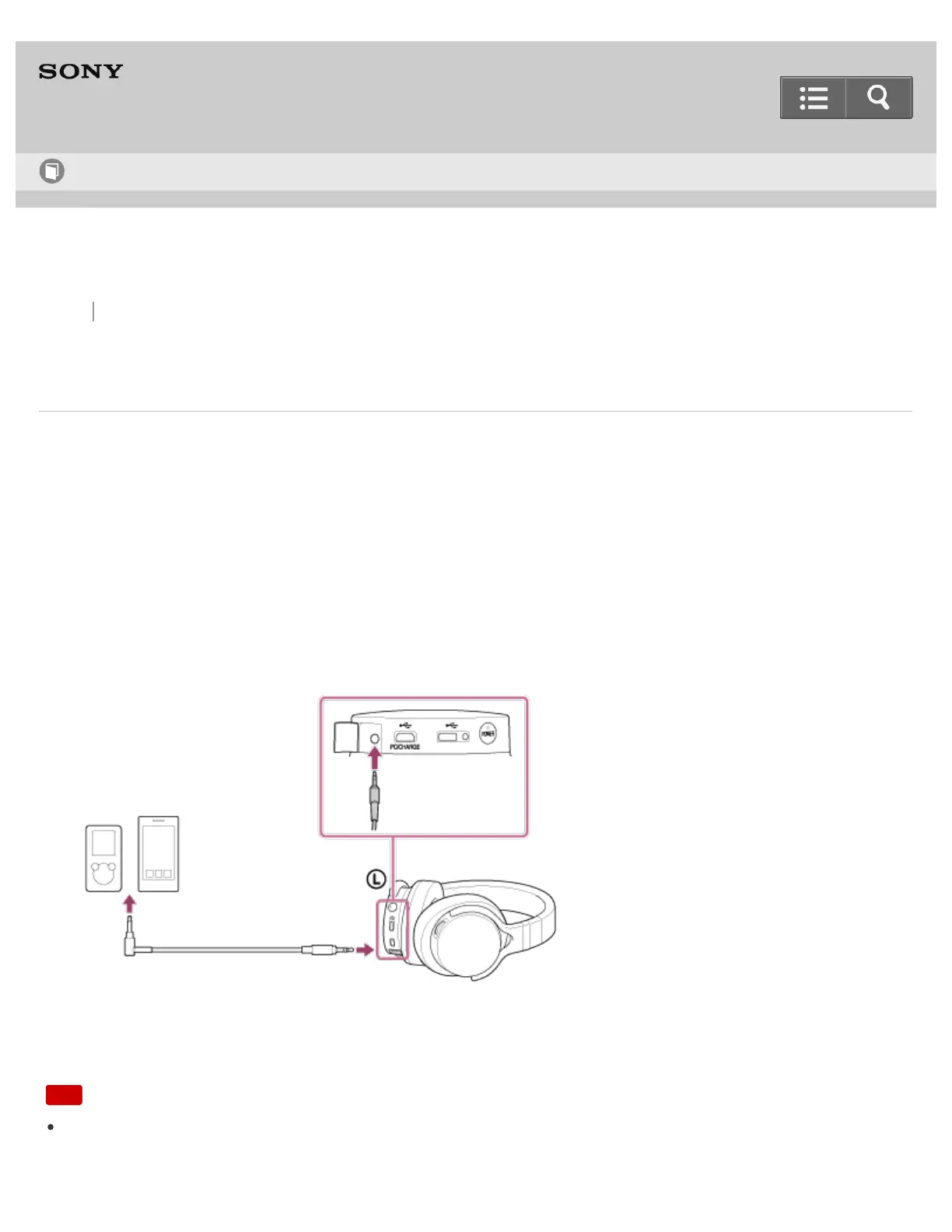
Connecting to an analog output device
You can connect the headphones to an analog output device, such as a smartphone or portable music player, using
the headphone cable (supplied).
If the battery is empty or being charged, the headphones can be used by connecting the headphone cable to audio
devices.
Before connecting, turn the volume of your device down.
1. Turn on the device.
2. Open the Input jack (stereo mini) cover.
3. Connect the device to the Input jack (stereo mini) using the headphone cable (supplied).
When the headphone cable is connected, the headphones turn off automatically, and the headphones do not turn
on while the headphone cable is connected.
Note
While using the headphones with the headphone cable, the VOL +/- knob is not available. Adjust the volume of the
connected device.
Help Guide
How to Use


 To Next Page
 Loading...