6
Location of controls
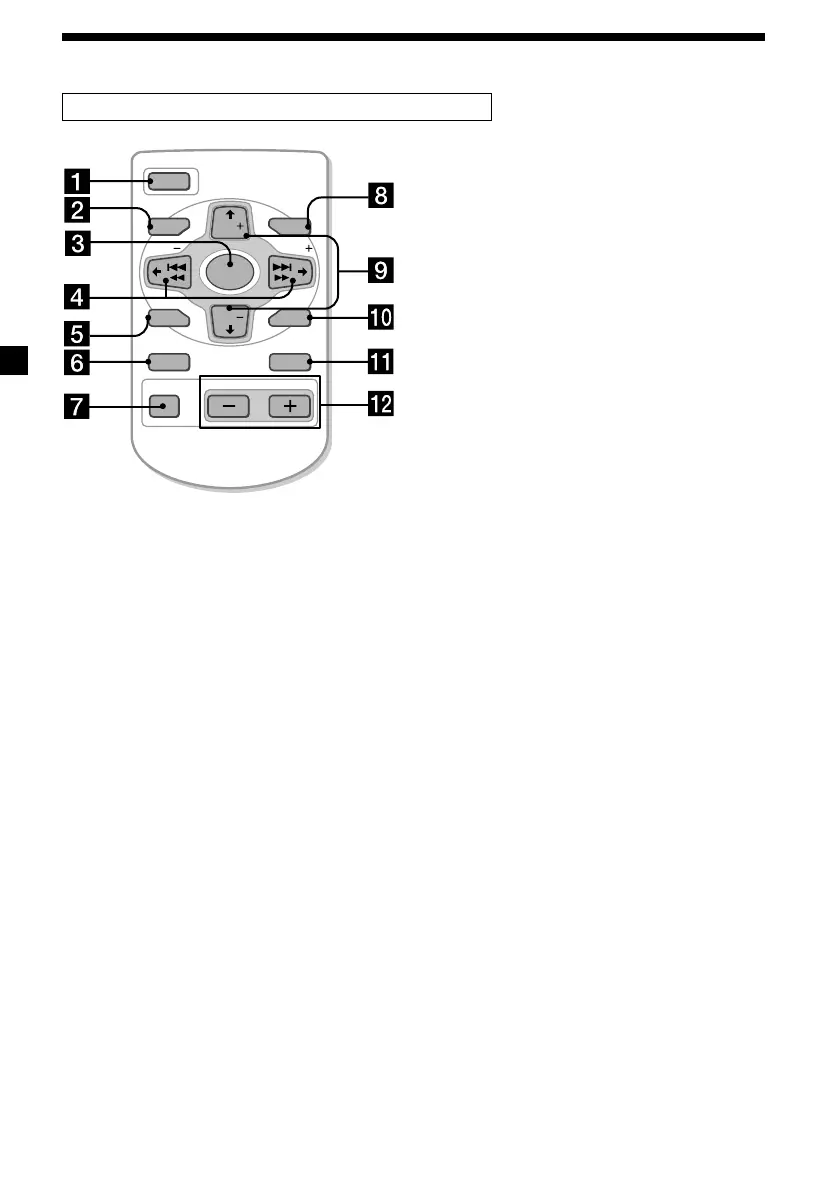
Card remote commander RM-X91 (optional)
The corresponding buttons of the card
remote commander control the same
functions as those on this unit.
1 OFF button
2 MENU button
3 SOURCE button
4 SEEK/AMS buttons
5 SOUND button
6 DSPL (DSPL/PTY) button
7 ATT button
8 LIST button
9 DISC/PRST buttons
q; ENTER button
qa MODE button
qs VOL buttons
Notes
• A unit turned off by pressing (OFF) for 2 seconds cannot be operated with the card remote commander
unless (SOURCE) on the unit is pressed, or a disc is inserted to activate the unit first.
• Do not leave the card remote commander where it can be exposed to direct sunlight such as on a
dashboard or the steering wheel, etc. The card remote commander may be deformed by the heat.
• The MiniDisc recorder may not operate properly with the card remote commander in direct sunlight. In
such a case, hold the card remote commander close to the unit’s receptor.
OFF
SEEK SEEK
OPEN/CLOSE
MENU LIST
SOUND
ENTER
DISC
DISC
SOURCE
DSPL MODE
VOLATT







 To Next Page