Repeat steps
0
and
8
to adjust other
frequency ranges.
6
Press
~
(BACK) twice.
The equalizer curve is stored
in
''CUSTOM."
Optimizing sound
by
Time
Alignment-
Listening
Position
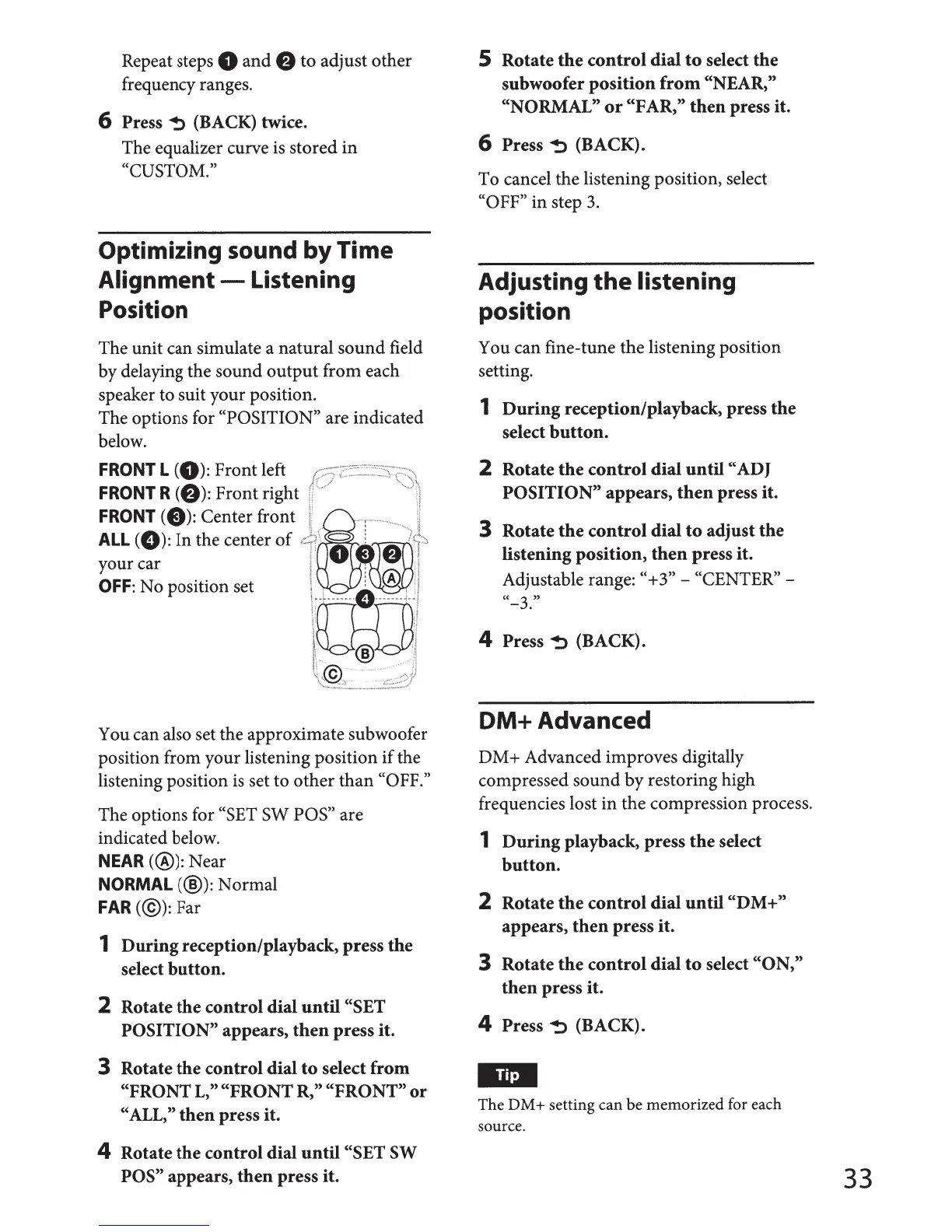
The unit can simulate a natural sound field
by delaying the sound
output
from each
speaker to suit your position.
The options for
"POSITION"
are indicated
below.
FRONT
L
(0):
Front left
r::~·:;~z:::"~~=·~_,:::~~~s~;:::~>>
FRONT
R
(f)):
Front right
~i,/
··
..
.
:J
FRONT
<8)=
center
front
1:
s···
..
..
11
ALL
(
0):
In the center
of
"::~
..•
·.
',
:\.
~
i
R;J
....
:.)(
•:.,·,
,: ..
:'·
:.:
'.
:>"
your car
1·
0.
f)
i
OFF:
No position set \
1
:
®:
I
'"
[8J
·,··-
··-··-···-
j·•l
\ !
~:
;·
®
......
·
..
··
'~
\\\~
~
::
~--~-·~·~''''~::~:;:::,:
:
You can also set the approximate subwoofer
position from your listening position
if
the
listening position
is
set to
other
than
"OFF."
The options for
"SET SW POS"
are
indicated below.
NEAR(@):
Near
NORMAL(@):
Normal
FAR(@):
Far
1
During
reception/playback, press
the
select
button.
2
Rotate
the
control
dial
until
"SET
POSITI 0 N"
appears,
then
press it.
3
Rotate
the
control
dial
to
select
from
"FRONT L,"
"FRONT
R,"
"FRONT"
or
"ALL,"
then
press it.
4
Rotate
the
control
dial
until
"SET SW
POS" appears,
then
press it.
5
Rotate
the
control
dial
to
select
the
subwoofer
position
from
"NEAR,"
"NORMAL"
or
"FAR,"
then
press it.
6
Press
~
(BACK).
To cancel the listening position, select
"OFF"
in step
3.
Adjusting
the
listening
position
You can fine-tune the listening position
setting.
1
During
reception/playback, press
the
select
button.
2
Rotate
the
control
dial
until
"ADJ
POSITION"
appears,
then
press it.
3
Rotate
the
control
dial
to
adjust
the
listening
position,
then
press it.
Adjustable range:
"+3"-
"CENTER"-
''-3.''
4
Press~
(BACK).
DM+
Advanced
DM+ Advanced improves digitally
compressed sound by restoring high
frequencies lost in the compression process.
1
During
playback, press
the
select
button.
2
Rotate
the
control
dial
until
"DM+"
appears,
then
press it.
3
Rotate
the
control
dial
to
select
"ON,"
then
press it.
4
Press~
(BACK).
The DM+ setting can be memorized for each
source.
33



 To Next Page