10
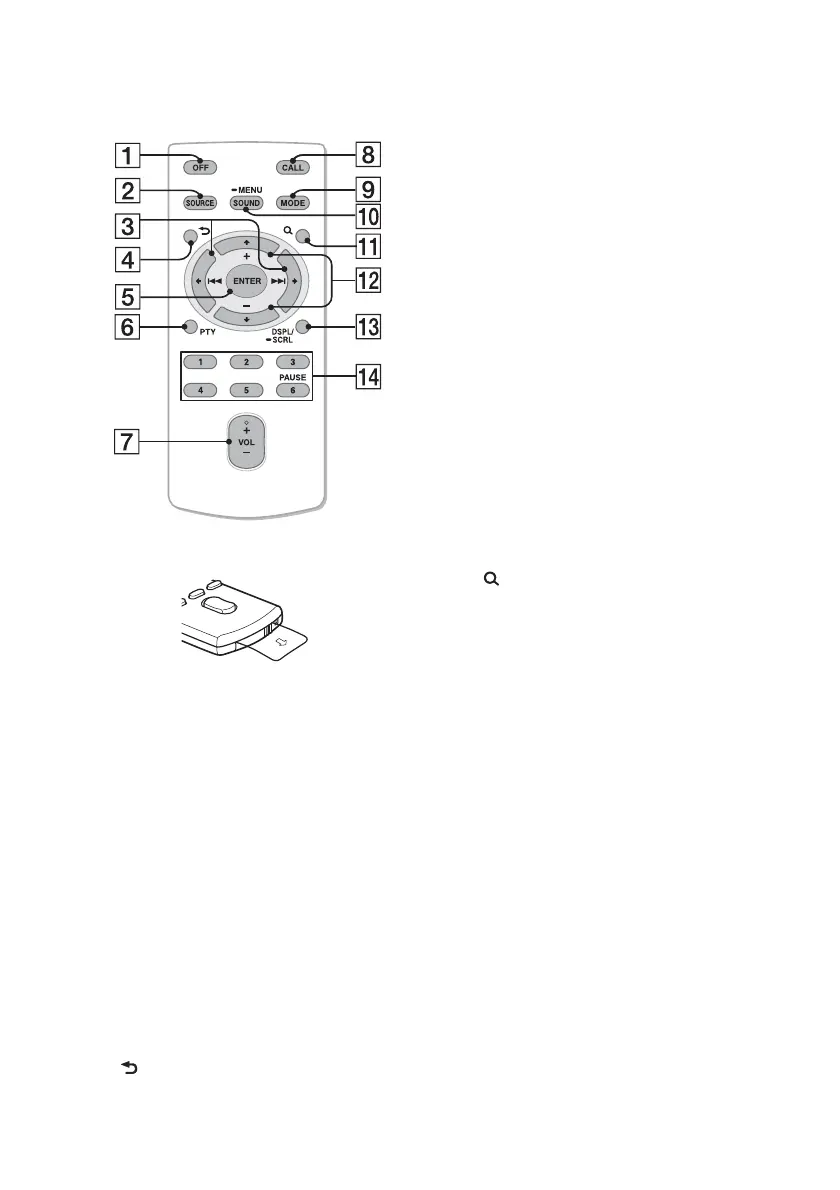
RM-X231 Remote
commander
Remove the insulation film before use.
OFF button
To turn off the power; stop the source;
reject a call.
SOURCE button*
1
Press to turn on the power.
Press repeatedly to change to another
source (Radio/CD/USB/AUX/
Bluetooth audio/Bluetooth phone).
()/ () buttons
To control Radio/CD/USB/Bluetooth
audio/App Remote, the same as
–/+ on the unit.
Setup items can be operated by .
After pressing , press
to change the source.
(BACK) button
To return to the previous display.
ENTER button
To apply a setting; receive a call; end a
call.
PTY (Program Type) button
VOL (Volume) +*
2
/– button
CALL button
To enter the call menu.
To receive/end a call.
MODE button
Press to select the radio band (FM/MW/
LW).
Press and hold to enter/cancel the
passenger control (iPod).
Press to activate/deactivate the
appropriate device (this unit/cellular
phone) (Bluetooth phone).
SOUND/MENU button
To enter the SOUND menu directly
(press); to enter setup mode (press and
hold).
(BROWSE) button
(+)/ (–) buttons
To control CD/USB/Bluetooth audio
device, the same as / (ALBUM
/) on the unit.
Setup items can be operated by .
DSPL (Display)/SCRL (Scroll) button
Number buttons
To receive stored stations (press); store
stations (press and hold).
To call a stored phone number (press);
to store a phone number as a preset
(press and hold) (in the call menu)
(Bluetooth phone).
To pause playback (press ).
*1 If App Remote is established with iPhone/
Android phone, the application name appears
on the display when selecting the source.
*2 This button has a tactile dot.














 To Next Page