MEX-N5100BE/N5100BT/N5150BT
8
BLUETOOTH INFORMATION WRITING METHOD
When the complete MAIN board, knob (VOL) (SV) assy or front
panel (SV) assy is replaced, the writing of Bluetooth information
is necessary.
Write the Bluetooth information according to the procedure below.
Preparation:
• Windows PC
• NFC compatible smartphone that installed the fi le manager ap-
plication (ASTRO File Manager, File Expert, etc.)
• USB cable for the smartphone
• NFCtagWriter.apk (ver.1.0.2 and above)
Note 1: The NFCtagWriter.apk is updated. When the NFCtagWriter.apk
is prepared already, be sure to refer to the “6. Version Check
Method of the NFC Tag Data Writing Application for the Servic-
ing” on the page 12, and check the version of NFCtagWriter.apk.
Note 2: Confi rm the method of obtaining the
NFCtagWriter.apk to the
service headquarters.
1. Installing the NFC Writing Application for the Servic-
ing
Install the NFCtagWriter.apk on the smartphone for writing of
Bluetooth information.
Procedure:
1. Prepare the NFCtagWriter.apk fi le on the PC.
2. Connect the smartphone to the PC with the USB cable.
3. Transfer the NFCtagWriter.apk to the smartphone.
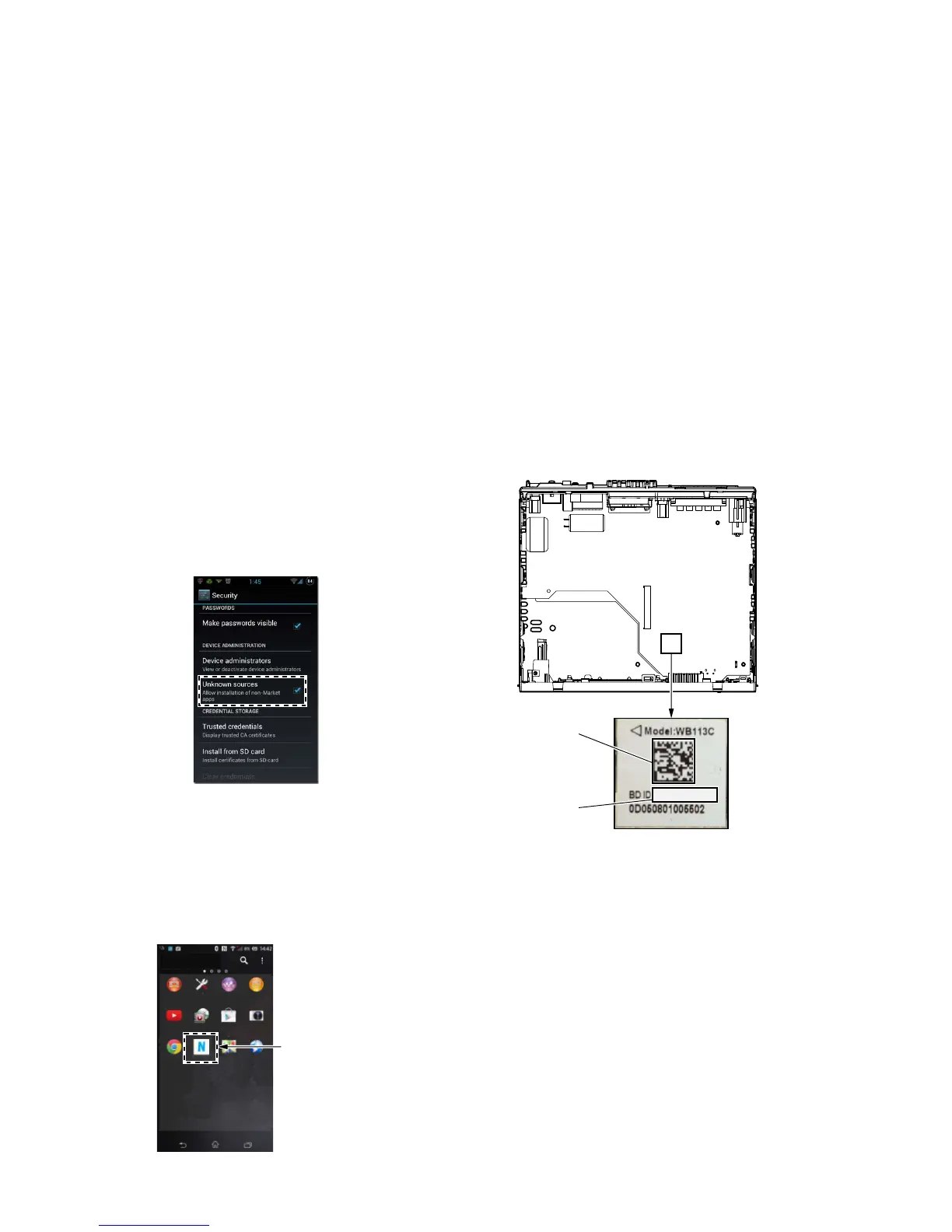
4. When tapping the “Settings” → “Security” on the screen of the
smartphone, check the box “Unknown sources”.
5. Disconnect the smartphone from the PC.
6. Use the fi le manager application to explore the NFCtagWriter.
apk on the smartphone.
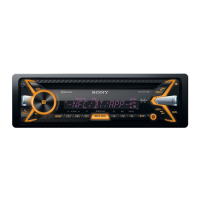
7. Click on the NFCtagWriter.apk to open it, and install the
NFCtagWriter.apk to the smartphone.
8. When tapping the “Settings” → “Security” on the screen of the
smartphone, uncheck the box “Unknown sources”.
Movies
YouTube Camera
Settings AlbumWALKMAN
Play Store
Browser
Maps
Media Player
Chrome NFCtagWriter
NFCtagWriter
application
Screen after the installation
for reference –
9. Refer to the “6. Version Check Method of the NFC Tag Data
Writing Application for the Servicing” on the page 12, and
check the version of NFCtagWriter.apk.
ver.0.9.0 : The use is not allowed.
Install the NFCtagWriter.apk of ver.1.0.2
and above.
ver.1.0.2 and above : This use is allowed.
2. Writing the NFC Tag Data
Write the NFC tag data (Bluetooth information) to the NFC mod-
ule in the knob (VOL) (SV) assy.
Procedure:
1. Check the Bluetooth address (BD_ADDR).
There are following two checking methods.
• How to read from the BT module label
• How to display on the liquid crystal display by the test mode
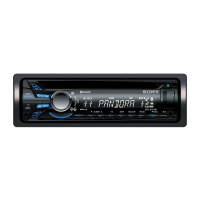
How to read from the BT module label:
Set the unit to the state where the BT module (Ref. No. IC1002
on the MAIN board) can be seen.
(Refer to the “2. DISASSEMBLY” on the page 23 and after)
BT module label
BD_ADDR
(Barcode)
BD_ADDR
48D2242F241A
– MAIN board top view –
– Continued on next page –


 To Next Page