13
GB
Disc
MHC-ECL99BT/MHC-ECL77BT.4-539-415-11(1)
Creating your own program
(Program Play)
1
Select the CD function.
Press CD.
2
Select the play mode.
Press PLAY MODE/TUNING MODE
repeatedly until “PROGRAM”
appears while the player is
stopped.
3
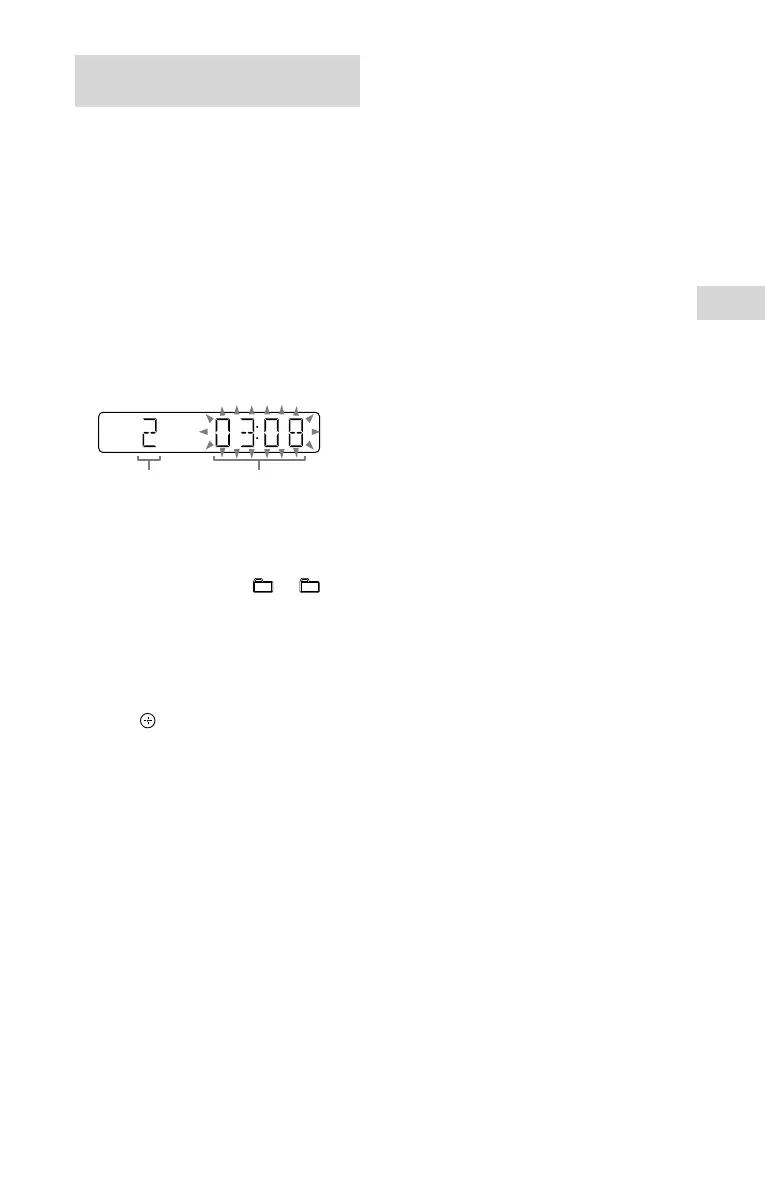
Select the desired track or file
number.
Press / repeatedly until
the desired track or file number
appears.
Selected
track or file
number
Total playing time
of the selected
track (CD-DA disc
only)
When programming MP3 files in a
specific folder, press +/ –
repeatedly to select the desired
folder, and then select the desired
file.
4
Program the selected track or
file.
Press to enter the selected track
or file.
5
Repeat steps 3 through 4 to
program additional tracks or
files, up to a total of 64 tracks
or files.
6
To play your program of
tracks or files, press .
The program is cleared when
you perform one of the following
operations:
changing the function.
turning off the system.
disconnecting the power cord.
opening the disc tray.
To play the same program again,
press .
To cancel Program Play
Press PLAY MODE/TUNING MODE.
To delete the last step from the
program list
Press CLEAR when playback is
stopped.



 To Next Page