MHC-M80D/MHC-M60D/MHC-M40D.GB.4-731-977-16(1)
12
GB
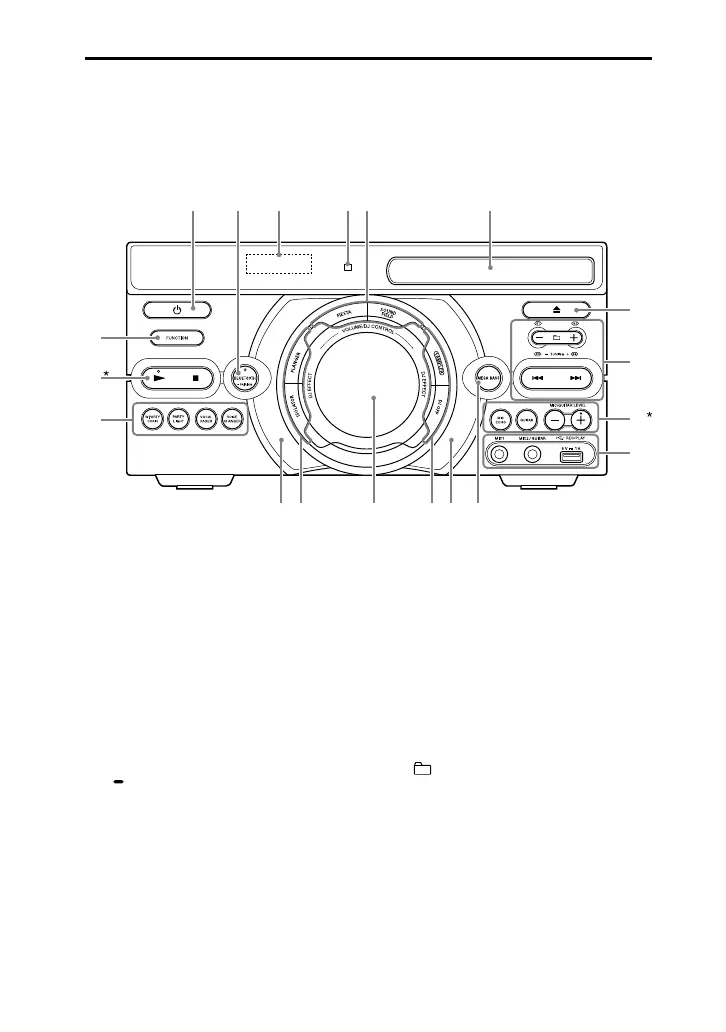
Guide to parts and controls
You can lock the keys except (power) on the unit to prevent them from
being operated by mistake (page 56).
Unit (Front)
* The and MIC/GUITAR LEVEL + buttons have a tactile dot. Use the tactile dot as a
reference when operating the system.
(power)
Turns on the system, or sets it to
standby mode.
BLUETOOTH
Selects BLUETOOTH function.
BLUETOOTH indicator (page
40)
PAIRING
Hold down to activate
BLUETOOTH pairing during
BLUETOOTH function.
Display
Remote control sensor
(page21)
FIESTA (page 47)
SOUND FIELD (page 47)
Disc tray
(open/close)
Opens or closes the disc tray.
+/– (select folder)
Selects a folder on a data disc or
a USB device.
/ (go backward/go
forward) (page 26)
TUNING+/– (page 39)
S1, S2, S3, S4 (page 48)


 To Next Page