7
MHC-VX888 4-232-653-11 (1)
Getting Started
Getting Started
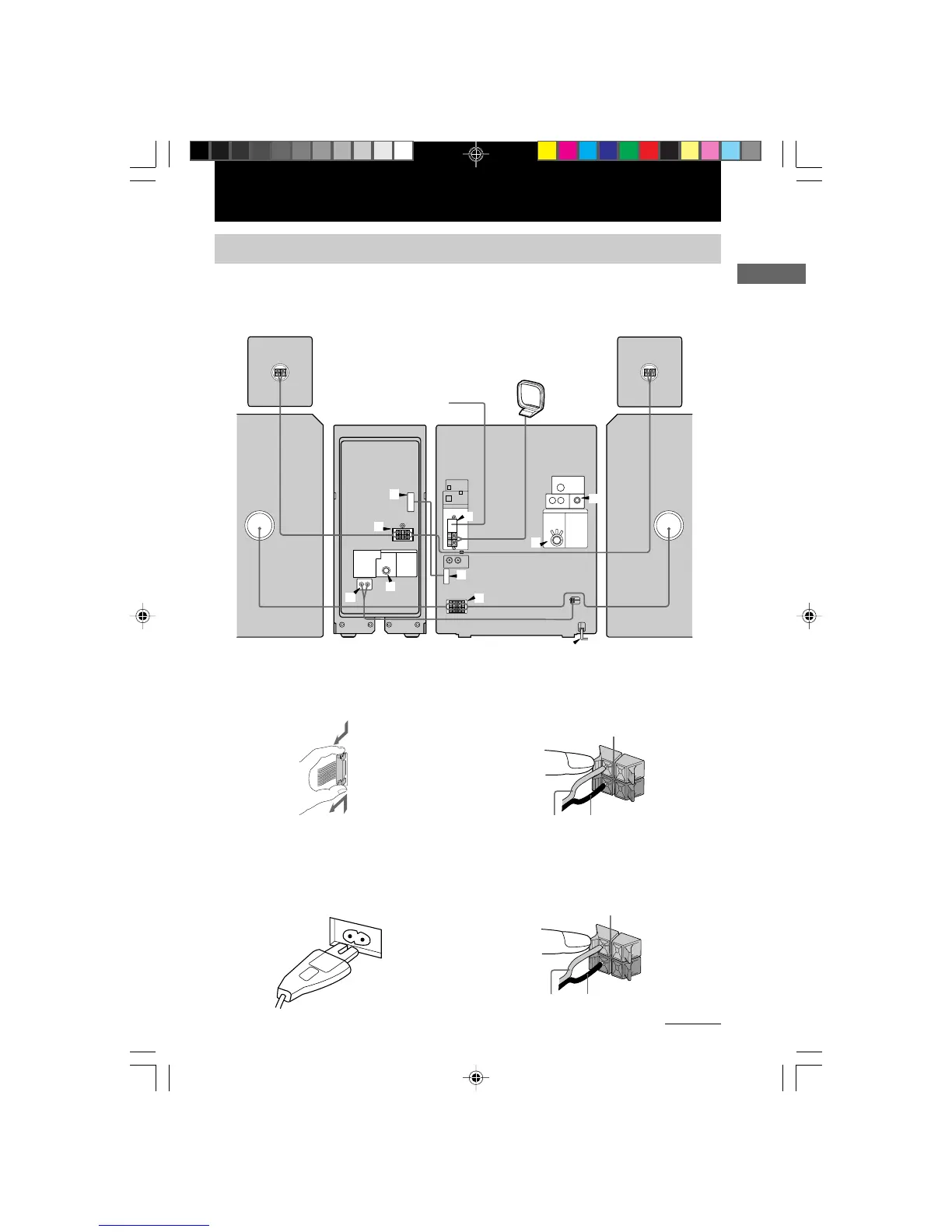
Hooking up the system
Do the following procedure 1 to 9 to hook up your system using the supplied cords and
accessories.
1 Connect the flat cord to the SYSTEM
CONTROL connectors until it clicks.
2 Connect the power cord from the main
unit to the ~ AC IN of the Sound Broad
amplifier.
Be sure to make this connection before you
connect the main unit's power cord to a wall
outlet.
3 Connect the speakers.
Connect the speaker cords of front speakers
to the SPEAKER jacks as below.
4 Connect the surround speaker .
Connect the surround speaker cords to the
SPEAKER jacks of the sound broad
amplifier.
1
1
2
3
8
4
7
7
5
6
AM loop antenna
Front speaker
(Left)
Front speaker
(Right)
FM antenna
Surround
speaker (Right)
Surround
speaker (Left)
Sound Broad
Amplifier
Main Unit
To disconnect
R
+
L
+
–
Insert only the stripped portion.
Black/Stripe (#)Red/Solid (3)
R
+
L
+
–
Insert only the stripped portion.
Grey with black line (#)
Solid grey (3)
continued
03GET_MHC-VX888.p65 GB 3/13/01, 5:23 PM7



 To Next Page