
 To Next Page
M
Melissa MccormickAug 11, 2025
What to do if the computer does not detect Sony Card Reader?
- SSandra DrakeAug 11, 2025
If your computer isn't detecting the Sony Card Reader, disconnect the reader/writer from the computer and reconnect it.

What to do if the computer does not detect Sony Card Reader?
If your computer isn't detecting the Sony Card Reader, disconnect the reader/writer from the computer and reconnect it.
What to do if the removable disk icon does not appear for Sony Card Reader?
See “Connecting the Reader/Writer to a Computer” and make sure the connection is correct. Also, a USB device other than the reader/writer may be connected to the USB port on the computer.
Why can't I access the memory card with Windows Explorer or My Computer using Sony Card Reader?
If you can't access the memory card with Windows Explorer or My Computer, ensure a memory card is inserted into the proper slot.
How to fix the missing drive icon for Sony Card Reader in Windows 2000 or Windows Me?
If the drive icon of the unit does not appear in the “My Computer” window and the “USB Mass Storage Device” is displayed in the “Device Manager,” delete it, disconnect the USB cable from your computer, and then reconnect it.
 General
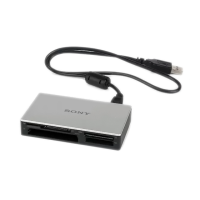
| Brand | Sony |
|---|---|
| Model | MRW62E-S2 |
| Type | Card Reader |
| Interface | USB 2.0 |
| Supported Memory Cards | Memory Stick, Memory Stick PRO, Memory Stick Duo, Memory Stick PRO Duo, SD, SDHC |