EasyManua.ls Logo

Sony MX-710 - Control Panel Removal; Cover Plate Removal; Bottom Plate Removal

Sony MX-710
16 pages
Print Icon
To Next Page IconTo Next Page
To Previous Page IconTo Previous Page
Loading...
MX-710
SECTION
2
DISASSEMBLY
2-1.
CONTROL
PANEL
REMOVAL
2-4.
COVER
REMOVAL
Remove
four
screws
RK
4
x
10.
Remove
two
screws
B
3
x
8.
After
the
control
panel
is
removed,
switches
and
After
the
cover
removal,
external
de
power
supply
variable
resistors
can
be
replaced.
can
be
connected
to
the
set.
2-2.
COVER
PLATE
REMOVAL
Remove
six
screws
B
3
x
6.
After
the
cover
plate
is
removed,
VU
meter
cali-
bration
can
be
performed.
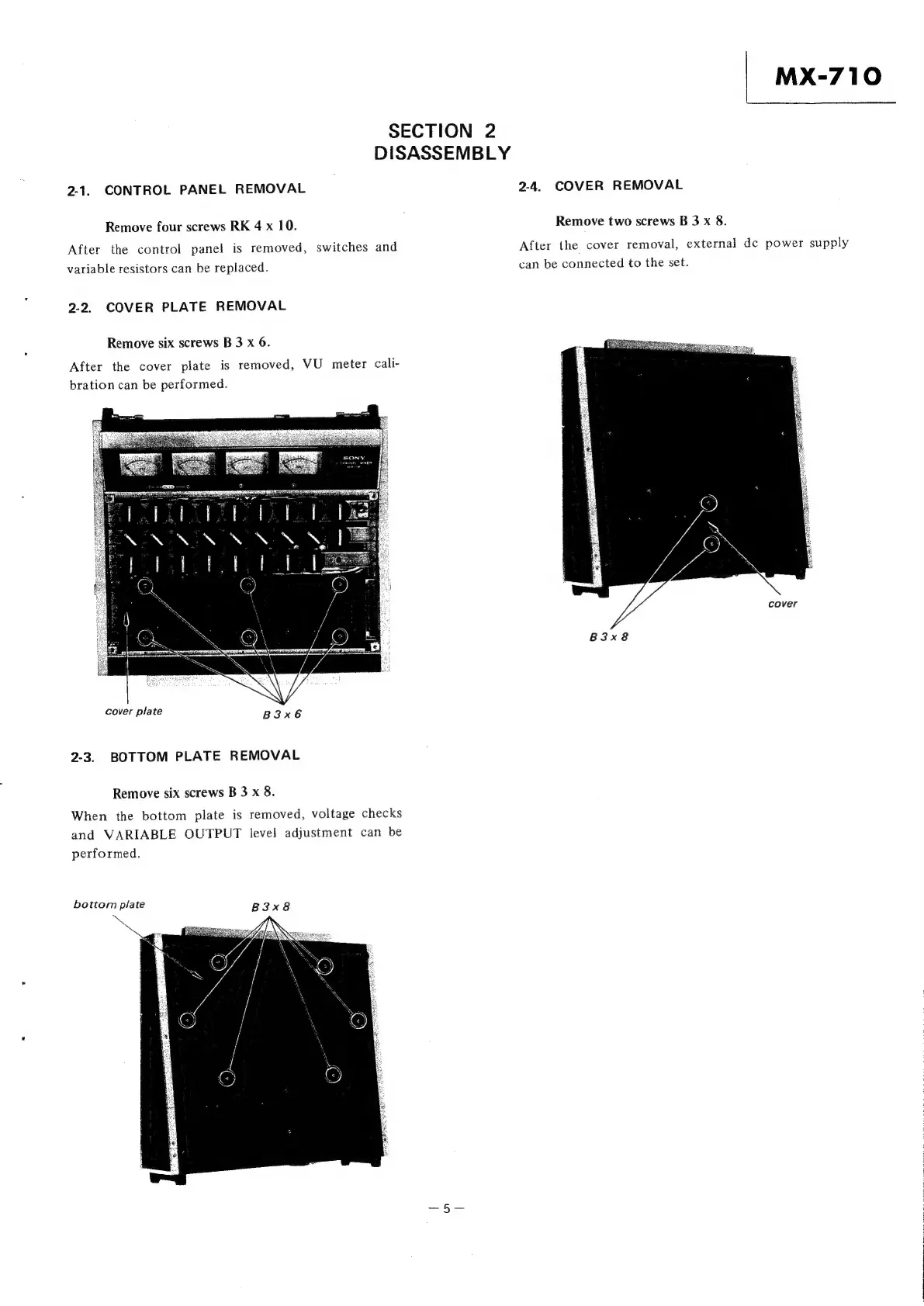
cover
B3x8
cover
plate
B3x6
2-3.
BOTTOM
PLATE
REMOVAL
Remove
six
screws
B
3
x
8.
When
the
bottom
plate
is
removed,
voltage
checks
and
VARIABLE
OUTPUT
level
adjustment
can
be
performed.
bottom
plate
B3x8
aS

Related product manuals