EasyManua.ls Logo

Sony PHV-A7 - Basic Operation - Image Settings; Setting Negative or Positive Film; Using the Zoom Function; Focus Adjustment Methods

Sony PHV-A7
18 pages
Print Icon
To Next Page IconTo Next Page
To Previous Page IconTo Previous Page
Loading...
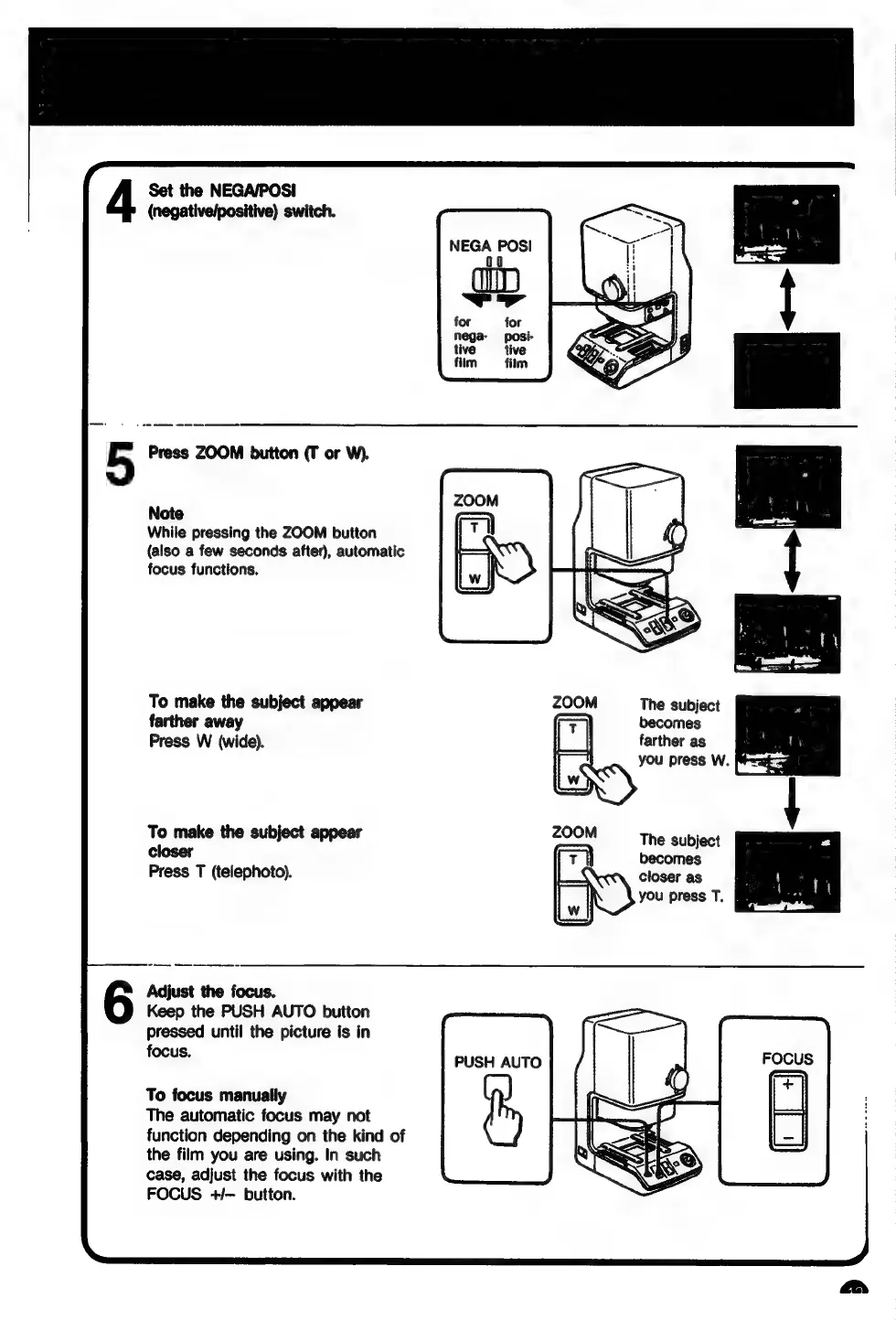
Set
the
NEGA/POSI
(negative/positive)
switch.
5
Press
ZOOM
button
(T
or
W).
Note
While
pressing
the
ZOOM
button
(also
a
few
seconds
after),
automatic
focus
functions.
To
make
the
subject
appear
farther
away
Press
W
(wide).
To
make
the
subject
appear
closer
Press
T
(telephoto).
Adjust
the
focus.
Keep
the
PUSH
AUTO
button
pressed
until
the
picture
is
in
focus.
To
focus
manually
The
automatic
focus
may
not
function
depending
on
the
kind
of
the
film
you
are
using.
In
such
case,
adjust
the
focus
with
the
FOCUS
+/—
button.
NEGA
POSI
00
ld
for
for
posi-
film
film
ZOOM
The
subject
becomes
farther
as
-
e
you
press
W.
at
og
ZOOM
|
The
subject
T
becomes
closer
as
aia
you
press
T.
&
w
PUSH
AUTO