EasyManua.ls Logo

Sony PHV-A7 - Troubleshooting Guide

Sony PHV-A7
18 pages
Print Icon
To Previous Page IconTo Previous Page
Loading...
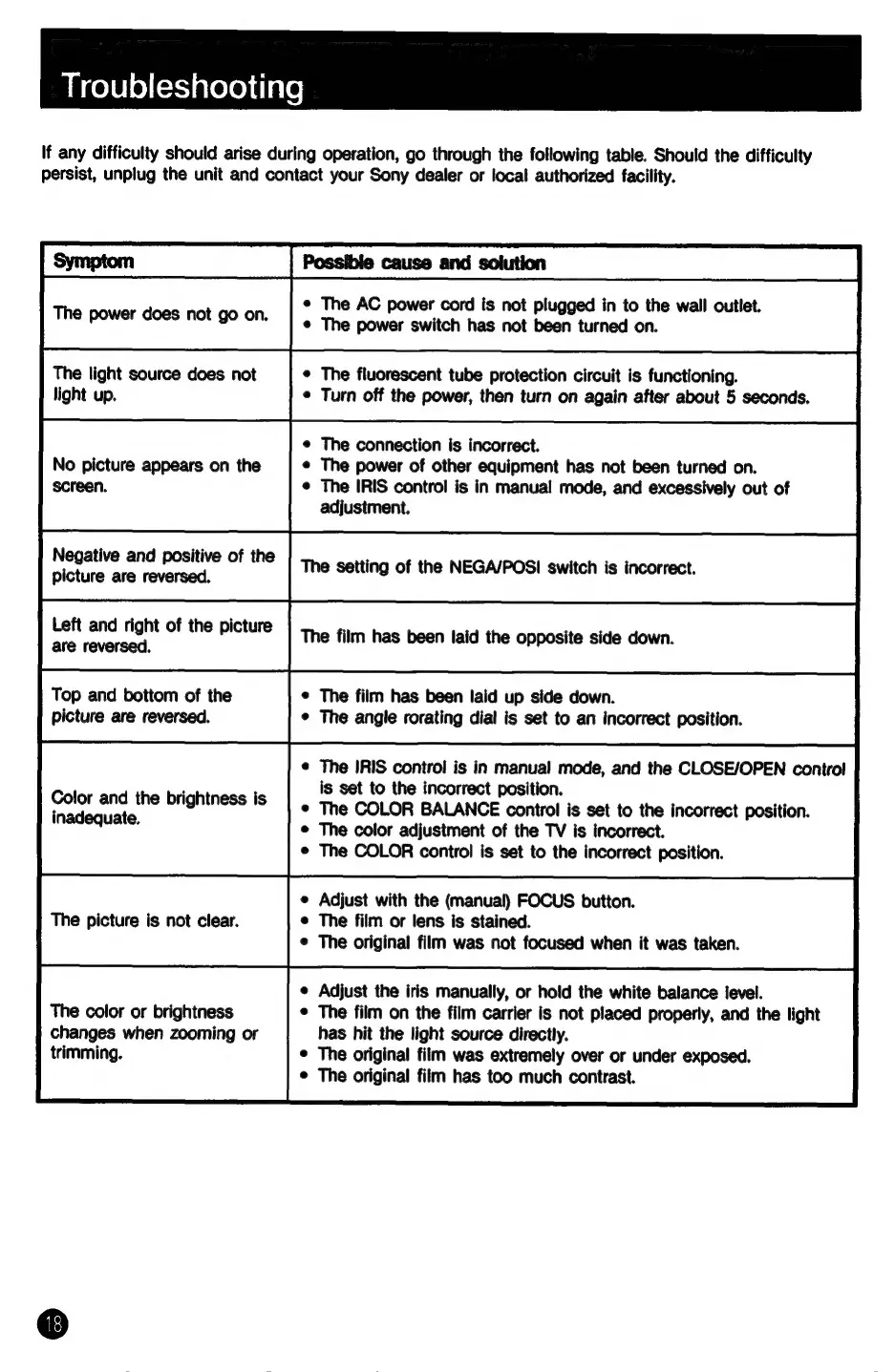
Troubleshooting
If
any
difficulty
should
arise
during
operation,
go
through
the
following
table.
Should
the
difficulty
persist,
unplug
the
unit
and
contact
your
Sony
dealer
or
local
authorized
facility.
The
power
does
not
go
on.
The
light
source
does
not
light
up.
No
picture
appears
on
the
screen.
Negative
and
positive
of
the
picture
are
reversed.
Left
and
right
of
the
picture
are
reversed.
Top
and
bottom
of
the
picture
are
reversed.
Color
and
the
brightness
is
inadequate.
The
picture
is
not
clear.
The
color
or
brightness
changes
when
zooming
or
trimming.
¢
The
AC
power
cord
is
not
plugged
in
to
the
wall
outlet.
¢
The
power
switch
has
not
been
turned
on.
¢
The
fluorescent
tube
protection
circuit
is
functioning.
¢
Turn
off
the
power,
then
turn
on
again
after
about
5
seconds.
¢
The
connection
is
incorrect.
¢
The
power
of
other
equipment
has
not
been
turned
on.
©
The
IRIS
control
is
in
manual
mode,
and
excessively
out
of
adjustment.
The
setting
of
the
NEGA/POSI
switch
is
incorrect.
The
film
has
been
laid
the
opposite
side
down.
¢
The
film
has
been
laid
up
side
down.
¢
The
angle
rorating
dial
is
set
to
an
incorrect
position.
The
IRIS
control
is
in
manual
mode,
and
the
CLOSE/OPEN
control
is
set
to
the
incorrect
position.
The
COLOR
BALANCE
control
is
set
to
the
incorrect
position.
The
color
adjustment
of
the
TV
is
incorrect.
The
COLOR
control
is
set
to
the
incorrect
position.
Adjust
with
the
(manual)
FOCUS
button.
The
film
or
lens
is
stained.
The
original
film
was
not
focused
when
it
was
taken.
Adjust
the
iris
manually,
or
hold
the
white
balance
level.
¢
The
film
on
the
film
carrier
is
not
placed
properly,
and
the
light
has
hit
the
light
source
directly.
©
The
original
film
was
extremely
over
or
under
exposed.
©
The
original
film
has
too
much
contrast.