EasyManua.ls Logo

Sony PROFORMA WM60 - User Manual

Sony PROFORMA WM60
32 pages
Print Icon
To Next Page IconTo Next Page
Loading...
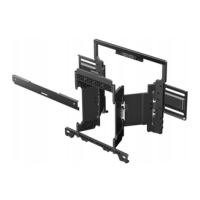
Wall Mount
Installation Guide
PROFORMAWM60
English Instructions…Page 2
Spanish Instructions…Page 12
French Instructions…Page 22
Question and Answer IconNeed help?

Do you have a question about the Sony PROFORMA WM60 and is the answer not in the manual?

Summary

English Instructions

Welcome and Product Overview

Introduction to the ProForma WM-60 Wall Mount and its capabilities.

Safety Precautions

General Warning: Risk of Death or Injury

Critical warnings about electrical hazards, plumbing, structural integrity, and safe handling.

Customer Installation Responsibilities

Guidance for customers on required expertise, understanding instructions, and seeking professional help.

Professional Installer Responsibilities

Advice for professional installers on reading the guide thoroughly and understanding liability.

Television Compatibility Requirements

Specifications for TV VESA mount compatibility, screen size, and maximum weight.

Additional Safety Guidelines

Further safety instructions on environmental factors, screw tightening, shock, wall surface, and cable management.

Wall Mounting Notice

Note on potential long-term effects on wall surfaces due to TV mounting.

Whats Included

Parts List

Detailed list of all included parts for the wall mount installation, including quantities.

Installation Procedure

Step 1: Location Selection and Marking

Choosing the mounting location and marking studs or concrete surfaces.

Step 2: Measuring and Marking Wall Points

Calculating precise wall screw hole positions based on TV VESA measurements.

Step 3: Attaching the Wall Bracket

Mounting the main wall bracket securely to the wall using lag bolts or anchors.

Step 4: Attaching TV Harness to Television

Connecting the TV harness to the back of the television using appropriate screws.

Step 5: Attaching Spacers or Pads

Installing spacers for parallel mounting or pads for slight tilt adjustment.

Step 6: Hanging Television on Wall Bracket

Safely lifting and attaching the television onto the installed wall bracket.

Step 7: Using Spacer Kickstands

Operating kickstands on spacers for improved cable access behind the TV.

Warranty Information

Limited Warranty Details

Terms, conditions, exclusions, and duration of the product's limited warranty.

Customer Service Contact

Information and contact numbers for obtaining service, support, and product information.

Summary

English Instructions

Welcome and Product Overview

Introduction to the ProForma WM-60 Wall Mount and its capabilities.

Safety Precautions

General Warning: Risk of Death or Injury

Critical warnings about electrical hazards, plumbing, structural integrity, and safe handling.

Customer Installation Responsibilities

Guidance for customers on required expertise, understanding instructions, and seeking professional help.

Professional Installer Responsibilities

Advice for professional installers on reading the guide thoroughly and understanding liability.

Television Compatibility Requirements

Specifications for TV VESA mount compatibility, screen size, and maximum weight.

Additional Safety Guidelines

Further safety instructions on environmental factors, screw tightening, shock, wall surface, and cable management.

Wall Mounting Notice

Note on potential long-term effects on wall surfaces due to TV mounting.

Whats Included

Parts List

Detailed list of all included parts for the wall mount installation, including quantities.

Installation Procedure

Step 1: Location Selection and Marking

Choosing the mounting location and marking studs or concrete surfaces.

Step 2: Measuring and Marking Wall Points

Calculating precise wall screw hole positions based on TV VESA measurements.

Step 3: Attaching the Wall Bracket

Mounting the main wall bracket securely to the wall using lag bolts or anchors.

Step 4: Attaching TV Harness to Television

Connecting the TV harness to the back of the television using appropriate screws.

Step 5: Attaching Spacers or Pads

Installing spacers for parallel mounting or pads for slight tilt adjustment.

Step 6: Hanging Television on Wall Bracket

Safely lifting and attaching the television onto the installed wall bracket.

Step 7: Using Spacer Kickstands

Operating kickstands on spacers for improved cable access behind the TV.

Warranty Information

Limited Warranty Details

Terms, conditions, exclusions, and duration of the product's limited warranty.

Customer Service Contact

Information and contact numbers for obtaining service, support, and product information.

Sony PROFORMA WM60 Specifications

General IconGeneral
BrandSony
ModelPROFORMA WM60
CategoryRacks & Stands
LanguageEnglish

Related product manuals