EasyManua.ls Logo

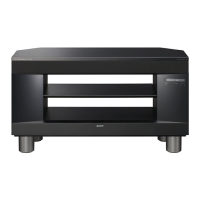
Sony SU-B401S - User Manual

Sony SU-B401S
60 pages
Print Icon
To Next Page IconTo Next Page
Loading...
TV Stand/
Soporte para Televisor
con Bocinas Activas
Instructions
Mode d’emploi
Instrucciones
Instruções
Lea este manual antes de usar el producto
4-268-384-12(1)
© 2011 Sony Corporation
PT
FR
ES
Printed in Malaysia
http://www.sony.net/
SU-B401S
US
Question and Answer IconNeed help?

Do you have a question about the Sony SU-B401S and is the answer not in the manual?

Summary

Important Safety Instructions

Owners Record

Record model and serial numbers for warranty and dealer reference.

FCC Related Information

Details on FCC compliance for Class B digital devices.

General Safety Precautions

Important safety advice for product use and to prevent accidents.

CAUTION and WARNINGs

Specified Product Compatibility

Lists compatible Sony products for the TV stand.

AC Adapter Safety

Warnings and precautions for using the AC adapter.

Toppling Prevention Measures

Instructions to prevent the TV stand from tipping over.

Stable Surface Installation

Importance of installing the TV stand on a stable surface.

Installation Environment and Safety

Environmental Placement Rules

Avoid blocking vents, liquids, heat, and ensure airflow.

AC Power Cord and Product Use

AC power cord safety and using only specified products.

TV Stand Security and Maintenance

Securing the TV, installation notes, and cleaning.

Assembly and Installation Safety

Installation Procedures

Two-person install, secure TV, avoid modification.

Assembly Care

Be careful not to injure hands during assembly.

Precautions for Use

Safe practices for power sources and operational steps.

Parts Check and Initial Assembly

Unpacking the TV Stand

Instructions for carefully removing the TV stand from its carton.

Checking Included Parts

List of parts included with the TV stand.

Pre-Assembly Preparations

Tools and setup needed before starting assembly.

TV Installation Steps

Attach Neck to TV Stand

Attaching the neck component using screws.

Moving the TV Safely

Proper technique for holding and moving the TV.

Attach Joint to TV Rear

Connecting the joint to the back of the TV.

Install TV onto Stand

Placing the TV into the TV stand groove.

Securing the TV and Stand

Securing TV to Board

Instructions for securing the TV to a board with hardware.

Preventing Toppling

Measures to prevent the TV and stand from toppling.

Contacting Support

Information for obtaining optional support belts.

Connecting TV and Player

Anchor TV to the Wall

Securing the TV to the wall using bolts and anchors.

HDMI Connection Setup

Connecting the TV to the stand using an HDMI cable.

HDMI Connection Notes

Recommendations for using High Speed HDMI cables.

Connecting AC Power

HDMI Connection Details

Checking HDMI setups and compatibility.

Connect AC Power Cord

Connecting the AC adapter to a wall outlet.

TV Settings and Troubleshooting

Control for HDMI Setup

Setting the 'Control for HDMI' function to 'On'.

Audio System Setup

Setting the 'Audio System' to 'TV Speakers'.

Sound Troubleshooting

Steps to resolve no sound issues.

Indicator Status

Explanation of the power indicator light.

Specifications

Dimensions and Stand Weight

Physical dimensions and weight of the TV stand.

Amplifier and HDMI Sections

Technical details of the amplifier and HDMI connectors.

Speaker System

Specifications for front and subwoofer speaker units.

General Power Requirements

Power consumption and standby information.

Summary

Important Safety Instructions

Owners Record

Record model and serial numbers for warranty and dealer reference.

FCC Related Information

Details on FCC compliance for Class B digital devices.

General Safety Precautions

Important safety advice for product use and to prevent accidents.

CAUTION and WARNINGs

Specified Product Compatibility

Lists compatible Sony products for the TV stand.

AC Adapter Safety

Warnings and precautions for using the AC adapter.

Toppling Prevention Measures

Instructions to prevent the TV stand from tipping over.

Stable Surface Installation

Importance of installing the TV stand on a stable surface.

Installation Environment and Safety

Environmental Placement Rules

Avoid blocking vents, liquids, heat, and ensure airflow.

AC Power Cord and Product Use

AC power cord safety and using only specified products.

TV Stand Security and Maintenance

Securing the TV, installation notes, and cleaning.

Assembly and Installation Safety

Installation Procedures

Two-person install, secure TV, avoid modification.

Assembly Care

Be careful not to injure hands during assembly.

Precautions for Use

Safe practices for power sources and operational steps.

Parts Check and Initial Assembly

Unpacking the TV Stand

Instructions for carefully removing the TV stand from its carton.

Checking Included Parts

List of parts included with the TV stand.

Pre-Assembly Preparations

Tools and setup needed before starting assembly.

TV Installation Steps

Attach Neck to TV Stand

Attaching the neck component using screws.

Moving the TV Safely

Proper technique for holding and moving the TV.

Attach Joint to TV Rear

Connecting the joint to the back of the TV.

Install TV onto Stand

Placing the TV into the TV stand groove.

Securing the TV and Stand

Securing TV to Board

Instructions for securing the TV to a board with hardware.

Preventing Toppling

Measures to prevent the TV and stand from toppling.

Contacting Support

Information for obtaining optional support belts.

Connecting TV and Player

Anchor TV to the Wall

Securing the TV to the wall using bolts and anchors.

HDMI Connection Setup

Connecting the TV to the stand using an HDMI cable.

HDMI Connection Notes

Recommendations for using High Speed HDMI cables.

Connecting AC Power

HDMI Connection Details

Checking HDMI setups and compatibility.

Connect AC Power Cord

Connecting the AC adapter to a wall outlet.

TV Settings and Troubleshooting

Control for HDMI Setup

Setting the 'Control for HDMI' function to 'On'.

Audio System Setup

Setting the 'Audio System' to 'TV Speakers'.

Sound Troubleshooting

Steps to resolve no sound issues.

Indicator Status

Explanation of the power indicator light.

Specifications

Dimensions and Stand Weight

Physical dimensions and weight of the TV stand.

Amplifier and HDMI Sections

Technical details of the amplifier and HDMI connectors.

Speaker System

Specifications for front and subwoofer speaker units.

General Power Requirements

Power consumption and standby information.

Sony SU-B401S Specifications

General IconGeneral
Product colorSilver
Compatible productsKDL-40NX723
Mounting typeFloor

Related product manuals