
 Need help?
Do you have a question about the Sony PSP-1001K and is the answer not in the manual?
Lists all items included in the PSP™ system package for verification.
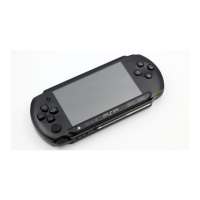
Identifies and explains the purpose of various buttons and components of the PSP™ system.
Guides users through the initial setup steps, including charging the battery.
Instructions for powering the PSP™ system on and off correctly.
Explains how to put the PSP™ system into and out of sleep mode to pause activities.
Steps for inserting and ejecting UMD™ discs into the PSP™ system.
Instructions on how to insert and eject Memory Stick Duo™ media.
Describes how to lock the system's buttons to prevent accidental input.
Details on adjusting audio tone and muting sound playback using the sound button.
Explains how to adjust screen brightness and turn off the backlight.
Information on checking battery charge level, estimating power, and battery life.
Guides users through starting and playing games on the PSP™ system.
How to access and use the game options menu for managing saved data.
Instructions for copying and deleting game data using the saved data utility.
How to play UMD™VIDEO and videos saved on a Memory Stick Duo™.
Explains how to use the on-screen control panel for video playback operations.
How to control video playback using system buttons or the remote.
Accessing and using the Video options menu for playback control and deletion.
Methods for saving video files onto a Memory Stick Duo™.
How to play UMD™MUSIC and music saved on a Memory Stick Duo™.
Using the on-screen control panel for music playback operations.
Controlling music playback with system buttons or the remote control.
Accessing and using the Music options menu for playback and deletion.
Methods for importing and saving music files to a Memory Stick Duo™.
How to view images saved on a Memory Stick Duo™.
Using the on-screen control panel for image viewing and manipulation.
Controlling photo viewing with system buttons or the remote control.
Accessing and using the Photo options menu for managing images.
How to set up and play image slideshows.
Guides on connecting to the internet using the PSP™ system's browser.
Detailed steps and license agreement for establishing an internet connection.
How to use the RSS Channel feature to access streaming audio content.
Detailed configuration of wireless network (WLAN) connections.
Overview of system settings and categories like video, photo, and network.
Adjusting language and volume settings for UMD™VIDEO playback.
Settings for adjusting the slideshow speed for viewing images.
Customizing system language, nickname, and formatting media.
Changing the system's visual theme and wallpaper.
Setting the date, time, time zone, and daylight saving time.
Options to conserve battery power by turning off backlight or entering sleep mode.
Adjusting volume levels and key tone sounds.
Managing passwords and parental control features for system security.
Configuring how many items are saved for RSS Channel content.
Connecting the PSP™ system to a PC via USB for file transfer.
Detailed configuration of wireless network (WLAN) connections.
Process for updating the PSP™ system software using the network.
Guide on using the on-screen keyboard for text input and character entry.
Information on updating system software for new features and security.
Details on the types of Memory Stick™ and UMD™ media supported by the PSP™ system.
Lists the various file types supported for video, music, and photo playback.
Technical details and specifications of the PSP™ system hardware.
Solutions for problems related to power, battery charge, and charging.
Troubleshooting common screen display issues like darkness or color problems.
Solutions for no sound or poor sound quality issues.
Troubleshooting problems related to UMD™ insertion and playback.
Solutions for issues with inserting or recognizing Memory Stick Duo™ media.
Troubleshooting problems with UMD™VIDEO playback.
Solutions for music playback issues, including data recognition and group playback.
Troubleshooting common issues with image display and folder management.
Solutions for problems establishing network connections.
Troubleshooting issues with headphones and the remote control.
Solutions for miscellaneous problems like warm system or unresponsive buttons.
 General
| Brand | Sony |
|---|---|
| Model | PSP-1001K |
| Category | Game Console |
| Language | English |








 To Next Page