DE
IT
NL
PT
GB
RU
Using the sound button
Press and release
Each time you press the button, the tone
changes among HEAVY POPS
JAZZ UNIQUE OFF. *1
Press for more
than one second
The sound is muted. *2
*1 : The tone can be changed only when using headphones.
Also, the tone setting is temporarily set to “OFF” during
gameplay.
*2 : To clear muting, press the sound button again.
Using the display button
Press and release
Each time you press the button, the
display changes among three levels of
screen brightness. *1
Press for more
than one second
The backlight turns off and the screen
goes blank. *2
Press for more
than five seconds
The system switches to video output
mode ( page 18).
*1 : The highest level (level 4) can be selected only while the
PSP™ system is plugged in using the AC Adaptor.
*2 : To turn the backlight back on, press any of the PSP™
system buttons.
Preparation
Part names and functions
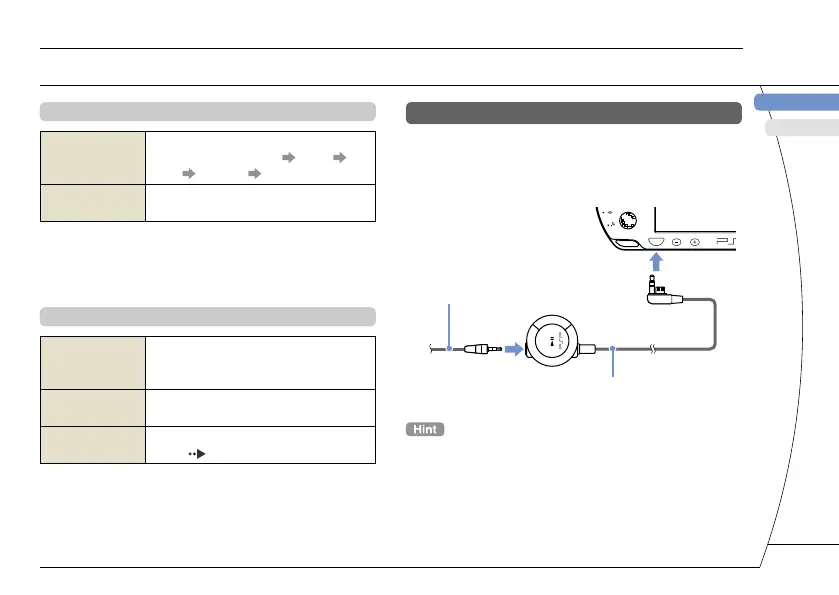
Connecting Headphones
You can connect the remote control (sold separately)
to the headset connector. You can also connect the
headset (sold separately) or other commercially
available headphones to the remote control.



 To Next Page