EasyManua.ls Logo

Sony RM-450 - Page 6

Sony RM-450
53 pages
Print Icon
To Next Page IconTo Next Page
To Previous Page IconTo Previous Page
Loading...
RM-450/RM-450CE
[7]
(8)
(9) fol
fa
[12
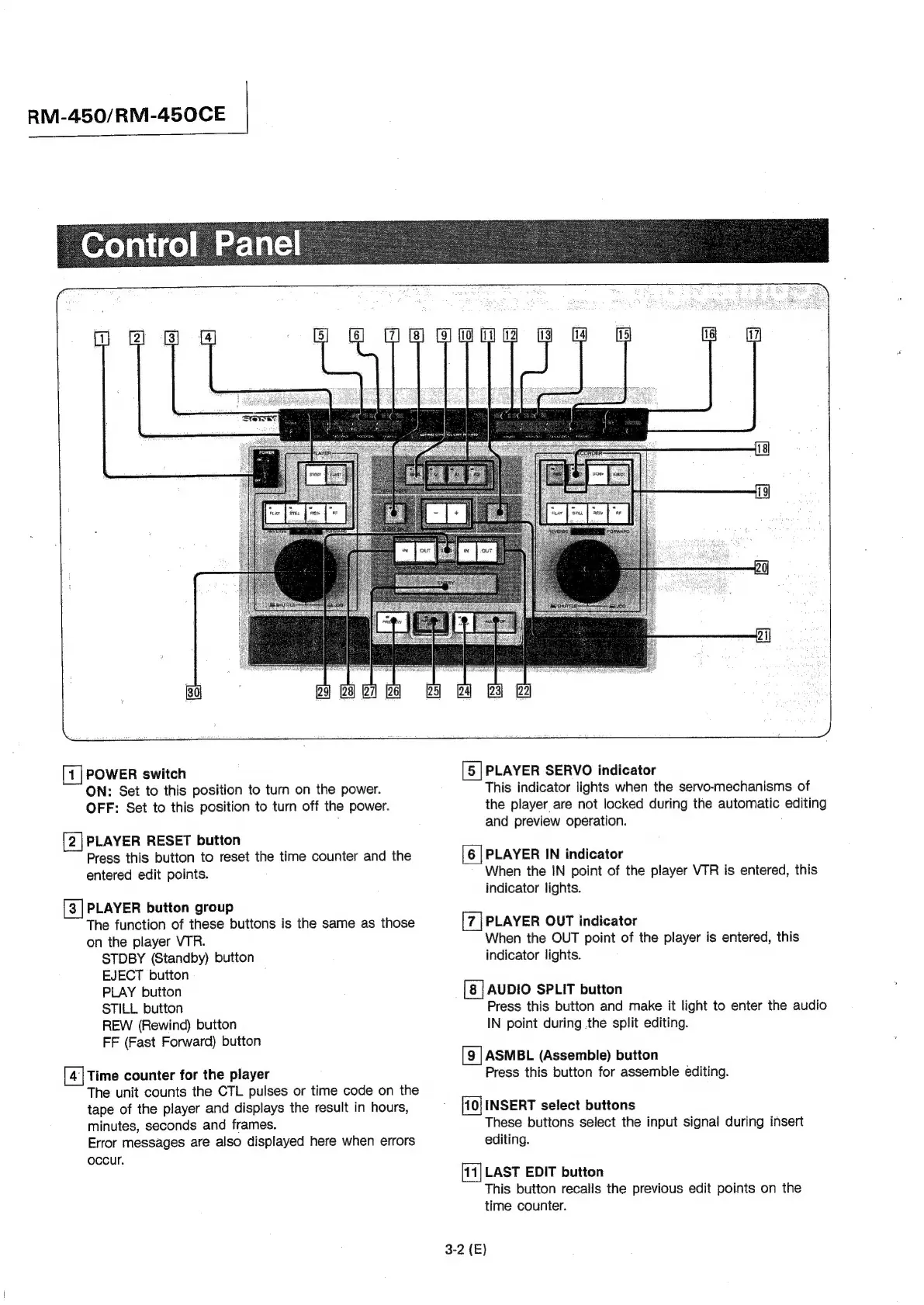
POWER
switch
ON:
Set
to
this
position
to
turn
on
the
power.
OFF:
Set
to
this
position
to
turn
off
the
power.
[2]PLAYER
RESET
button
Press
this
button
to
reset
the
time
counter
and
the
entered
edit
points.
[3
|
PLAYER
button
group
The
function
of
these
buttons
is
the
same
as
those
on
the
player
VTR.
STDBY
(Standby)
button
EJECT
button
,
PLAY
button
STILL
button
REW
(Rewind)
button
FF
(Fast
Forward)
button
Time
counter
for
the
player
The
unit
counts
the
CTL
pulses
or
time
code
on
the
tape
of
the
player
and
displays
the
result
in
hours,
minutes,
seconds
and
frames.
Error
messages
are
also
displayed
here
when
errors
occur.
=
[5
|PLAYER
SERVO
indicator
This
indicator
lights
when
the
servo-mechanisms
of
the
player
are
not
locked
during
the
automatic
editing
and
preview
operation.
[6
|
PLAYER
IN
indicator
When
the
IN
point
of
the
player
VTR
is
entered,
this
indicator
lights.
PLAYER
OUT
indicator
When
the
OUT
point
of
the
player
is
entered,
this
indicator
lights.
[8]
AUDIO
SPLIT
button
Press
this
button
and
make
it
light
to
enter
the
audio
IN
point
during
the
split
editing.
ASMBL
(Assemble)
button
Press
this
button
for
assemble
editing.
INSERT
select
buttons
These
buttons
select
the
input
signal
during
insert
editing.
[11]
LAST
EDIT
button
This
button
recalls
the
previous
edit
points
on
the
time
counter.
3-2
(E)

Other manuals for Sony RM-450

Related product manuals