EasyManua.ls Logo

Sony RM-E80 - Page 9

Sony RM-E80
18 pages
Print Icon
To Next Page IconTo Next Page
To Previous Page IconTo Previous Page
Loading...
sEcTroN 2
DISASSEMBLY
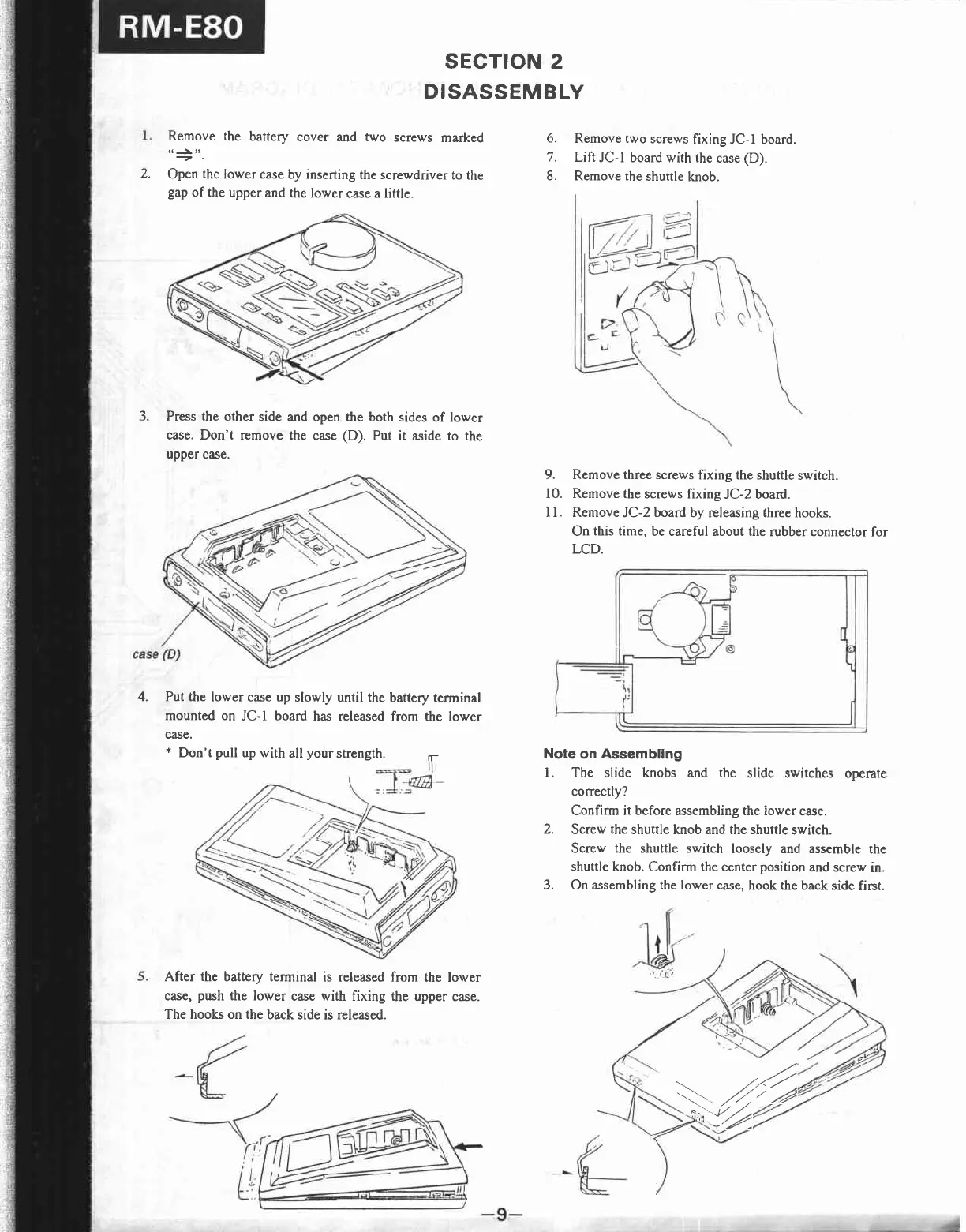
2.
Remove the
battery
cover
and
two
screws
marked
Open
the
lower case
by inserting
the screwdriver
to the
gap
of the
upper and
the lower
case a little.
6.
Remove two
screws
fixing
JC-l board.
7.
Lift
JC-l board with the
case
(D).
8. Remove the
shuttle
knob.
9.
Remove three screws
fixing the shuttle
switch.
10. Remove the
screws fixing
JC-2 board.
I I
.
Remove
JC-2
bozrd
by releasing three
hooks.
On
this time,
be careful about the
rubber connector
for
LCD.
Note
on Assembllng
l.
The slide knobs and the
slide switches operate
correctly?
Confirm it before assembling the lower
case.
Screw
the
shuttle knob and the shuttle
switch.
Screw
the shuttle switch
loosely and assemble
the
shuttle
knob. Confirm the center
position
and screw
in.
On assembling the lower case,
hook the back side
first.
3.
Press the other side
and open
case. Don't remove
the case
uPPer
case.
the both sides
of lower
(D).
Put
it aside to the
4. Put the
lower case up
slowly until the
battery terminal
mounted
on
JC-l
board
has released
from the
lower
case.
*
Don't
pull
up with
all
your
strength.
F
After
the
battery terminal
is released from
the lower
case,
push
the lower
case with fixing the
upper case.
The hooks on the
back side
is
released.
2.
3.
z4
{z

Related product manuals